Need help?
Do you have a question about the Mellerware Brizy! and is the answer not in the manual?
Emphasizes reading instructions before use for accident prevention.
Specifies use by children aged 8+ and persons with reduced capabilities under supervision.
Cleaning and maintenance must be done by children under supervision.
Warns that the appliance is not a toy and children must be supervised.
Ensure fan is switched off from mains before installation or assembly.
Disconnect appliance from mains before cleaning or removing guard.
Damaged connections must be handled by authorized support; no self-repair.
Appliance is intended for household use, not professional or industrial.
Verify voltage matches rating label and ensure stable placement.
Do not use if cable/plug is damaged or casings break; disconnect immediately.
Do not use if dropped, damaged, or leaking; avoid using damaged power cord.
Appliance is not suitable for outdoor use or exposure to moisture.
Avoid touching moving parts during operation and contact with battery liquid.
Do not use if accessories are not fitted or on/off switch is faulty.
Stop appliance before cleaning. Store out of reach of children/vulnerable persons.
Keep appliance in good condition, checking for misaligned or jammed parts.
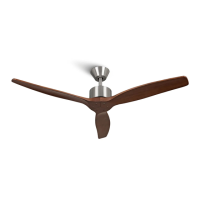
Lists and describes parts A-J, including suspension tubes, bracket, motor, blades, remote.
Details functions of speed, on/off, rotation, timer, night, and airflow mode buttons.
Remove packaging, ensure fan is off, handle motor carefully on a soft surface.
Ensure power is disconnected; follow regulations; grounding is recommended.
Recommends professional installation for electrical work and optimal results.
Install fan at a minimum distance of 2.50 meters from the ground or objects.
Use appropriate fixing material for ceiling bracket depending on roof type; consult a professional.
Handle batteries carefully, avoid touching poles simultaneously; remove protective covering.
Insert battery respecting polarity, replace cover. Use same kind/charge batteries.
Turn on with button (2), select speed with button (1).
Control operating time by selecting 1h, 2h, 4h, or 8h timer buttons (4); fan switches off automatically.
Use button (6) for natural mode, providing breezy sensation with increasing/decreasing speed.
Button (3) changes rotation for Summer (anti-clockwise breeze) or Winter (clockwise heat distribution).
Button (5) decreases speed to speed 1 for 1 hour, then remains at speed 1 for sleeping.
Stop the appliance using the on/off button (2) when finished.
Disconnect, cool down, clean with damp cloth and mild detergent, then dry.
Do not use solvents, acid/base pH products, or abrasives.
Never submerge the appliance in water or place under running water.
Contact authorized service for damage or problems; do not attempt self-repair.
Dispose of packaging materials using appropriate public recycling bins.
Product contains no substances harmful to the environment.
Symbol indicates disposal at authorized WEEE collection points after product life.
Symbol indicates battery removal before disposal; dispose of batteries in authorized containers, not fire.
Details maximum fan flow rate, power input, service value, and air velocity.
Lists standby power consumption and fan sound power level.
Product is covered by legal guarantee; contact official services to enforce rights.
Find the nearest official technical assistance service via the Mellerware website.
 General
| Brand | Mellerware |
|---|---|
| Model | Brizy! |
| Category | Fan |
| Language | English |

 To Next Page