6
SWITCHING ON AND OPERATION
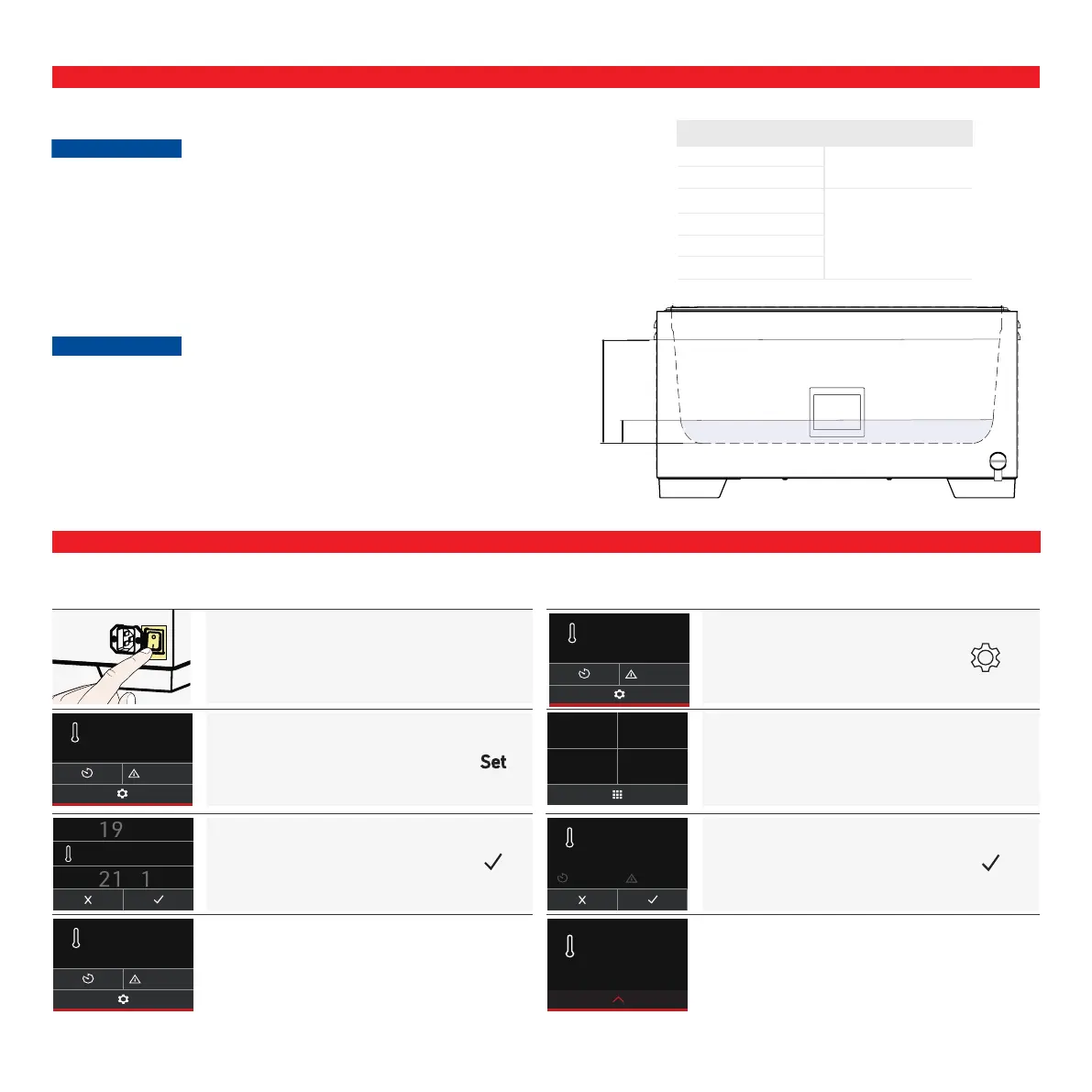
FILLING AND EMPTYING THE APPLIANCE
Basic operation - Setting the temperature
PRESS
to switch on
TEMPERATURE
select
SCROLL
to set and conrm
40.0
°C
Set
37.0
°C
20.0
°C
Filling
Observe the following points before lling the water bath:
X Water bath may not be operated while empty.
X Check that the outlet valve is closed before lling
X Observe the minimum ll level for the water bath.
X Observe the maximum lling level when lling and loading the water bath, which
is marked by the notches in the water bath tray.
Emptying
Observe the following points before emptying the water bath:
X Allow water cool down before draining.
X Outlet valve can overheat during operation, please observe safety instructions.
X Open outlet valve slowly to prevent water from leaking out uncontrolled.
40.0
°C
Set
20.0
°C
20.0
°C
Basic operation - Setting the CustomView
SETTINGS
select
select
TEMPERATURE & SET
apply and conrm
Set
37.0
°C
00:00
h
0.0
°C
37.0
°C
40.0
°C
Set
20.0
°C
20.0
°C
Large WTB Filling level
6 min. 4 cm
11
15
min. 2 cm24
35
50
CustomView



 To Next Page