Your Remote Control
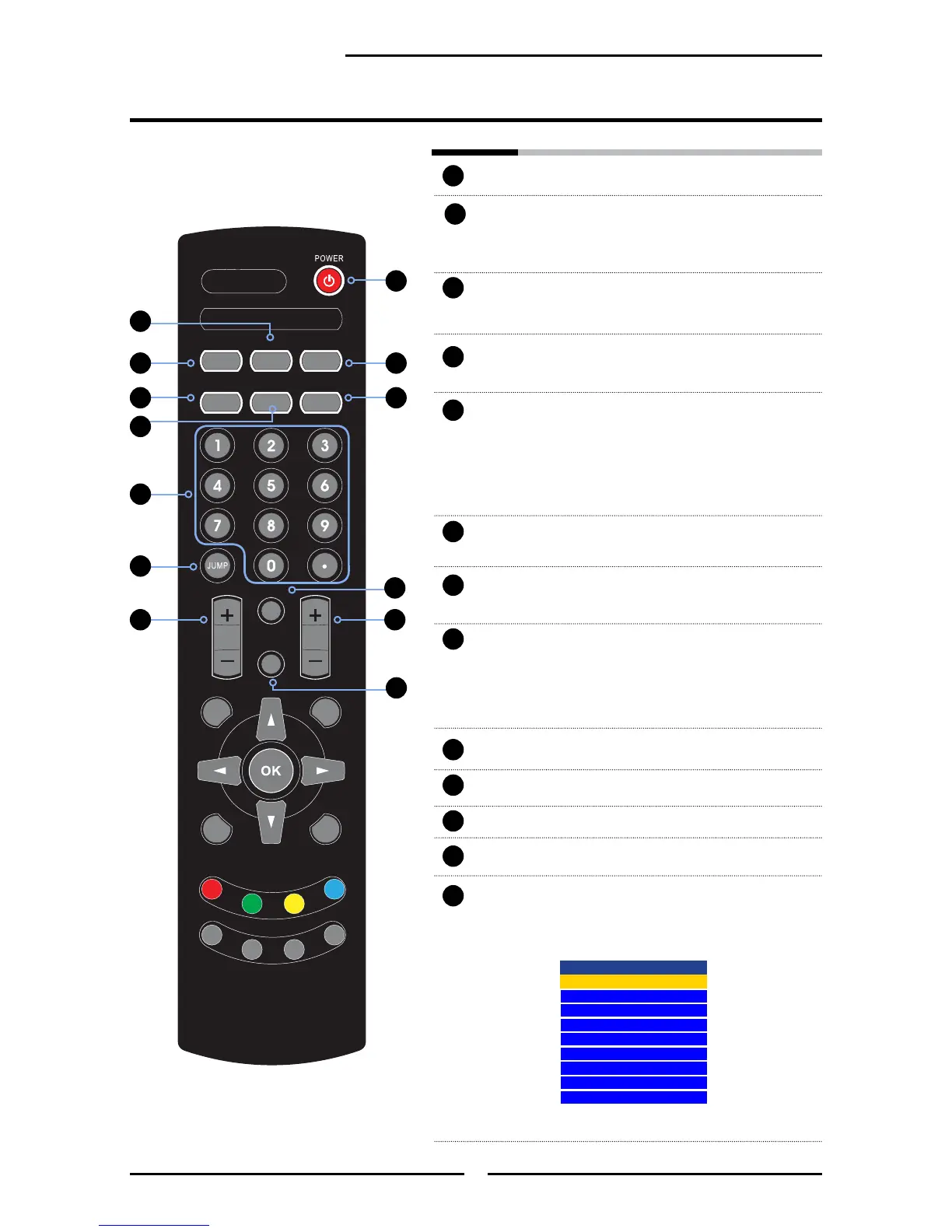
POWER Turns the LCD TV on and off.
MTS Cycles through the multi-channels TV
sound (MTS) options: SAP/MONO/
STEREO
S.MODE Selects sound effect options: Surround/
Live/Dance/Techno/Classic/Soft/Rock/
Pop/Off.
P.MODE Selects picture mode: Vivid/Hi-Bright/
Cinema/Sport/User
CAPTION Cycles through the Closed Caption:
Anlalog Closed Caption:CC1/CC2/
CC3/CC4/TT1/TT2/TT3/TT4/Off
Digital Closed Caption:Service1/
Service2/Service3/Service4/Service5/
Service6/Off
SLEEP Cycles through the PDP TV sleep timer:
OFF/10/20/30/40/50/60/90/120 mins
P.SIZE Cycles through Wide mode settings :
NORMAL /FULL/WIDE/ZOOM
0-9 Select and switch to a channel by using
0-9 buttons.
In HDTV mode, use with 0-9 and
buttons to select a digital channels.
JUMP Returns to previously selected channel.
MUTE Mutes and restores the audio
VOL.+- Increases and decreases volume.
CH.+- Scans up and down the channels.
INPUT Pressing INPUT display the source list,
use ▲▼ to select the video equipment
connected to the video inputs of your
LCD TV and press OK to conrm:
1
2
3
4
5
6
7
8
9
10
3
5
6
11
8
9
11
12
13
2
1
4
10
12
13
7
Input Source
TV(CABLE/AIR)
VIDEO1 (SIDE)
VIDEO2 (REAR)
VIDEO3 (S-VIDEO)
VIDEO4 (YPbPr1)
VIDEO5 (YPbPr2)
VIDEO6 (HDMI1)
VIDEO7 (HDMI2)
COMPUTER(VGA)



 To Next Page