10
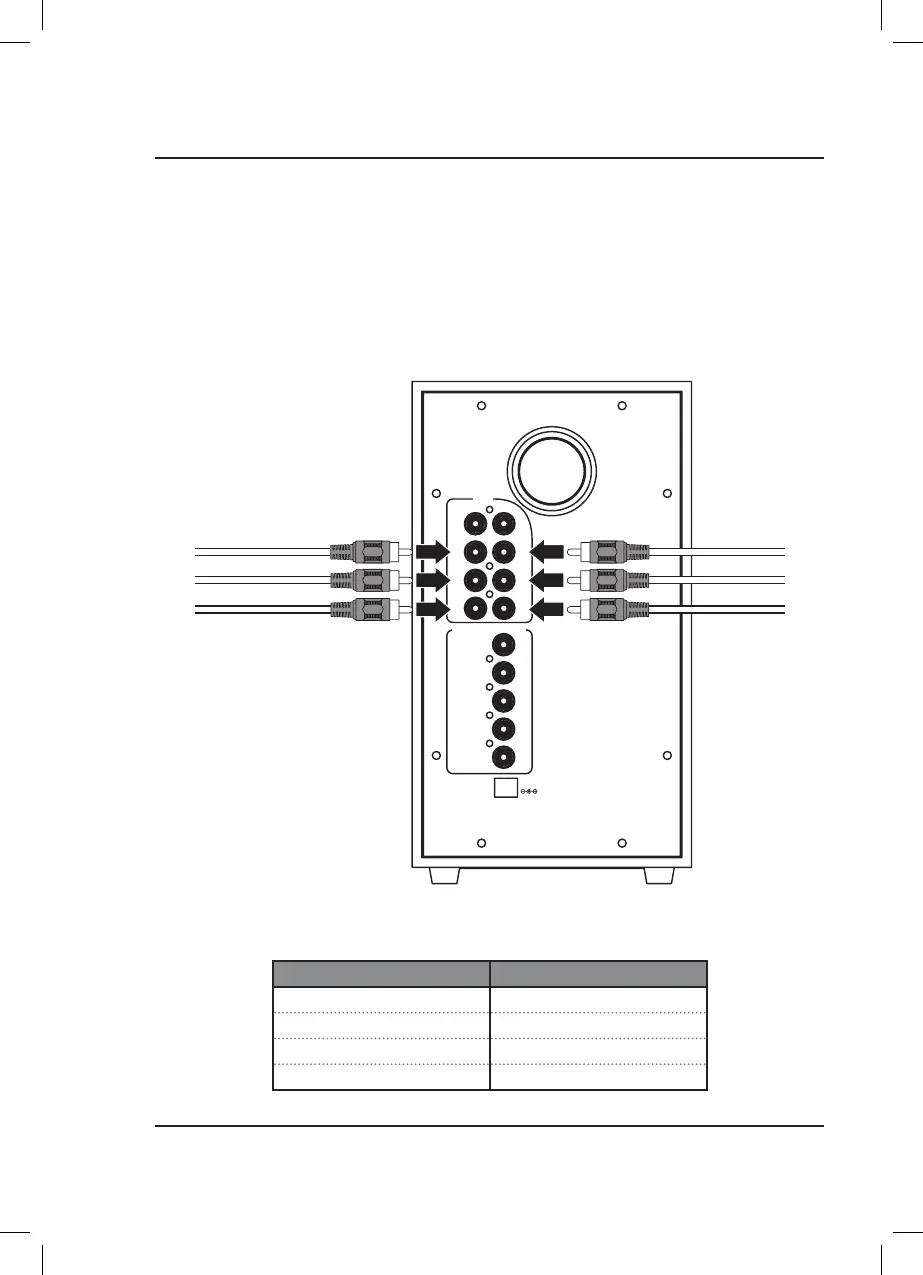
6 Port 5.1 Surround Sound RCA Inputs (5.1 CH)
To use the 5.1 input on this system will require a source (TV, DVD, Blu-Ray, or other media player) with 5.1 Surround
Sound analog audio outputs. If your media source is so equipped, use the lower 6 audio inputs on the rear of the
subwoofer.
Requires 6x RCA audio cables (included).
1. Connect the RCA audio cables to the RCA Inputs on the subwoofer and the audio outputs on your TV, DVD
player, etc. When connecting the audio cables, match the colored plugs to the same colored input ports.
2. Power ON the speaker and press Source (subwoofer) or 5.1CH (remote) to select 5.1 Surround Sound Mode,
indicated by an orange light.
AUX
SUB
SR
FR
R
FL
FR
SL
SR
CEN
DC IN
CEN
SL
FL
L
SPEAKER OUTPUT
Audio Input Audio Channel
FL / FR Front Left / Front Right
SL / SR Surround Left / Surround Right
CEN Center
SUB Subwoofer
Audio Inputs


 To Next Page