9
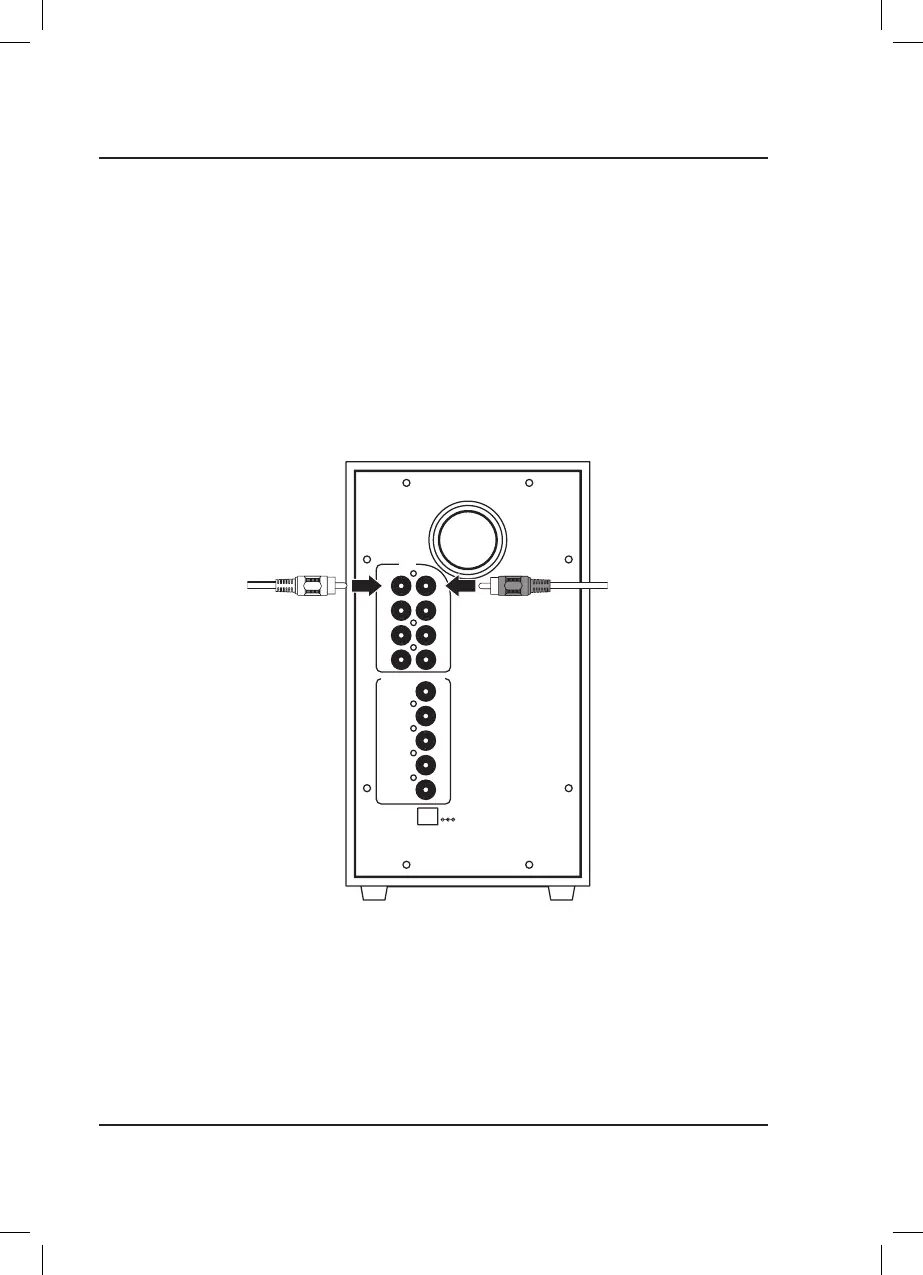
2 Port Stereo RCA Inputs (Aux)
If your TV, DVD, or other media player has a 3.5mm audio line output, use the top 2 audio inputs (Left/Right channel)
on the rear of the subwoofer for stereo audio. While connected to the Aux inputs, the unit will send audio signal to all
of it's speakers to simulate a surround sound effect.
Requires a 3.5mm stereo audio cable (included).
1. Connect the RCA stereo audio cable to the RCA Stereo Inputs on the subwoofer and the audio line outputs on
your TV, DVD player, etc.
2. Power ON the speaker and press Source (subwoofer) or AUX (remote) to select Aux Mode, indicated by a
white light.
AUX
SUB
SR
FR
R
FL
FR
SL
SR
CEN
DC IN
CEN
SL
FL
L
SPEAKER OUTPUT
Audio Inputs
Stereo RCA to
3.5mm Audio Cable
(included)


 To Next Page