Chapter 3 Using the LCD TV
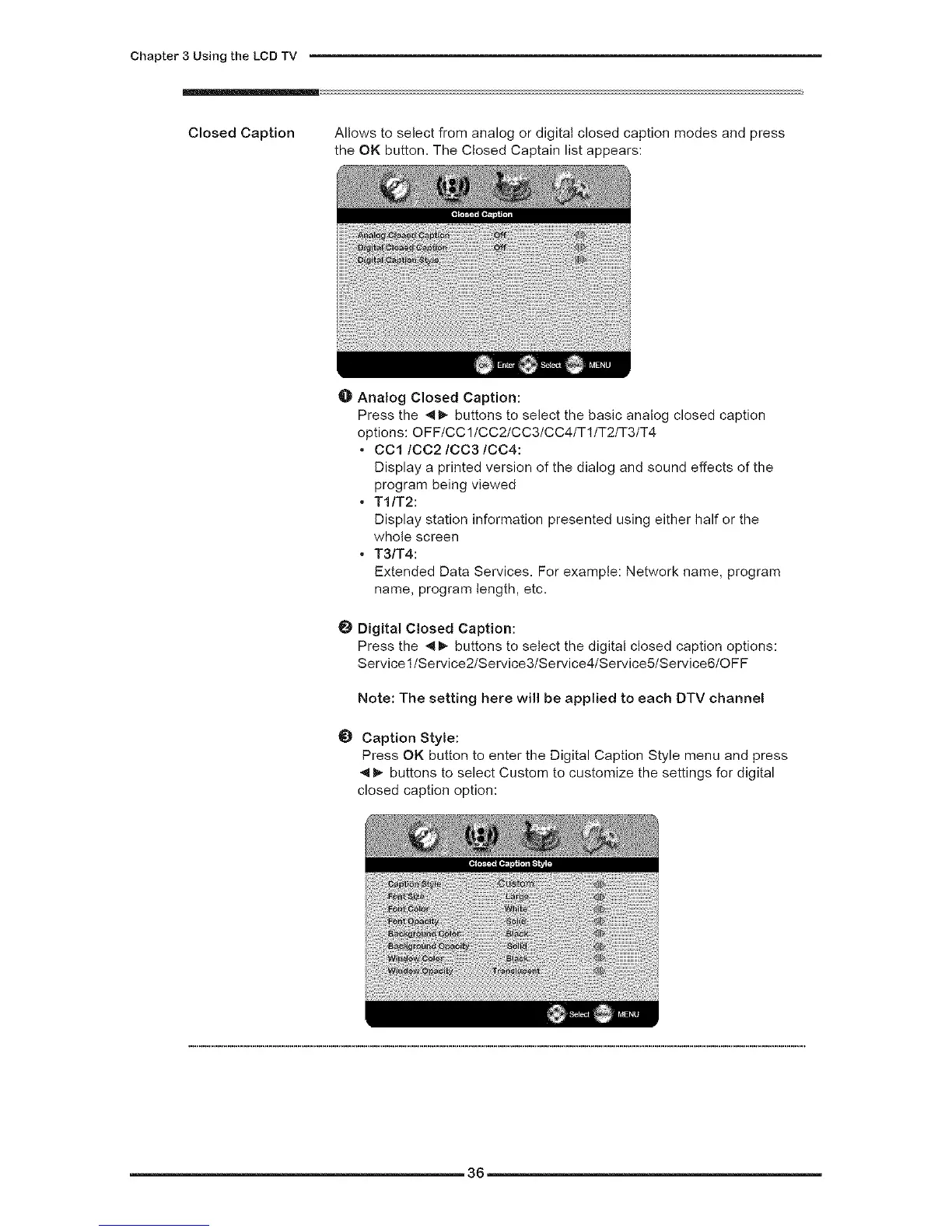
Closed Caption Allows to select from analog or digital closed caption modes and press
the OK button. The Closed Captain list appears:
O Analog Closed Caption:
Press the _- buttons to select the basic analog closed caption
options: OFF/CC 1/CC2/CC3/CC4/T1/T2/T3/T4
• OO1/OO2/OO3/OO4:
Display a printed version of the dialog and sound effects of the
program being viewed
• TI/T2:
Display station information presented using either half or the
whole screen
• T3/T4:
Extended Data Services. For example: Network name, program
name, program length, etc.
Digital Closed Caption:
Press the _- buttons to select the digital closed caption options:
Service llService21Service31Service41Service51Service61OFF
Note: The setting here will be applied to each DTV channel
O Caption Style:
Press OK button to enter the Digital Caption Style menu and press
4_- buttons to select Custom to customize the settings for digital
closed caption option:
36


 To Next Page