EasyManua.ls Logo

Memorex MVT2135B - Recording a TV Program (Continued); Stopping and Pausing Recording

Memorex MVT2135B
58 pages
Print Icon
To Next Page IconTo Next Page
To Previous Page IconTo Previous Page
Loading...
38
POWER
SLEEP
TV MONI.
EJECT
QUICK VIEW
MUTING
INPUT SELECT
REC/OTR
SPEED
MENU
+
+
SET/TRACKING
SKIP
SEARCH
COUNTER
RESET
ZERO
RETURN
AUTO
TRACKING
TV/CAP/
TEXT
PROGRAM
CANCEL
ENTER
STOP
PLAY
F.FWD
REW
TIMER REC
PAUSE/STILL
CHANNEL
CALL
1
2
3
456
78
0
9
+
VOLUME
1
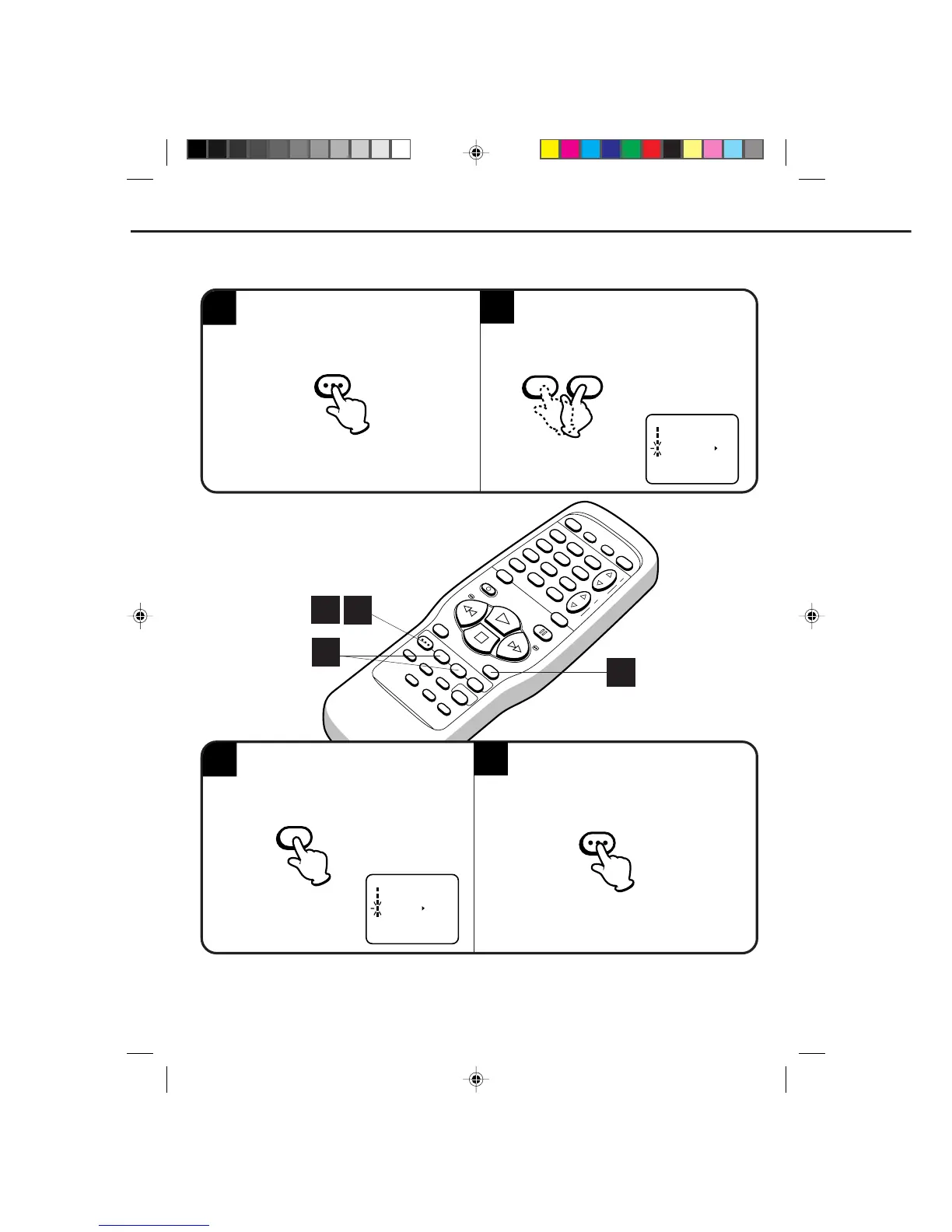
TO WATCH A TAPE REPEATEDLY
4
2
SPECIAL PLAYBACK (CONTINUED)
M E N U
TIMER REC SET
TV SET-UP
CH SET-UP
AUTO REPEAT ON OFF
SYSTEM SET-UP
+/–/ENTER/MENU
3
M E N U
TIMER REC SET
TV SET-UP
CH SET-UP
AUTO REPEAT ON OFF
SYSTEM SET-UP
+/–/ENTER/MENU
Press the MENU button. Press the SET/TRACKING + or – button to
select the AUTO REPEAT option.
Press the MENU button. If you press the PLAY
button, the tape will play over and over until the
repeat mode is canceled.
Press the ENTER button to select the ON
position.
NOTE: To cancel repeat mode, follow above steps 1 and 2, then press the ENTER button to select the OFF position.
Press the MENU button to return to the TV.
The repeat function is canceled automatically when the unit is switched off or the tape is ejected.
1
4
2
3
MENU
–+
SET/TRACKING

MENU
ENTER
545A201A-E/P30-39 19*04*0, 17*1038

Related product manuals