1
I'll bring entertainment to your big screen.
MWD38 v2200-01
Wireless HDMI Streaming Device
1 52 3 4
Connecting to Wi-Fi with a Mobile Device
1. Open your phone/tablet's Wi-Fi Settings menu.
2. Select "MWD38B-xxxxx" and enter the password "12345678."
3. After connecting to the Streaming Device, open an internet browser on your phone/tablet and enter the IP
address at the top of your television screen. When the web page opens, press the "Wi-Fi" icon.
4. Press "Scan."
5. Select your Wi-Fi network from
the list and enter your Wi-Fi
network password, then press
"Join" or "Connect." The IP
address on your television
screen will change and an
icon will appear showing the
Streaming Device is connected
to your Wi-Fi network. You can
now use screen mirroring on
your device to stream apps
using your Wi-Fi network.
Connect the Wireless HDMI Streaming Device to Your TV
System Requirement: Android 4.4 and above, iOS 8 and above, Window 8.1 and above (Intel Processor),
MAC 10.9 and above.
1. Connect the Streaming Device to any media player (TV, projector, etc.) with an HDMI port.
2. Connect the USB plug to a USB port on the media player or a USB power adapter (not included).
3. Set the media player's source to the HDMI input to which the Streaming Device is connected. An image
should now be displayed from the Streaming Device.
LED Indicator
Reset Button
If the device is
having trouble
connecting, press
and hold for 10
seconds to reset.
Note:
You must use the included USB power cord and Wi-Fi
attachment, otherwise the Streaming Device will not be able to
connect to Wi-Fi.
The Streaming Device only works on the 2.4GHz Wi-Fi frequency.
1
2

 Need help?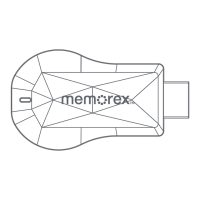

 To Next Page
 General