EasyManua.ls Logo

Memory-map Adventurer 2800 - Adventurer 2800 Interface Features; Overlay and Settings Menu; Menu Navigation; Info Button

Memory-map Adventurer 2800
6 pages
Print Icon
To Next Page IconTo Next Page
To Previous Page IconTo Previous Page
Loading...
1 • UK
* add-on apps and map cards sold separately
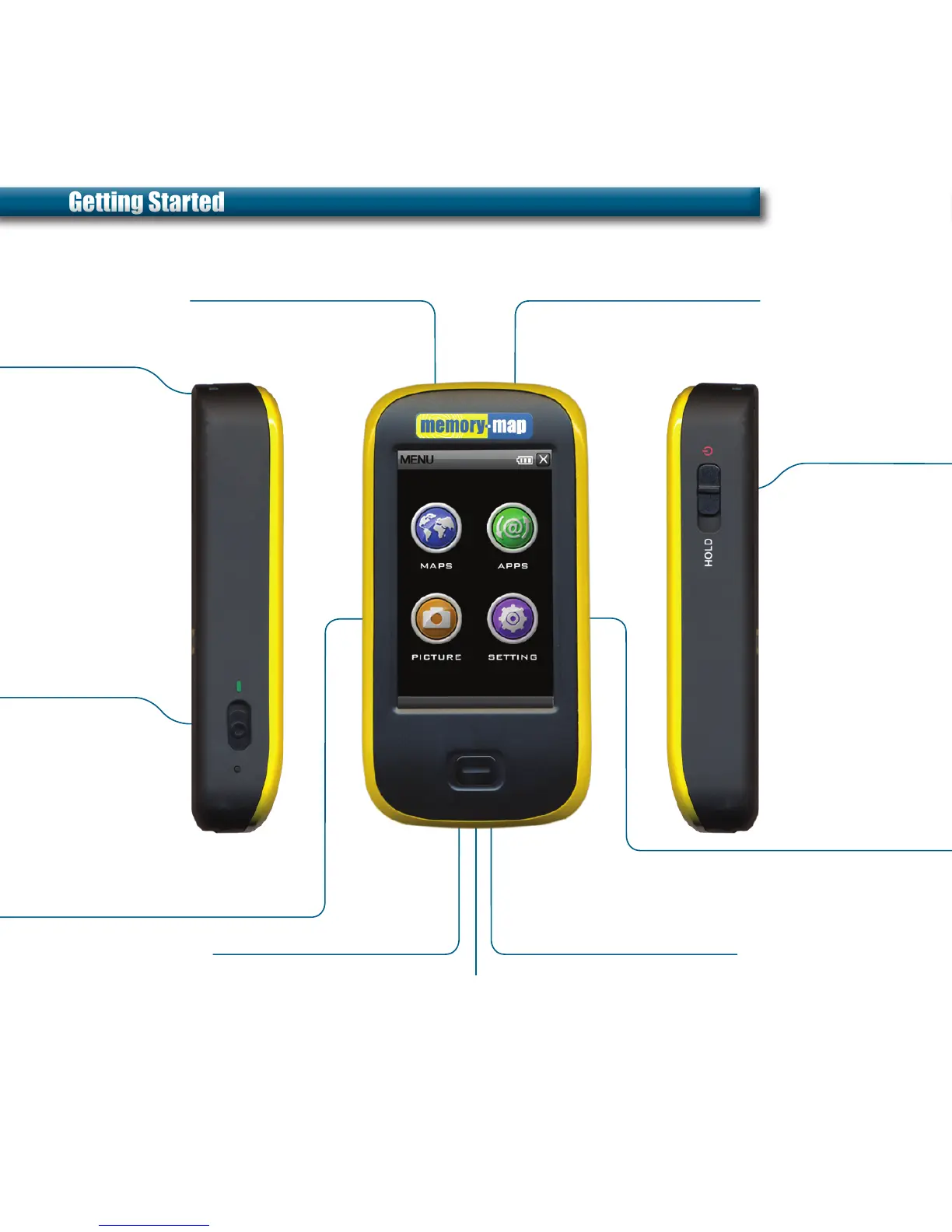
Power On /
Standby /
Hold /
On / Off
Lanyard
Memory-Map
®
Battery Charging light
Add-on Apps
Settings
Main power switch
Turn off when not in
use to save battery
Slide towards green
marker before
powering on
Attachment for
strap and stylus
Tap MAPS icon to launch Choose from a range of add-on
apps such as SatNav*
Picture Viewer
microSD card slot mini USB port
Store and view photos
Blue indicator lights whilst charging
Plug & Play map cards
and applications*
Charge & PC interface
Customise settings such
as Volume, Backlight and
Powersave for optimum
performance
When Off
Push up for 2
seconds to turn on
When On
Push up for 2 seconds
to Standby and enable
GPS quick start mode
Hold
Push down to HOLD
position to disable
touchscreen
Getting StartedGetting Started

Other manuals for Memory-map Adventurer 2800

Related product manuals