EasyManua.ls Logo

Memory-map Adventurer 3500 - Getting Started; Picture Viewer

Memory-map Adventurer 3500
6 pages
Print Icon
To Next Page IconTo Next Page
To Previous Page IconTo Previous Page
Loading...
1 • UK
* add-on apps and map cards sold separately
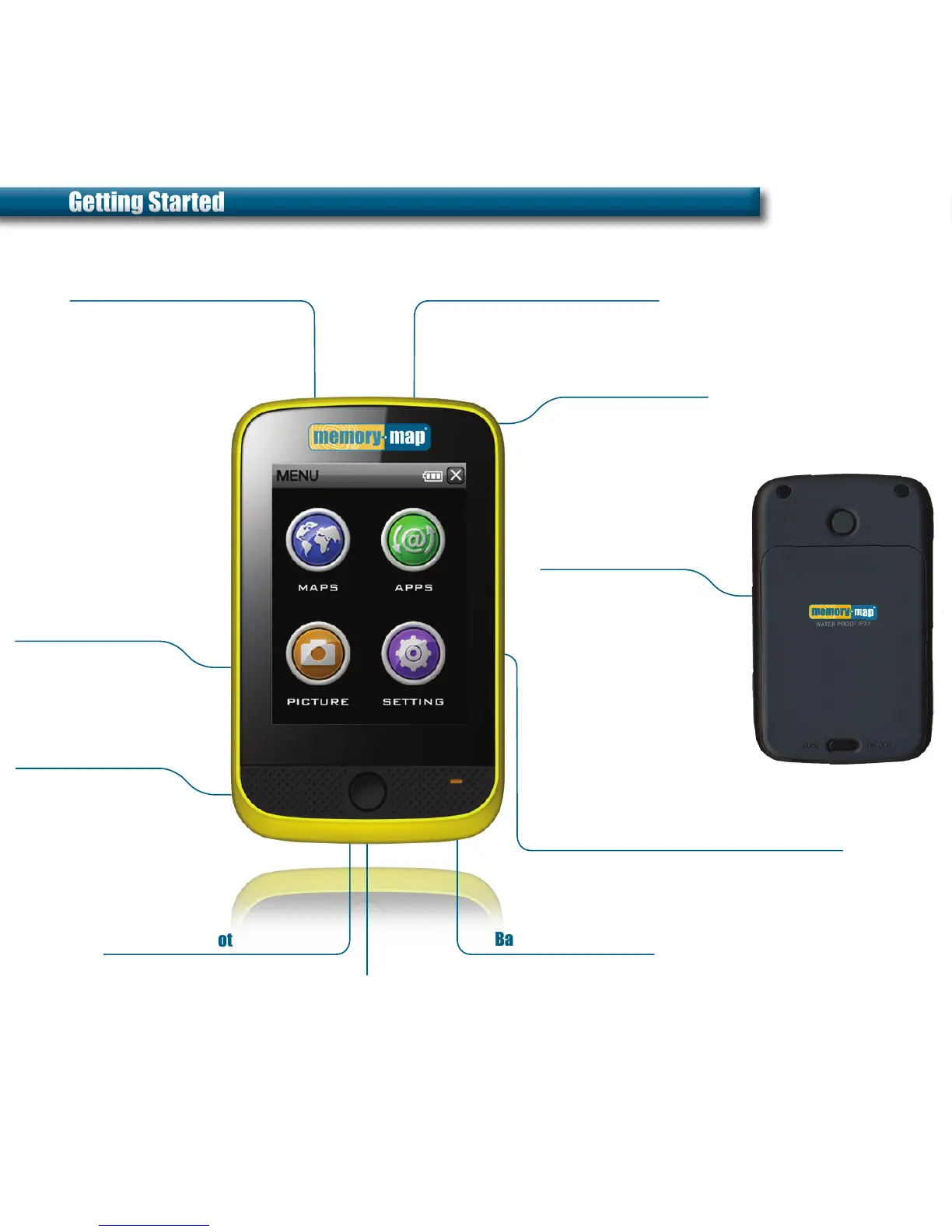
On / Off
Memory-Map
®
Battery Charging light
Add-on Apps
Settings
Push button to switch
Adventurer 3500 on
and off
Lanyard
Battery / Bike mount
Attachment for
strap and stylus
To change battery or
affix bike mount, ensure
Adventurer is clean and
dry, slide clip to ‘Unlock’
and gently lift battery
cover
Swap the battery and
replace the cover or
fit bike mount cover in
its place
Tap MAPS icon to launch
Memory-Map application
Choose from a range of
add-on apps such as SatNav*
Picture Viewer
microSD card slot
mini USB port
Store and view photos
Lit whilst charging
Plug & Play map cards
and applications*
Charge & PC interface
Customise settings such
as Volume, Backlight and
Powersave for optimum
performance
Getting StartedGetting Started

Other manuals for Memory-map Adventurer 3500

Related product manuals