Page 8
IMPORTANT: Always run a test to establish
whether the converter will operate a par-
ticular piece of equipment or device. In the
event of a power overload, the converter is
designed to automatically shut down.
This safety feature prevents damaging
the converter while testing devices and
equipment within the wattage range of
the converter.
If a device does not operate properly when
first connected to the converter, turn the
converter ON/OFF switch ON, OFF, and
ON again in quick succession. If this pro-
cedure is not successful, it is likely that
the converter does not have the required
capacity to operate the device in question.
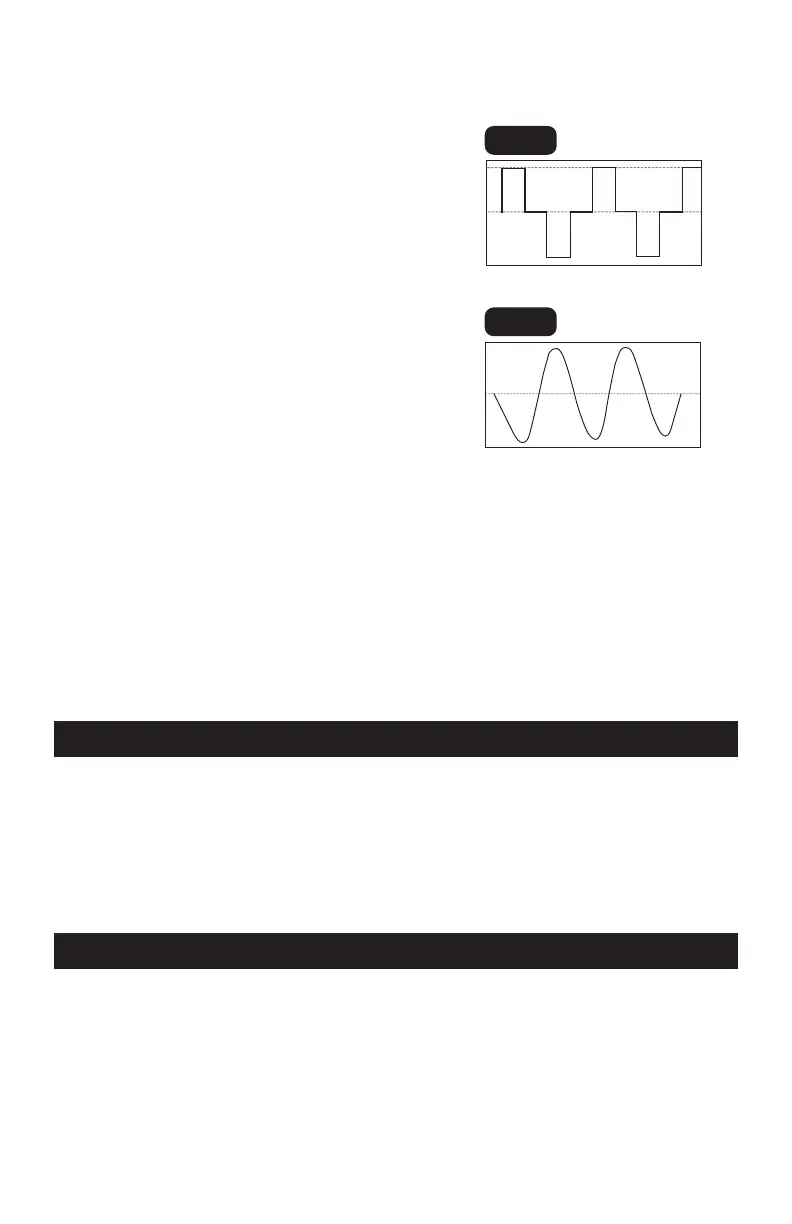
IMPORTANT: This converter uses a nonsi-
nusoidal waveform (Fig. 1) which is not the
same as power company electricity (Fig 2).
Therefore, we do not recommend you use it
to power the following devices:
1.
Switch mode power supplies
2.
Linear power supplies
3.
Class 2 transformers
4.
Line filter capacitors
5.
Shaded pole motors
6.
Fan motors
7.
Microwave ovens
8.
Fluorescent and high intensity lamps
(with a ballast)
9.
Transformer less battery chargers
Using the converter with any of these
devices may cause the device to run
warmer or overheat.
Fig. 1
Modied sine waveform
produced by converter
Fig. 2
Pure sine waveform
typical of home AC outlet
IMPORTANT: If you are using the power
converter to operate a battery charger,
monitor the temperature of the battery
charger for about 10 minutes. If the battery
charger becomes abnormally warm, dis-
connect it from the converter immediately.
8. FASTENING THE CONVERTER TO A FLAT SURFACE
For your convenience, the converter may
be fastened horizontally to a flat sur-
face. The area where the converter is to
be fastened must be dry, well-ventilated
and away from any combustible material
or fumes.
1.
Turn off and disconnect the converter.
2.
Place the back of the converter with the
mounting bracket against a flat, secure
surface.
3.
Attach the converter, using corrosion-
resistant screws.
9. CONNECTING CONVERTER CABLES
The converter and power source must be
in the OFF mode.
IMPORTANT: Make sure to connect your
converter only to a 12 volt power supply.
To avoid electrical shock, it is necessary
to ground the converter as well as the
device powering it. The converter should
be grounded, using a 16 AWG copper
wire (included).
NOTE: Do not turn on the converter or the
power source until the converter and the
power source are grounded.



 To Next Page