Need help?
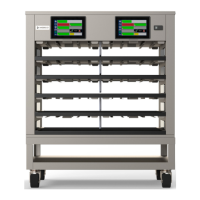
Do you have a question about the Merco MHC54SNT1T and is the answer not in the manual?
Covers critical safety instructions, potential hazards, and operational precautions for the equipment.
Specifies criteria for selecting a suitable installation location and covers general installation safety warnings.
Details equipment weight, dimensions, clearance requirements, and electrical service guidelines.
Highlights crucial safety precautions to be followed during the operation of the equipment.
Details the required specifications for editing or adding products to the menu.
Explains how to define, manage, and delete groups of products with similar specifications.
Explains how to access and adjust preferences like Use-First, Group-Dots, Split View, etc.
Guides on setting the date, time, time zone, and DST using NTP or manual input.
Allows monitoring of cabinet temperatures and running service tests on heating elements.
Details how to change the factory default manager passcode and how to reset it.
Step-by-step instructions for updating the User Interface board software via USB.
Instructions for updating the Input/Output board software, noting its lower likelihood of needing updates.
Outlines user responsibilities for maintenance and critical safety precautions during procedures.
A chart listing common problems, their causes, and recommended corrective actions for the unit.
 General
| Brand | Merco |
|---|---|
| Model | MHC54SNT1T |
| Category | Commercial Food Equipment |
| Language | English |

 To Next Page