EasyManua.ls Logo

Mercury Premier Dual Handle ERC - User Manual

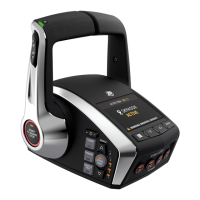
Mercury Premier Dual Handle ERC
2 pages
Print Icon
To Next Page IconTo Next Page
Loading...
Premier
Dual Handle ERC
DIGITAL THROTTLE & SHIFT
QUICK REFERENCE
G
H
I
C
E
B
A
K
J
©2022 Mercury Marine. All Rights Reserved.
90-8M0208793 SEPTEMBER 2022
WARNING: Active Trim cannot detect water depth and will not
trim up automatically in shallow water. The boat operator will
need to override Active Trim by trimming manually or pressing
the ACTIVE TRIM button on the ERC or a VesselView display to
turn o the feature.
Active Trim is an intuitive, hands‑free system that continually adjusts
engine or drive trim based on changes in operating conditions to
improve performance, fuel economy and ease of operation.
At boat startup, Active Trim resumes the on/o state from
the previous shutdown. Active Trim can be overridden at any
time by using the regular manual trim switch.
To engage Active Trim
Press the ACTIVE TRIM button.
To disengage Active Trim
Press the ACTIVE TRIM button.
Active Trim Proles
There are ve trim proles. The lower the number, the less
aggressive the trim position of the outboard or drive will be at
a lower boat speed. As the trim prole number is increased, the
more aggressive the trim position will be at lower boat speeds.
ACTIVE TRIM
F
D
FOR 2-4 ENGINE APPLICATIONS
A. NEUTRAL (N) LED
Illuminates when the engines are
in the neutral gear position.
C. START/STOP ALL ENGINES
Starts or stops all the engines
sequentially from port to starboard.
B. TRIM ALL ENGINES
Raises and lowers all engines/drives.
D. START/STOP INDIVIDUAL ENGINES
Starts or stops an individual engine.
F. TRIM
INDIVIDUAL ENGINES
Raises and lowers individual
engine/drive.
G. BRIGHTNESS
Increases and decreases
brightness of lights on the ERC
and Mercury helm components.
H. 1 LEVER
Enables throttle and shi
functions of all engines to be
controlled by the port lever.
I. TRANSFER
Transfer boat control to a
dierent helm.
K. ACTIVE TRIM
Turns the Active Trim
feature ON or OFF.
K. PROFILE /
Changes the selected
Active Trim prole.
K. 1 / 2 / 3 / 4 / 5 LEDs
Indicates current
Active Trim prole.
J. THROTTLE ONLY
Increase engine RPM
without shiing into gear.
E. DISPLAY SCREEN
Shows pop-ups for advanced features as
well as system information and faults.
This Quick Reference Guide is intended to be used in concert with
your engine Operation and Maintenance Manual. Your engine
Operation and Maintenance Manual provides information on this
subject matter in greater detail.
To download or purchase a printed Operation and Maintenance
Manual for your engine, visit MercuryMarine.com.
Question and Answer IconNeed help?

Do you have a question about the Mercury Premier Dual Handle ERC and is the answer not in the manual?

Summary

Active Trim System

Active Trim Profiles

Five trim profiles available; lower number is less aggressive at lower boat speeds.

Premier Dual Handle ERC Controls

Neutral (N) LED Indicator

Illuminates when engines are in the neutral gear position.

Trim All Engines Control

Raises and lowers all engines/drives simultaneously.

Start;Stop All Engines Control

Starts or stops all engines sequentially.

Start;Stop Individual Engines Control

Starts or stops an individual engine.

Display Screen Functionality

Shows advanced features, system information, and faults.

Trim Individual Engines Control

Raises and lowers individual engine/drive trim.

Control Brightness Adjustment

Adjusts brightness of ERC and helm components.

1 Lever Control Mode

Controls throttle/shift for all engines with the port lever.

Helm Transfer Function

Transfers boat control to a different helm station.

Throttle Only Mode

Operates engine throttle without shifting into gear.

Active Trim Engagement

Turns the Active Trim feature ON or OFF.

Active Trim Profile Selection

Changes the selected Active Trim profile.

Active Trim Profile Indicators

LEDs indicate the current Active Trim profile.

Starting Engines

Starting Engine Sequence

Steps for positioning switches, turning keys, and using start/stop buttons.

Throttle Only Mode Operation

Engaging Throttle Only Mode

Procedure to enable throttle-only operation without engaging gear.

Disengaging Throttle Only Mode

Procedure to turn off throttle-only mode, returning to normal control.

Helm Transfer Procedure

Helm Transfer Steps

Sequence for transferring engine control between helm stations.

Helm Transfer Safety Warning

Caution against transferring control without manned stations or in gear.

Single Lever Mode Operation

Engaging Single Lever Mode

Procedure to control all engines with one lever for synchronized operation.

Disengaging Single Lever Mode

Procedure to disable single lever control and return to dual lever operation.

Overview

The Mercury Premier Dual Handle ERC (Electronic Remote Control) is a digital throttle and shift system designed for 2-4 engine applications, offering an intuitive and hands-free boating experience. This quick reference guide outlines its key features, usage, and maintenance considerations.

Active Trim System

Function Description: Active Trim is an intuitive, hands-free system that continuously adjusts engine or drive trim based on changes in operating conditions. Its primary goal is to optimize performance, fuel economy, and ease of operation.

Usage Features:

  • Engagement/Disengagement: Active Trim is engaged or disengaged by pressing the dedicated "ACTIVE TRIM" button on the ERC.
  • Startup Behavior: Upon boat startup, Active Trim automatically resumes its last known on/off state from the previous shutdown.
  • Manual Override: The system can be overridden at any time using the regular manual trim switch, providing the operator with full control.
  • Trim Profiles: There are five distinct trim profiles available. A lower profile number indicates a less aggressive trim position for the outboard or drive at lower boat speeds. Conversely, a higher profile number results in a more aggressive trim position at lower boat speeds. This allows operators to customize the trim behavior to suit their preferences and boating conditions.
  • Safety Warning: It is crucial to note that Active Trim cannot detect water depth and will not automatically trim up in shallow water. In such situations, the boat operator must override Active Trim by trimming manually or by pressing the ACTIVE TRIM button on the ERC or a VesselView display to turn off the feature to prevent potential damage.

Digital Throttle & Shift (DTS) Premier Dual Handle ERC

Function Description: This system provides precise digital control over the boat's engines, offering a range of features for enhanced maneuverability, safety, and convenience.

Key Components and Features:

  • A. Neutral (N) LED: This indicator illuminates when the engines are in the neutral gear position, providing a clear visual cue of the current gear state.
  • B. Trim All Engines: This button allows for simultaneous raising and lowering of all engines/drives, simplifying trim adjustments for multi-engine setups.
  • C. Start/Stop All Engines: This feature enables sequential starting or stopping of all engines, typically from port to starboard, streamlining engine management.
  • D. Start/Stop Individual Engines: For more granular control, this button allows the operator to start or stop individual engines as needed.
  • E. Display Screen: The integrated display screen shows pop-ups for advanced features, system information, and fault codes, keeping the operator informed about the system's status.
  • F. Trim Individual Engines: This button provides the ability to raise and lower individual engines/drives, offering precise control over each engine's trim.
  • G. Brightness: This control allows the operator to increase or decrease the brightness of the lights on the ERC and other Mercury helm components, optimizing visibility in various lighting conditions.
  • H. 1 Lever: When activated, this feature enables the throttle and shift functions of all engines to be controlled solely by the port lever, simplifying operation in certain scenarios.
  • I. Transfer: This button facilitates the transfer of boat control to a different helm, a crucial feature for vessels with multiple control stations.
  • J. Throttle Only: This mode allows the operator to increase engine RPM without shifting into gear, useful for warming up engines or testing without engaging propulsion.
  • K. Active Trim: This button turns the Active Trim feature ON or OFF.
  • K. Profile ▲ / ▼: These buttons are used to change the selected Active Trim profile, allowing the operator to cycle through the five available profiles.
  • K. 1/2/3/4/5 LEDs: These LEDs indicate the currently active Active Trim profile, providing immediate visual feedback to the operator.

Usage Features:

Starting Engine(s):

  1. Position the lanyard stop switch to the RUN position.
  2. Ensure ERC levers are in the NEUTRAL position.
  3. Turn key(s) to the ON position; a single horn beep confirms system readiness.
  4. Engines can be started by pressing the START/STOP ALL ENGINES button, individual START/STOP buttons, or by turning the key(s) to the START position. The Smart Start feature automatically cranks the engine(s).
  5. An amber LED on the START/STOP button and a green neutral light will illuminate upon engine startup.

Throttle Only Mode:

  • Function: Allows engine throttle operation without shifting into gear.
  • Engagement:
    1. Place ERC levers in NEUTRAL.
    2. Press THROTTLE ONLY on the ERC; the Throttle Only light will turn on, and neutral lights will blink.
    3. Move ERC levers to FORWARD or REVERSE; a warning horn will beep, but the drive remains in neutral.
    4. Engine RPM can be increased.
  • Disengagement:
    1. Place ERC levers in NEUTRAL (Throttle Only mode will not disengage otherwise).
    2. Press THROTTLE ONLY; the Throttle Only light will turn off.
    3. Neutral lights stop flashing and remain illuminated. ERC levers can then control boat movement.
    • Note: Pressing THROTTLE ONLY while in gear only turns off the light; engines remain in Throttle Only mode until levers return to NEUTRAL.

Helm Transfer:

  • Function: Transfers engine control between multiple control stations.
  • Procedure:
    1. Ignition key(s) must be ON.
    2. All ERC levers on all helms must be in NEUTRAL.
    3. At the desired active helm, press TRANSFER once; the transfer light illuminates, and a beep confirms impending transfer.
    • Note: If levers are not in NEUTRAL, neutral lights will flash; move levers to NEUTRAL to stop flashing.
    1. Within 10 seconds, press TRANSFER a second time to complete the transfer.
    2. A second beep confirms successful transfer; the transfer light remains on at the active helm.
    3. The helm where the request was initiated becomes active and controls the vessel.
  • Safety Warning: To avoid serious injury or death from loss of boat control, never leave the active station while the engine is in gear. Helm transfer should only be attempted when both stations are manned. One-person helm transfer should only be performed while engines are in neutral and the boat is stationary.

Single Lever Mode:

  • Function: Allows the throttle and shift functions of all engines to be controlled by the port-side ERC lever.
  • Engagement:
    1. Place both ERC levers in NEUTRAL.
    2. Press 1 LEVER; the Single Lever light turns on.
    3. Place the port ERC lever into gear. The starboard lever can be moved without affecting engine function.
    4. RPM on all engines will increase and decrease in sync while all drives remain in gear.
  • Disengagement:
    1. Place both ERC levers in NEUTRAL.
    2. Press 1 LEVER; the Single Lever light turns off.

Maintenance Features:

  • Documentation: This Quick Reference Guide is intended to be used in conjunction with the engine Operation and Maintenance Manual. The full manual provides more detailed information on all aspects of the system.
  • Access to Manuals: Operation and Maintenance Manuals can be downloaded or purchased from MercuryMarine.com.

This comprehensive system is designed to provide a seamless and efficient boating experience, combining advanced digital control with user-friendly features and important safety considerations.

Mercury Premier Dual Handle ERC Specifications

General IconGeneral
BrandMercury
ModelPremier Dual Handle ERC
CategoryControl Systems
LanguageEnglish