13
725T
PLUS
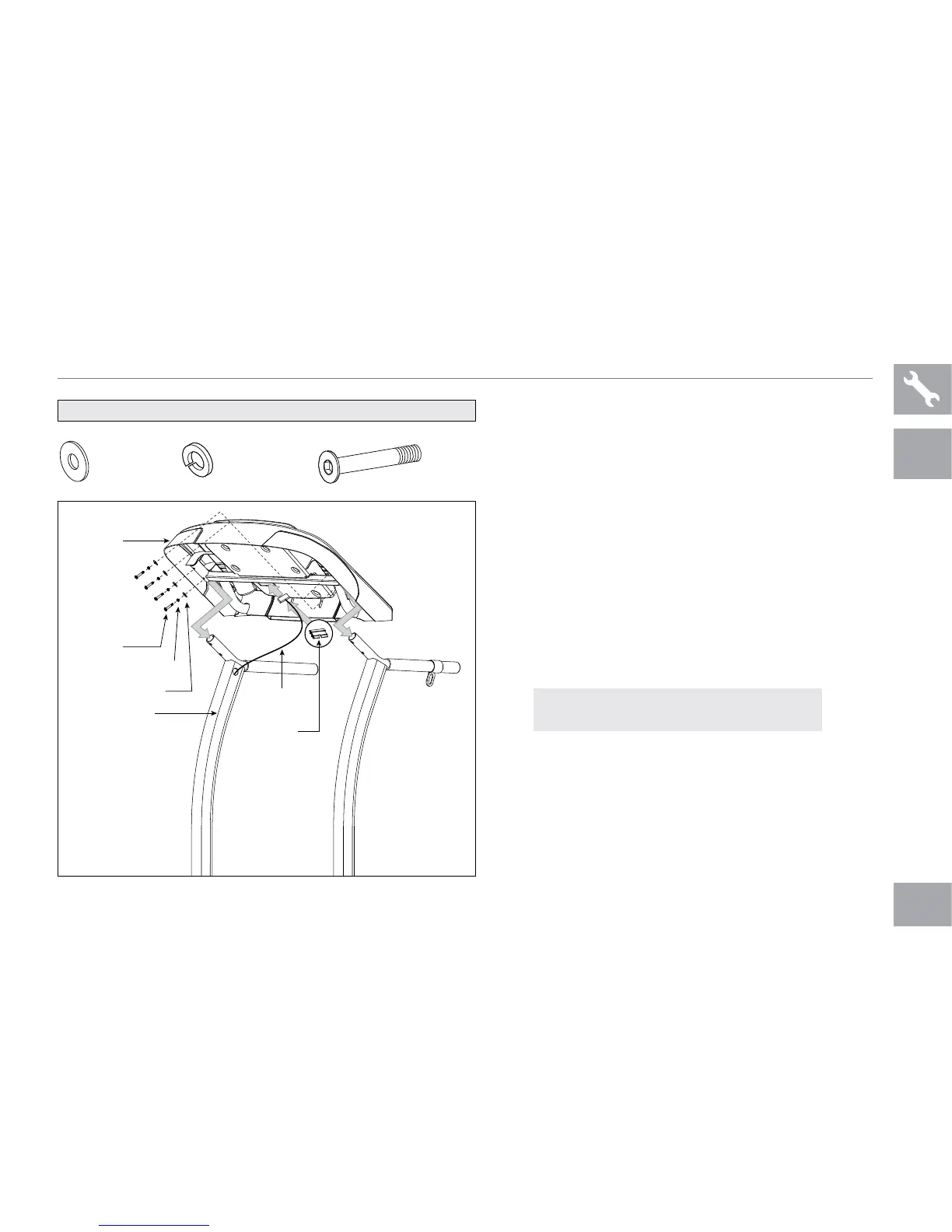
725T PLUS ASSEMBLY STEP 3
* This step is for 725T PLUS model only.
A Open hardware bag 3.
B Slide console onto console masts and
attach using 4 arc washers (e), 4 spring
washers (f) and 4 bolts (g)
.
C Connect the console cable and carefully tuck
wires in
console mast to avoid damage.
D Attach
console cable cover to secure
console cable.
BOLT (G)
45 mm
Qty: 4
SPRING WASHER (F)
12 mm
Qty: 4
ARC WASHER (E)
14 mm
Qty: 4
HARDWARE BAG 3 CONTENTS :
CONSOLE
BOLTS (G)
SPRING WASHERS (F)
ARC WASHERS (E)
CONSOLE MAST
CONSOLE
CABLE
CONSOLE
CABLE COVER
NOTE: Be careful not to pinch any wires
while assembling the console.
725T PLUS ONLY



 To Next Page