14
715T
PLUS
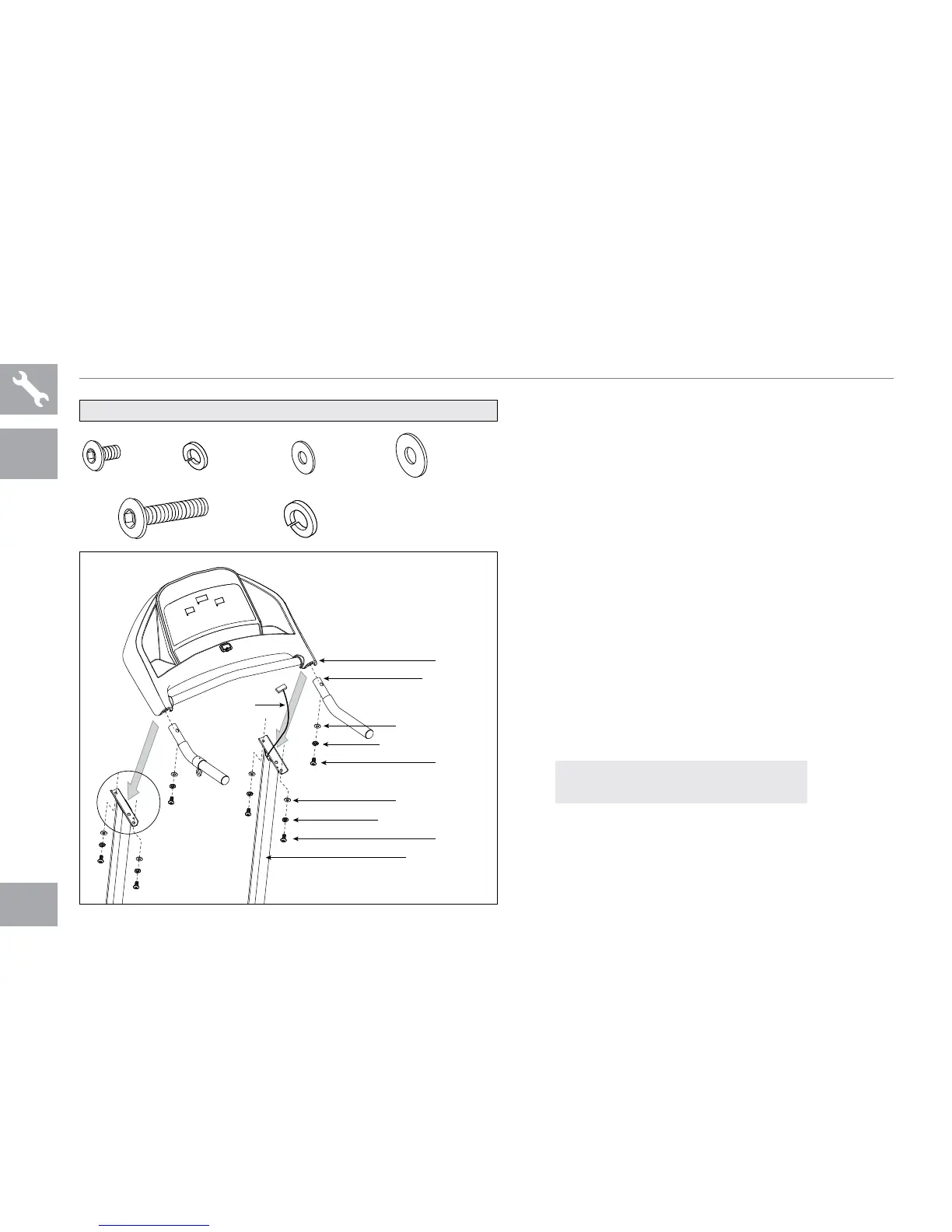
715T PLUS ASSEMBLY STEP 3
* This step is for 715T PLUS model only.
A Open hardware bag 3.
B Slide each handlebar into the console
and attach using 2 bolts (e), 2 spring
washers (f) and 2 arc washers (g). Do
not completely tighten bolts until step D.
C Gently place the console on top of the
console masts. Attach the left side first
using 2 bolts (h), 2 spring washers (b)
and 2 arc washers (d).
D Attach the right side of the console using
2 bolts (h), 2 spring washers (b) and 2
arc washers (d). Completely tighten all bolts
from steps B–D.
BOLT (E)
15 mm
Qty: 4
BOLT (H)
55 mm
Qty: 4
SPRING
WASHER (F)
6 mm
Qty: 2
ARC
WASHER (G)
6 mm
Qty: 2
SPRING WASHER (B)
8 mm
Qty: 4
ARC
WASHER (D)
8 mm
Qty: 4
HARDWARE BAG 3 CONTENTS :
ASSEMBLE
LEFT SIDE
FIRST
CONSOLE
CABLE
BOLTS (E)
SPRING WASHERS (F)
ARC WASHERS (G)
HANDLEBAR
CONSOLE
BOLTS (H)
SPRING WASHERS (B)
ARC WASHERS (D)
CONSOLE MAST
NOTE: be careful not to pinch any
wires while attaching the console.
715T PLUS ONLY


 To Next Page