© 2005 Meritool, LLC
6
NOTE: The dosing and
speed control features of
the PowerPush™ 7000,
when used in conjunction
with one another, allow for
a specific amount of
adhesive to be dispensed
from the tool in a specific
amount of time.
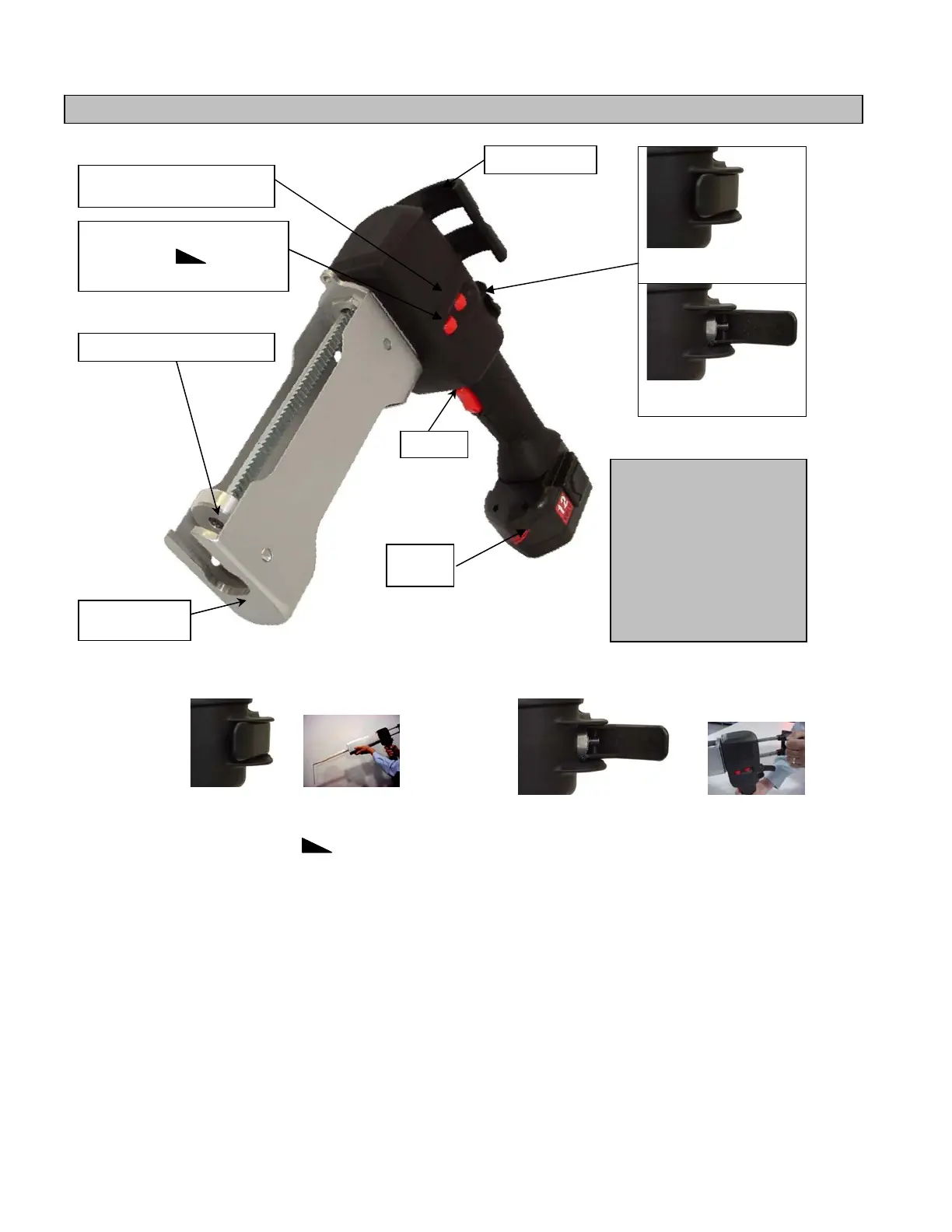
FUNCTIONAL DESCRIPTION
Trigger
• “ON”/“OFF” mechanism
Clutch Lever
• Close clutch lever to engage gears and start
dispensing adhesive.
• Open clutch lever to allow free movement of rack.
Speed Control Knob +
SPEED
-
• The speed feature allows you to speed up or slow down the flow of adhesive. To use this feature, turn the speed
control knob to the flow that is applicable to the application.
• Changing the speed while using the dosing feature will reduce or increase the amount of adhesive dispensed.
Dose Control Knob +
DOSE
-
• The dose control knob is used to set the amount of time per trigger pull for which adhesive is dispensed.
• To use this feature, turn the dosing control knob until the amount of
adhesive needed per trigger pull is discharged.
Battery Pack
• To remove battery pack, squeeze both release buttons and slide the battery pack forward.
• To insert battery pack, slide battery pack fully onto the base of the handle.
Rack Handle
• To reposition the pistons, open the clutch lever and push or pull the rack handle, as needed.
Cartridge Nozzle Opening
• Line up the cartridge in the opening to ensure accurate cartridge alignment and proper engagement of pistons.
Rack Handle
Clutch Lever Closed
(to dispense adhesive)
Clutch Lever Open
(to retract rack)
Trigger
Cartridge Nozzle
Opening
Piston & Rack Assembly
Battery
Pack
Speed Control Knob
Dose Control Knob


 To Next Page