EasyManua.ls Logo

Merlin E980M - User Manual

Merlin E980M
2 pages
Print Icon
To Next Page IconTo Next Page
Loading...
1. Programming - Merlin Security+ 2.0 door opener systems
The remote is preset for use with Merlin Security+ 2.0 systems, so for EVO door opener
models with this code, simply program in the usual manner. Refer to the WIRELESS
PROGRAMMING section in your Opener Operating Manual.
NOTE: If you are unsure what code has been set previously,
use the Security+ programming sequence on page 2.
1. Press & hold the button on the remote you wish to use.
2. Press & release the LEARN button on the opener.
3. Release the remote button when the opener light flashes.
The code has been learnt and the next press of the remote button should activate the door.
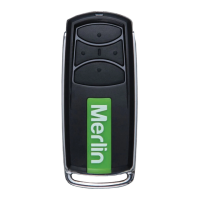
E980M - Water Resistant Four Button Remote Control
IP65 rated*
Press and hold the
button on the remote
control you wish to use.
The LED indicator on
the transmitter flashes
continuously.
Press and
immediately release
the Learn button.
“click”
“click”
2 3
1
Initially: Locate the LEARN button on your particular opener and identify the button on
the remote you wish to use. Do not select a button already in use.
The Merlin Water Resistant Four Button Remote Control can be used with both Merlin
Security+ and Security+ 2.0 codes (dual function).
4 buttons are available and any button can be programmed with either code.
S P
1 2 3
123 2
LEARN
BUTTON
ROLLER DOOR OPENER
LEARN
BUTTON
LED
INDICATOR
SECTIONAL DOOR
OPENER
LEARN
BUTTON
LED
INDICATOR
DN
UP
P
S
1
2
3
LEARN
BUTTON
LED
INDICATOR
OR
WARNING! This product contains a button/coin cell battery.
To prevent possible SERIOUS INJURY or DEATH:
The opener light flashes
or 2 clicks are heard
when it has learnt the code
• The battery is hazardous.
• Keep new and used batteries away from children.
• Do not ingest battery. Chemical burn hazard.
• If the coin cell battery is swallowed or placed inside any part
of the body, it can cause severe or fatal injuries in 2 hours or
less.
• If the battery compartment does not close securely, stop using the product
and keep away from children.
• If you think batteries might have been swallowed or placed inside any part
of the body, call the 24-hour Poisons Information Centre on 13 11 26 in
Australia, or the 24-hour National Poisons Centre on 0800 764 766 in
New Zealand, or seek immediate medical attention.
• Dispose of used coin/button cell batteries immediately and safely. Flat
batteries can still be dangerous.
LED
* IP65 Protection against low-pressure water
jets from any angle– see gomerlin.com.au
or gomerlin.co.nz for more information.
©2021 The Chamberlain Group, Inc
Question and Answer IconNeed help?

Do you have a question about the Merlin E980M and is the answer not in the manual?

Overview

The Merlin E980M is a water-resistant four-button remote control, rated IP65, designed for use with Merlin garage door opener systems. It is a dual-function remote, compatible with both Merlin Security+ and Security+ 2.0 codes. The remote features four programmable buttons, allowing any button to be assigned to either code type.

Function Description:

The primary function of the E980M remote is to activate Merlin garage door openers. Each of the four buttons can be programmed to control a different device or the same device with a specific code. This allows for versatile control of multiple garage doors, gate operators, light controls, or access control systems. The remote is designed for ease of use, with a simple programming process for both Security+ 2.0 and Security+ systems.

Important Technical Specifications:

  • Model: E980M
  • Water Resistance: IP65 rated. This means it is protected against low-pressure water jets from any angle, making it suitable for outdoor use and resistant to splashes.
  • Compatibility: Merlin Security+ and Security+ 2.0 code systems (dual function).
  • Buttons: Four programmable buttons.
  • Battery: Lithium coin cell battery (CR2032).
  • Battery Life: Approximately 3 years under normal use.
  • Operating Range: Up to 3 car lengths away on typical installations. Actual range may vary depending on environmental conditions and specific installation.

Usage Features:

Initial Setup:

  1. Identify Learn Button: Locate the LEARN button on your specific opener model (e.g., roller door opener or sectional door opener).
  2. Select Remote Button: Choose a button on the remote that is not currently in use for programming.

Programming for Merlin Security+ 2.0 Door Opener Systems (Pre-set):

The remote is pre-set for Security+ 2.0 systems. For EVO door opener models, follow these steps:

  1. Press & Hold Remote Button: Press and hold the desired button on the remote. The LED indicator on the transmitter will flash continuously.
  2. Press & Release Opener LEARN Button: Briefly press and release the LEARN button on the opener.
  3. Release Remote Button: Release the remote button when the opener light flashes (or two clicks are heard). The code is now learned, and the next press of the remote button should activate the door.

Programming for Merlin Security+ Door Opener Systems (Unique Remote Programming Sequence):

This sequence is used to program the remote for Security+ systems or to return a button to Security+ 2.0 code if needed.

  1. Enter Programming Mode: Press and hold the left and right buttons on the remote simultaneously for approximately 5 seconds. Release the buttons when the remote LED stays ON continuously.
  2. Press & Release Opener LEARN Button: Briefly press and release the LEARN button on your garage door opener. The remote is now ready for programming for 30 seconds.
  3. Select & Press Remote Button: Press the desired button on the remote once. If the opener light flashes, the code is learned. If not, press the selected button again until the opener light flashes. Do not press this button further once the light flashes.
  4. Lock In Code: Press any one of the OTHER three buttons on the remote. This action locks in the code to the button selected in step 3, and the remote LED will turn OFF.
  5. Test Activation: The next press of the programmed button should activate the door. If not, repeat the entire process.

General Usage:

  • Activation: Press and hold the programmed button until the garage door starts to move.
  • Multi-Device Control: Additional buttons can be programmed to operate up to three other devices, such as other garage door openers, light controls, gate operators, or access control systems.

Maintenance Features:

Battery Replacement:

The remote control uses a CR2032 lithium coin cell battery, which typically lasts up to 3 years. A low battery is indicated if the remote control's LED does not flash when a button is pressed.

  1. Open Case: Use a screwdriver to remove the four screws on the back of the remote to open the case.
  2. Remove Old Battery: Carefully remove the old battery. Dispose of it properly and safely.
  3. Insert New Battery: Insert a new CR2032 coin cell battery with the positive side facing up.
  4. Replace Cover: Securely replace the cover and screws.

Safety Warnings (Important):

  • Button/Coin Cell Battery Hazard: This product contains a button/coin cell battery, which is hazardous if swallowed.
  • Keep Away from Children: Keep new and used batteries away from children.
  • Chemical Burn Hazard: Ingestion of the battery can cause severe or fatal injuries within 2 hours.
  • Secure Compartment: If the battery compartment does not close securely, stop using the product and keep it away from children.
  • Medical Attention: If batteries are suspected of being swallowed or placed inside any part of the body, immediately call the Poisons Information Centre (Australia: 13 11 26; New Zealand: 0800 764 766).
  • Disposal: Dispose of used coin/button cell batteries immediately and safely. Even flat batteries can be dangerous.

Warranty:

Chamberlain Australia Pty Limited / Chamberlain New Zealand provides a One Year Limited Warranty. This warranty covers defects in materials and/or workmanship for a period of 1 year from the date of purchase for the original consumer purchaser. This warranty is in addition to any rights and remedies available under Australian or New Zealand consumer protection laws, which include guarantees for replacement, refund, or compensation for major failures and for repair or replacement if goods fail to be of acceptable quality and the failure does not amount to a major failure.

Merlin E980M Specifications

General IconGeneral
BrandMerlin
ModelE980M
CategoryRemote Control
LanguageEnglish

Related product manuals