6
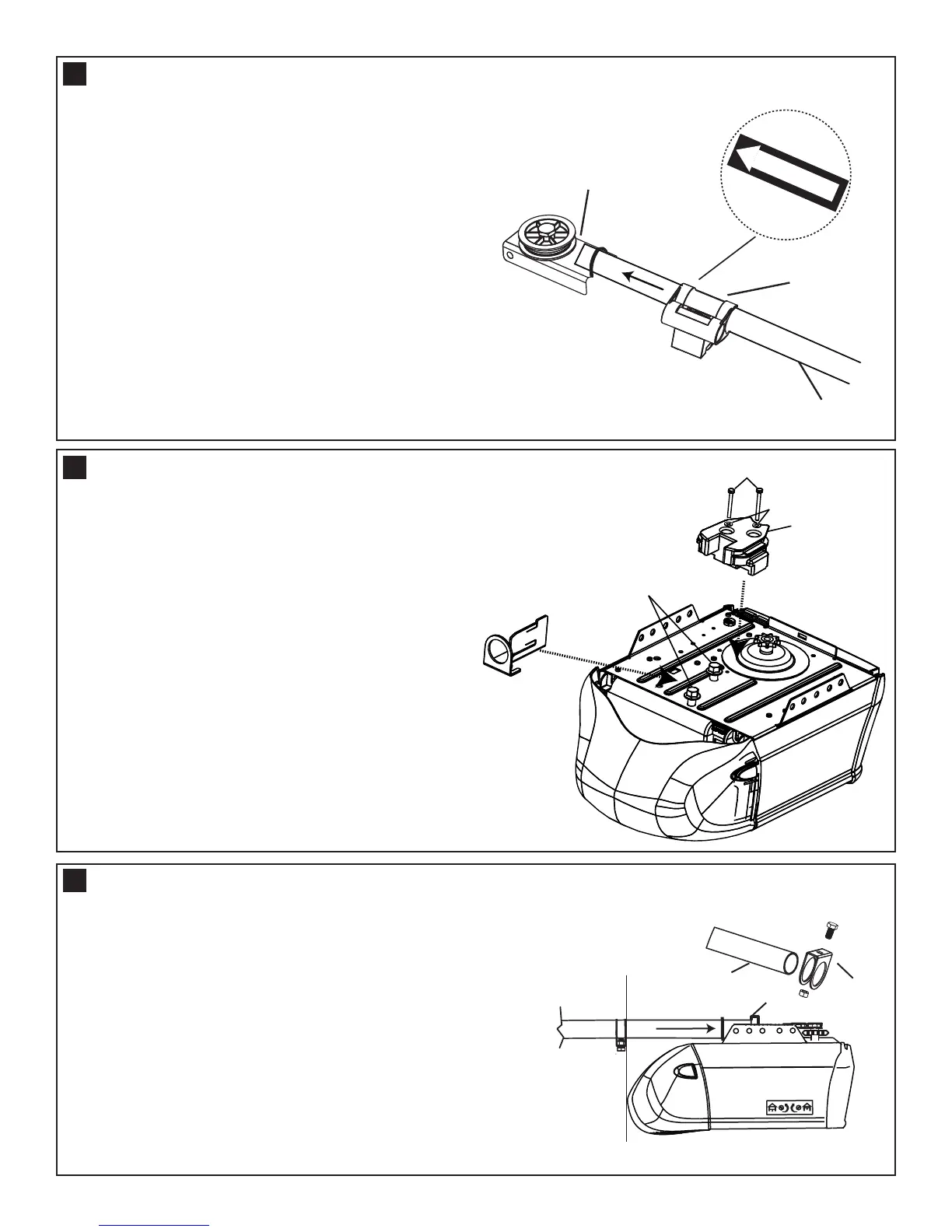
Slide the trolley assembly (1) onto the pole (3) tak-
ing note of the door direction arrow (fig 1). The trol-
ley should be located midway along the pole.
Insert the pole (3) into the idler pulley assembly (2)
as illustrated.
INSTALL THE TROLLEY AND IDLER PULLEY
fig 1
Loosen the two (factory fitted) washered screws (4)
from the top of the opener (approx 4mm).
THESE WASHERED SCREWS MUST BE USED
TO FASTEN THE POLE KIT ADAPTOR.
Fasten the chain spreader (2) using the hex screws
(1) and washers (3) from the hardware bag provided
with the opener. Slide the adaptor bracket under the
loosened screws then tighten (20-22Nm).
MOUNT THE ADAPTOR BRACKET AND CHAIN SPREADER
Slide the stop collar (1) onto the pole (2) (opener
end). Fit the pole through the adaptor bracket (3) to
the opener, then fasten the stop collar above the
edge of the lens cover as illustrated.
Move the stop collar to the open limit on the pole,
set the stop collar back 25mm toward the opener
and fasten in place. Observe the absolute stop posi-
tion.
Absolute
minimum
stop collar
setting
1
2
3
INSTALL THE STOP COLLAR AND POLE
8
9
10



 To Next Page