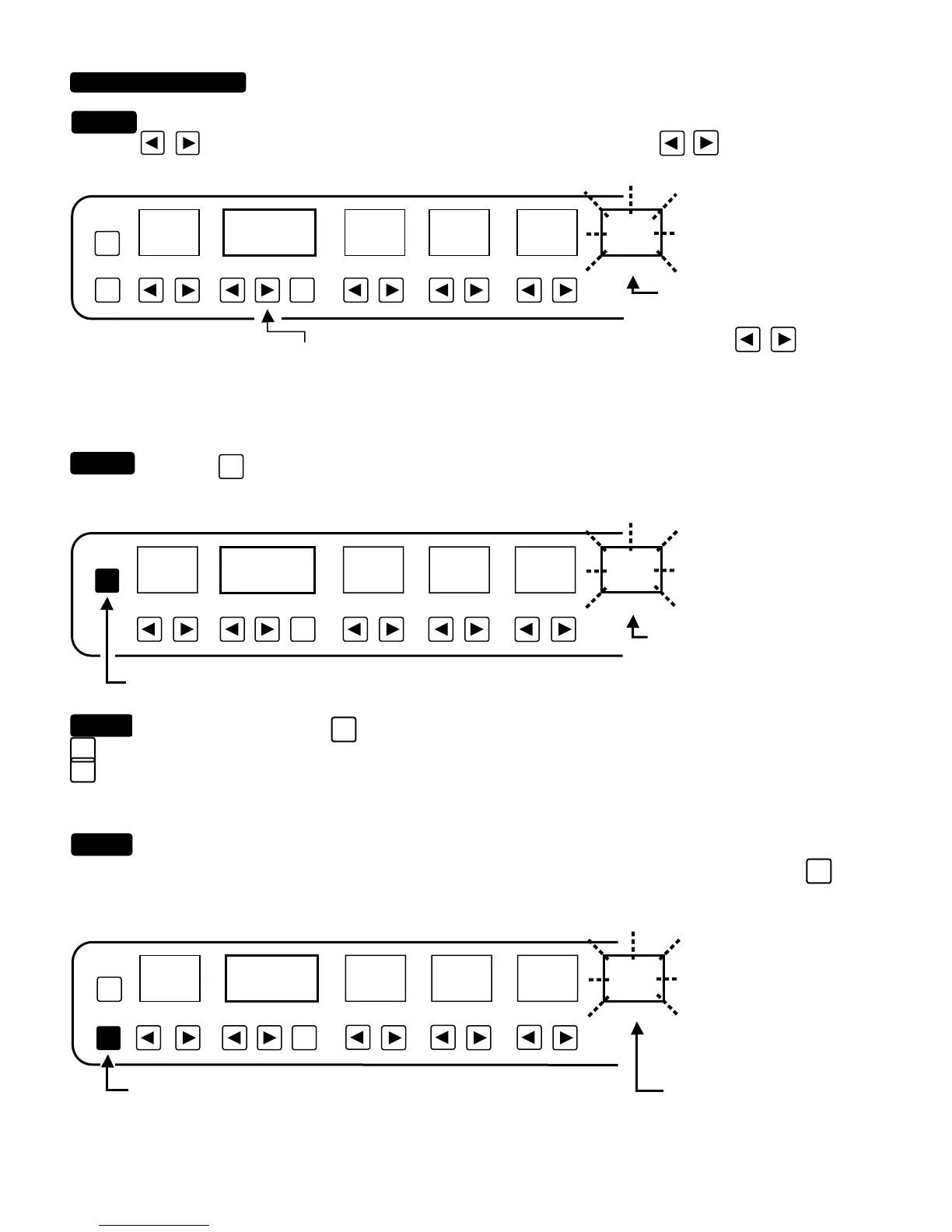
Assign a Value. Start with the first parameter that you assigned a controller to, “TRUST US ON THIS ONE”. Press
one of the
arrowed keys under this parameter. It will start to flash! Now Use the keys under the Program/
Channel window to Decrease or Increase the parameter’s maximum modulated VALUE.
Press the
ENTR
key one time. The parameter you are assigning a VALUE to will stop flashing momentarily and the
VALUE displayed in the PROGRAM WINDOW will be assigned to this flashing parameter in this PRESET only.
REPEAT: Do NOT press the
SHIFT
key again. Each time you assign a “VALUE” make sure that when you press the key
ENTR
the parameter display stops flashing momentarily. Always check this!!! Save yourself time. If you are unsure, simply press the
ENTR
key again.
EXIT and RETURN to normal “Parameter Routine”: After assigning all parameters that you wish to modulate with a
Controller number, a VALUE, you are now ready to EXIT the VALUE SUB-ROUTINE and check your work. Press the
EXIT
key one
time to Return to the normal Parameter routine. NOTICE FLASHING HAS STOPPED. With an expression pedal connected to a
conversion device, you will now be able to modulate parameters on your first preset. Drive your rig!
NOTE: If the pedal works backwards, unplug it , back the pedal off and plug it back in...this recalibrates the conversion device and
software interface.
BASS
MIDDLETREBLEGAINPROGRAM/CHANNELPRESET
PGM
/CH
COPY
15
01 23 4 5
FLASH
NOTICE that in this example, we pressed the up key and
have choosen the maximum amount of modulation in the
positive direction...when the control pedal is pressed this
parameter would go to a setting of 10.
NOTICE that the display STOPS
flashing while you are holding
the program keys.
VALUES OF CHANGE: SUB-ROUTINE (Continued)
BASS
MIDDLETREBLEGAINPROGRAM/CHANNELPRESET
PGM
/CH
COPY
15
ENTR
01 2 3 45
FLASH
WATCH for momentary pause of
flashing in the display window.
read paragraph
STEP 3.
STEP 4
STEP 5
NOTICE FLASHING
HAS STOPPED.
BASS
MIDDLETREBLEGAINPROGRAM/CHANNELPRESET
PGM
/CH
COPY
ENTR
EXIT
01
01
2
345
21
FLASH
PAGE 25
STEP 2.


 To Next Page
 Loading...