PAGE 24
1. There are fifteen positions of change and it is possible to change in either a negative or positive direction.
2. “00” in the Program Window =No Change from your BASE Preset.
3. BASE! Your Preset is your BASE. If you don’t connect your pedal, or you have the pedal calibrated so that “backed off” is “no control
change message sent,” the Preset will remain as it was before you assigned anything in the control change subroutines until you
connect and use an expression pedal. This is your BASE Preset!
4. Anytime you assign a Value to a parameter the modulation will start at your BASE Preset and increase or decrease from there, the
number of positions you assigned.
5. Positive “+ “ Values of change will display two digits in the Program Window
00
15
6. Negative “ - “ Values of change will display three digits in the Program Window
115
00
with the leading digit “1”
indicating negative “ - “ values of change.
7. Start the “Amount Count” at the next position on the parameter from the one in your BASE Preset. Don’t count the position you’re
at currently. Example: Your “Gain Control” is set to
6.0
in your Preset. You want to go to
8.0
when you gas the pedal. Count this way:
6.5, 7.0, 7.5, 8.0. This modulation would require a Value of “ 4 “ in tne positive direction. The Program Window would display
04
.
If it was a Value of “ 04 “ in the negative direction the Program Window would display
104
.
8. REMEMBER THE HALF POSITIONS. The TriAxis has half position parameter values between
3.0
and
8.0
. Remember to
count these when entering your modulation values.
Press the
SHIFT
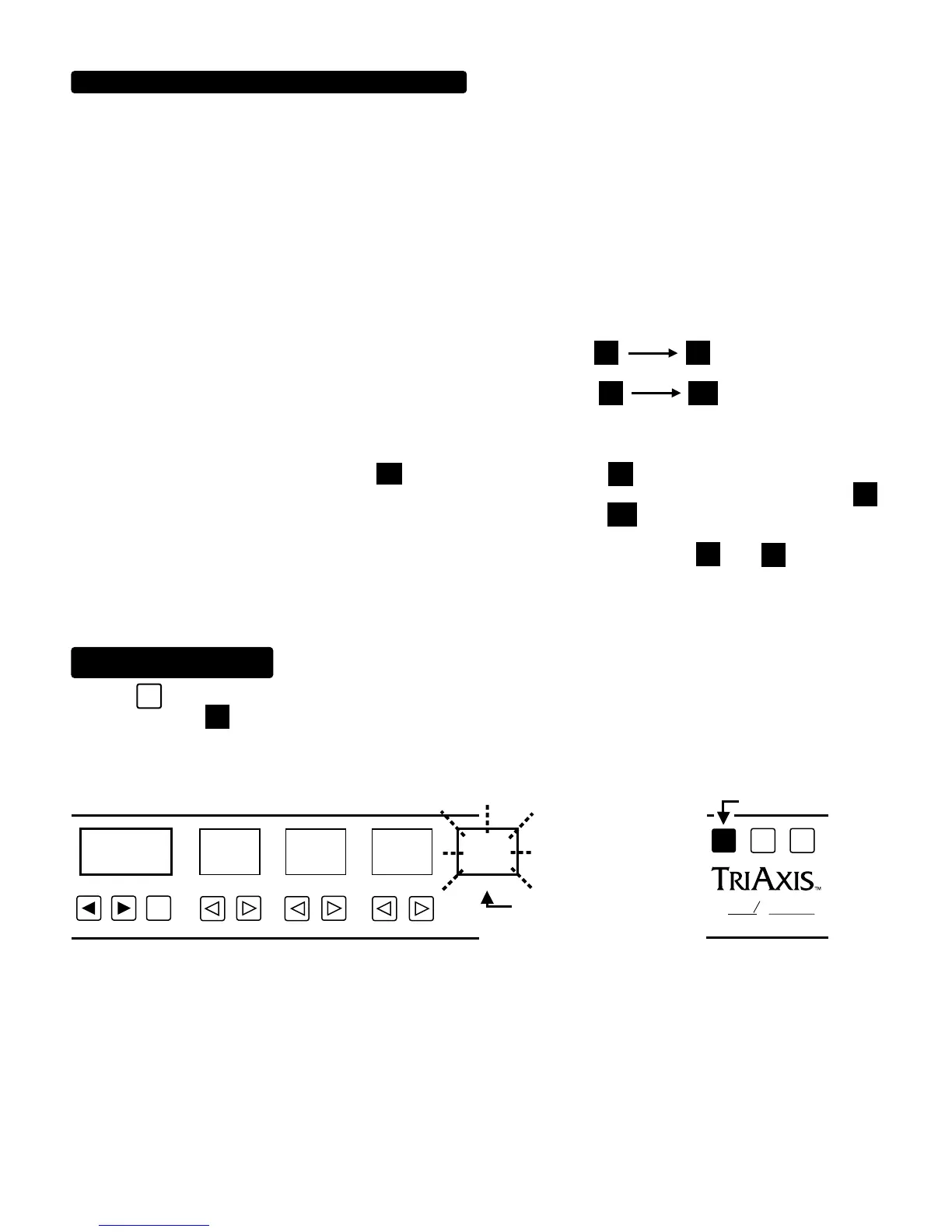
key again (fourth time). This last parameter you assigned a controller to will continue to flash. The PROGRAM
WINDOW will display
00
. (Again, because the unit has probably never been assigned for control change reception.) You are now in
the “Value Sub-routine”. This is when you decide: 1. In which direction (Up, “Plus”) or (“Down, “Minus”) and 2. How much
each parameter you have assigned a controller to will modulate (how many positions the parameter will modulate).
NOTE: Again, Negative values are indicated by a “1” in the leading digit place. For example, a value of negative 7 would be
displayed as “107 .”
IMPORTANT TO READ NOW! "RULES OF VALUES"
SUB-ROUTINE
VALUES OF CHANGE
BASS
MIDDLETREBLEGAINPROGRAM/CHANNEL
01 2 3 4 5
00
PGM
/CH
SHIFT
PRESS (4th time)
FLASH
ALL TUBE PREAMPLIFIER
OOGIE
B
M
ESA
IN THIS CASE IT
WOULD BE THE
BASS PARAMETER.


 To Next Page
 Loading...