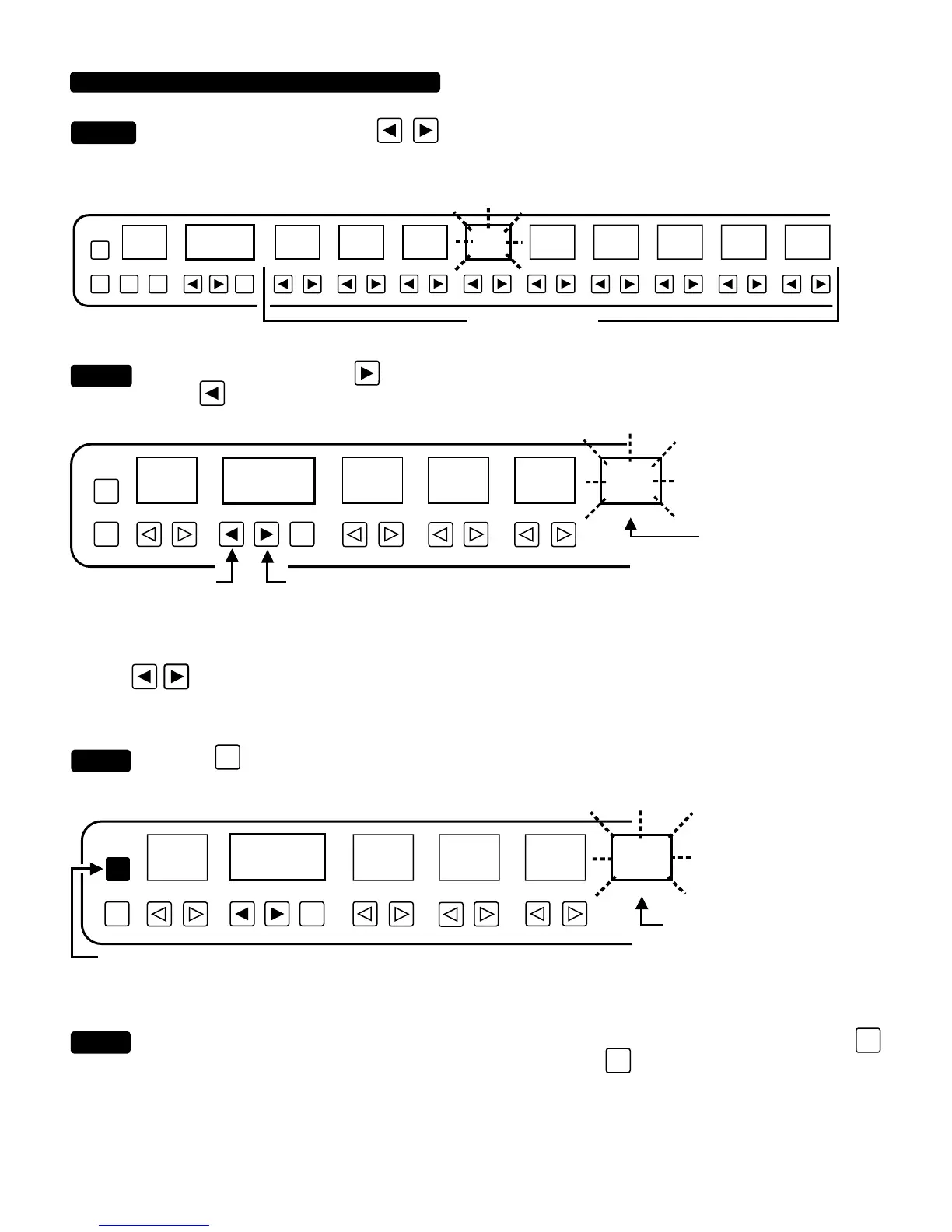
Choose a Parameter. Press any key under a parameter display and you will see the corresponding
display window begin to flash. For now (because you are most likely dealing with a new unit that has never been
programmed) all the parameters are set to Controller 00 (PROGRAM/CHANNEL window).
Choose a Controller. Press the
key until the window displays the desired Controller number. Press the PRO-
GRAM
DECREMENT key if you go past the desired controller.
NOTE: Remember, the flashing window displays the setting of the parameter NOT the controller number. The Controller number is
displayed only in the “PROGRAM/CHANNEL” window. Don’t try to assign the controller to the flashing parameter window by
using the
keys below the parameter window...nothing will happen.
Press the
ENTR
key one time. The parameter flashing will stop flashing momentarily and the “Controller” number appear-
ing in the “PROGRAM WINDOW” will be assigned to this flashing parameter in that preset only.
Repeat. Follow this same procedure for each parameter that you wish to modulate from Step 2 (do not press the
SHIFT
key at this time.) After each parameter/controller assignment, press the
ENTR
key. Make sure the parameter window
stops flashing momentarily, indicating the assignment has been completed. With controllers assigned to all desired parameters, you
are now ready to move to the Value subroutine.
CONTROLLER ASSIGN SUB-ROUTINE (continued)
STEP
2
STEP 3
DYNAMIC VOICE
PRESENCEMASTERLEAD 2 DRIVE
LEAD 1 DRIVEBASSMIDDLE
TREBLEGAINPROGRAM/CHANNELPRESET
PGM
/CH
COPY
01 2
345678
00
PARAMETER KEYS
FLASH
9
BASSMIDDLETREBLEGAINPROGRAM/CHANNELPRESET
PGM
/CH
COPY
0
123 4
5
01
DOWN
UP
FLASH
BASS window display remains
flashing indicating you are
assigning a controller to this
parameter.
BASSMIDDLETREBLEGAINPROGRAM/CHANNELPRESET
PGM
/CH
COPY
01 23 4 5
01
PRESS ONCE ONLY
ENTR
FLASH
PAUSE IN
STEP 4
STEP 5
PAUSE IN THE FLASHING
PARAMETER WINDOW. IF YOU
ARE NOT SURE...PRESS ENTER
AGAIN.
PAGE 23


 To Next Page
 Loading...