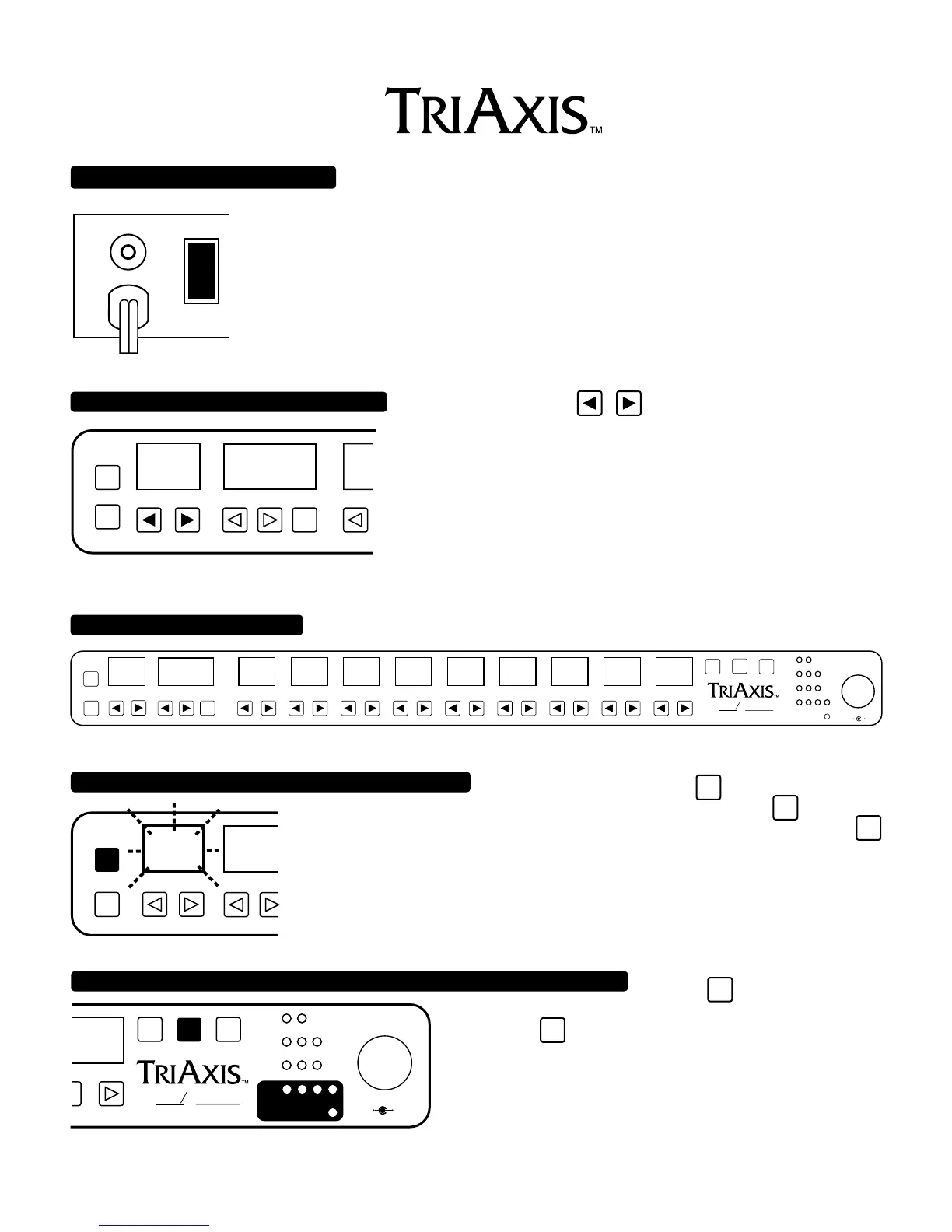
TURN POWER ON AT REAR OF UNIT:
ON/LIFT
OFF
ON GROUND
RUN THROUGH FACTORY PRESETS 1-10
PROGRAM/CHANNELPRESET
PGM
/CH
EXIT
ENTR
COPY
0
PRESET
NUMBER
OUTPUT
RHY
LD1
LD2
SW
1 2 3 4
FX LOOP
DYNAMIC VOICE
PRESENCEMASTERLEAD 2 DRIVELEAD 1 DRIVE
BASSMIDDLETREBLEGAIN
PROGRAM/CHANNEL
PRESET
PGM
/CH
EXIT
0
123456789
5
6
7
8
9
10
4
3
2
1
0
A B
ENTR
ALL TUBE PREAMPLIFIER
OOGIE
B
M
ESA
TO INCREASE OR DECREASE
TO ENTER AND SAVE NEW PARAMETER SETTINGS
COPY
PRESET
EXIT
ENTR
PROGRAM/ CH
4
FLASHES
TO ACTIVATE PROGRAMMABLE FX LOOP AND FUNCTION SWITCHES:
OUTPUT
RHY
LD1
LD2
5
6
7
8
9
10
4
3
2
1
0
A B
LOOP
SW
SW
1 2 3 4
FX LOOP
ALL TUBE PREAMPLIFIER
OOGIE
B
M
ESA
PAGE1
NOTE: The AC Power Switch is a 3 position - center off type switch. Always try the
ON/GROUND position first (switch down). If hum is noticed in the sound, then try the ON/LIFT
position. Whenever possible it is best to use the grounded position for many reasons unless having
TriAxis grounded creates noise problems such as buzz or AC hum.
NOTE: The A.C. power for TriAxis should be derived from the same power strip as that of the power
amp in use. Any effects units used should also be plugged into this same strip. This close proximity
of A.C. power supply for units within a system will prevent TONE degradation. Failure to follow this
wiring scheme may result in harsh or excessively bright tonal characteristics.
To do so use the Preset
keys. (Notice that 11-20 do not sound
very different unless TriAxis Switch 1 Jack is connected to a Mesa Switch
Track power amp and Track Switching is used.)
NOTE : Factory presets 1 thru 20 are Loaded automatically during power-
up, but can be disabled or reloaded manually by user when defeat proce-
dure is followed...see page 4 for directions.
Presets, Programs or Parameters use any of the arrowed keys.
to an existing preset, press the
ENTR
key two times. If pressed
one time Preset flashes to indicate it will be overwritten when you press
ENTR
key a second
time. If you happen to change your mind or wish to hear the original preset, press the
EXIT
key while PRESET is flashing to return to the original settings and void any changes you
had made.
Press the
LOOP
SW
key. This allows you to
sequence through all the possible LOOP/SWITCH combinations.
Press the
ENTR
key two times when the desired combination has
been selected to store this combination.


 To Next Page
 Loading...