FRONT PANEL:
(Continued)
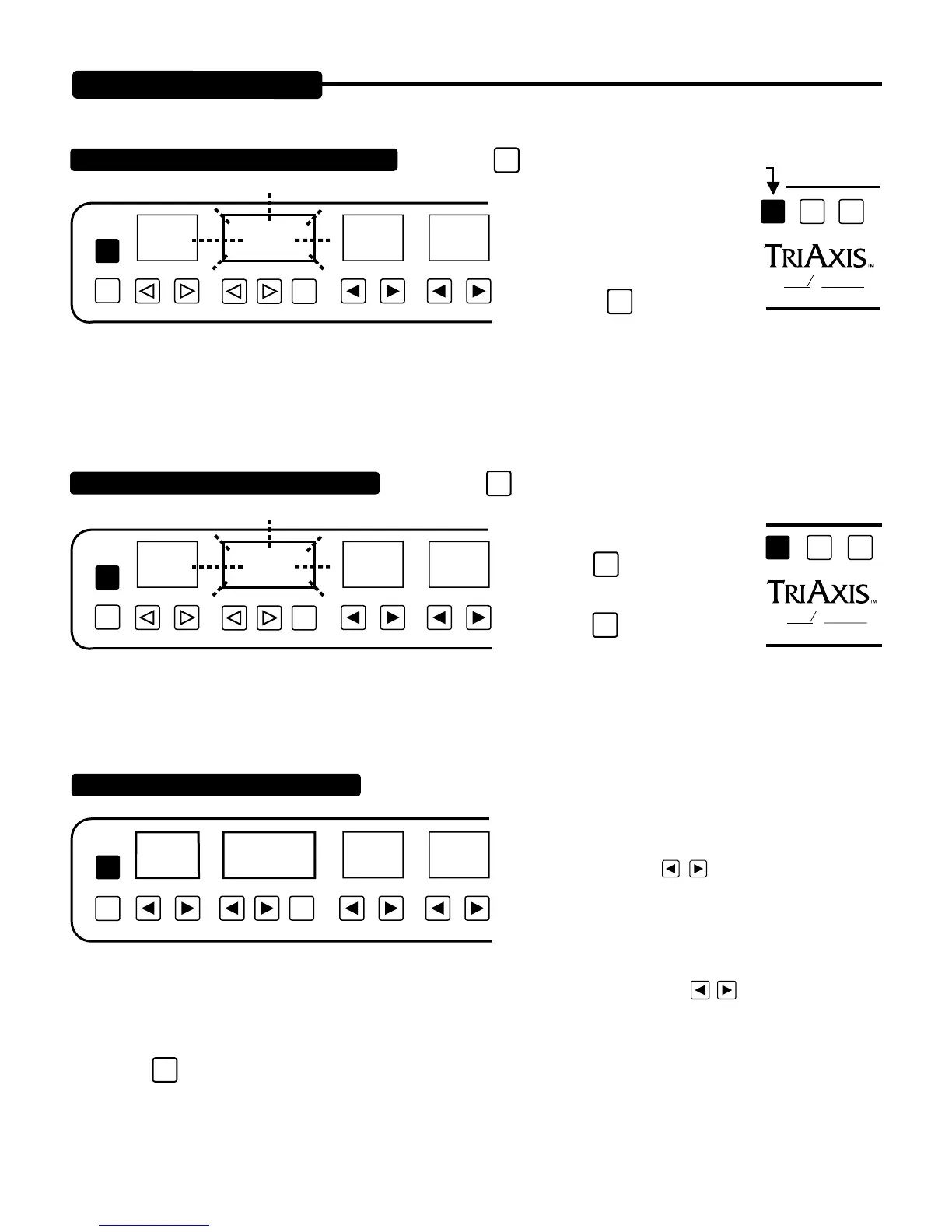
TO ACCESS PROGRAMS (via the numeric keys)
TREBLEGAINPROGRAM/CHANNELPRESET
PGM
/CH
COPY
01 23
ENTR
FLASH
SHIFT
OOGIE
B
M
ESA
ALL TUBE PREAMPLIFIER
TO ACCESS PRESETS (via the numeric keys)
TREBLEGAINPROGRAM/CHANNELPRESET
PGM
/CH
COPY
01 23
ENTR
FLASH
MAPPING A PRESET TO A PROGRAM
TREBLEGAINPROGRAM/CHANNELPRESET
PGM
/CH
EXIT
COPY
01 23
PRESET
NUMBER
PROGRAM
NUMBER
ENTR
PAGE 2
1. Press the
SHIFT
key one time to access the programs.
2. Select PROGRAM using nu-
meric keys located below GAIN,
TREBLE, MIDDLE, BASS, and
LEAD DRIVE windows.
3. Press the
ENTR
key one time to
access new PROGRAM number
and audition the PRESET listed at
that location.
1. Press the
SHIFT
key two times to make PRESET the active window, then
select the new PRESET using the nu-
meric keys once again.
2. Press the
ENTR
key one time to listen
to the displayed flashing PRESET.
3. Press the
ENTR
key two times to write
displayed flashing PRESET to displayed
PROGRAM number.
First understand that PRESETS are “SOUNDS” and that PROGRAMS are “Midi
PROGRAM LOCATIONS.”
1. Call up the PROGRAM LOCATION number that you
wish to write using the
keys directly under the PRO-
GRAM / CHANNEL window, a Midi Controller, or by using
the numeric keys located directly under the GAIN thru LEAD
1 DRIVE keys.
2. Choose the desired PRESET “sound” you wish to list under the Program Location number using
keys directly under the
PRESETwindow. Now you should see the PRESET you wish to map in the PRESETwindow and the Program Number you wish to
write this PRESET under, in the PROGRAM / CHANNEL window.
3. Press the
ENTR
key two times. Procedure is now complete.
SHIFT
OOGIE
B
M
ESA
ALL TUBE PREAMPLIFIER


 To Next Page
 Loading...