PAGE 3
FRONT PANEL:
(Continued)
COPY FEATURE
TREBLEGAINPROGRAM/CHANNELPRESET
EXIT
ENTR
COPY
01 23
FLASH
PGM
/CH
SHIFT
OOGIE
B
M
ESA
ALL TUBE PREAMPLIFIER
MODE SELECTION
OUTPUT
1 2 3 4
FX LOOP
5
6
7
8
9
10
4
3
2
1
0
A B
MODE
RHY
LD1
LD2
SW
ALL TUBE PREAMPLIFIER
OOGIE
B
M
ESA
DYNAMIC VOICE
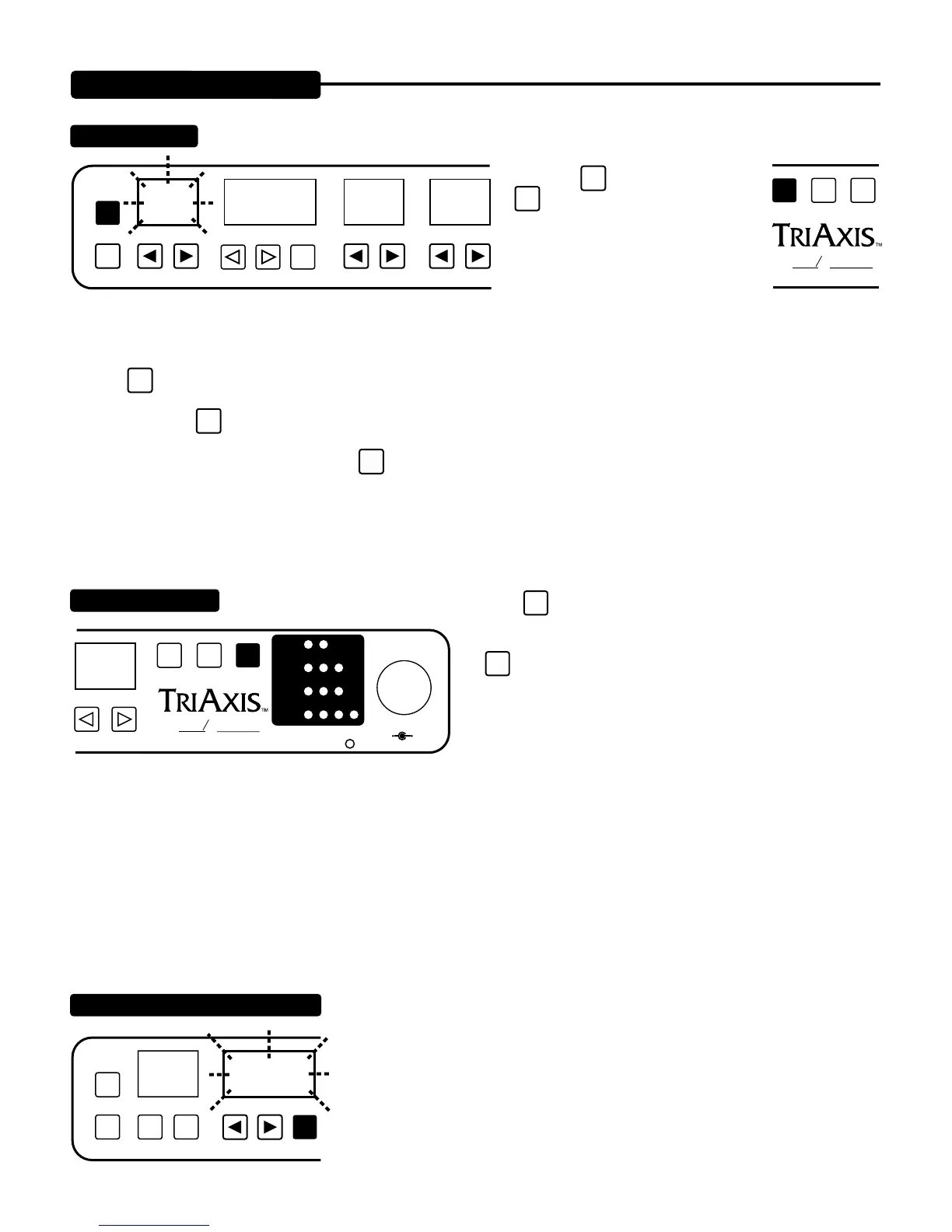
PROGRAM / CHANNEL WINDOW
PGM
/CH
PROGRAM/CHANNELPRESET
COPY
CHANNEL
NUMBER
To copy one PRESET to another PRESET location: 1. Choose the PRESET you wish to copy.
2. Press
SHIFT
key and then press
key. This “Source” PRESET now
flashes four times.
3. Select the “Destination” PRESET
using numeric keys located below the
GAIN thru LEAD 1 DRIVE windows.
You will now see the Destination PRE-
SET in the PRESET window.
4. Press
ENTR
key one time. The Destination PRESET now flashes indicating that the contents of the Destination PRESET will be
replaced by the “Source” PRESET parameters. (If you want to stop this copy procedure and avoid overwriting the Destination
PRESET, press the
EXIT
key and return to the “Source” PRESET.)
5. To complete the copy procedure, press the
ENTR
copy key one more time. The “Source” PRESET is now copied to the Destina-
tion PRESET and the PRESET display returns immediately to the “Source” PRESET. If you wish to check your work, toggle back
to the destination PRESET and confirm the parameter values were copied.
To sequence through the 8 modes, press the
MODE
key each time to select a new mode.
NOTE: Keep in mind the settings do not change with the
MODE
key, so if something sounds strange or if no sound is
heard, check Mode/Parameter settings.
THE MODES ARE SHAPED AS FOLLOWS:
Rhy-Green=Vintage Fat Rhythm Lead 1 - Red = Dual Rectifier Vintage Channel
Rhy-Yellow=Modern Bright Rhy Lead 2 - Green = Mid Gain MK IV Lead
Lead 1-Green=Vintage Mark 1 Lead Lead 2 - Yellow = Classic MKII Lead (MK II-V)
Lead 1-Yellow=Gain Boost MK I Ld. Lead 2 - Red = Searing MKIII Lead
(For greater detail on individual modes, see the modes section in this manual)
Feedback to the user regarding current Midi Program Number or current Midi Channel is
displayed in this window.
NOTE: Remember User PRESETS are not to be confused with Midi Programs. Pre-
sets are created by you (or at the factory) and can then be assigned to a Midi Program
number. In other words; Presets are sounds and Programs are Locations.


 To Next Page
 Loading...