FRONT PANEL:
(Continued)
PROGRAM / CHANNEL WINDOW: (Continued)
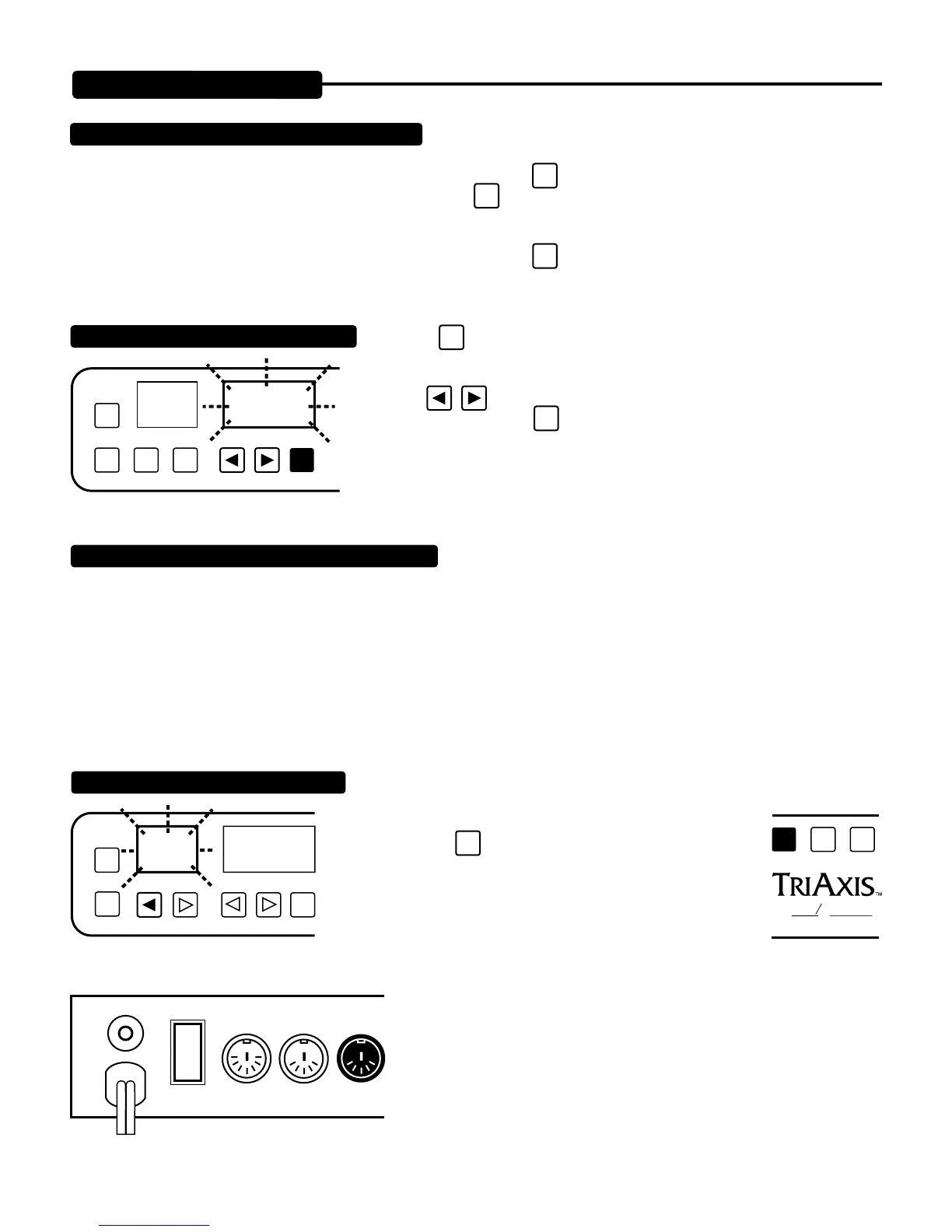
TO CHANGE MIDI CHANNEL NUMBER
COPY
PRESET
PROGRAM/CHANNEL
PGM
/CH
EXIT
ENTR
CURRENT
MIDI NO.
MIDI SYSTEM EXCLUSIVE DATA DUMP FEATURE
PROGRAM/CHANNELPRESET
COPY
4
FLASHES
EXIT
ENTR
PGM
/CH
IN
OFF
ON/LIFT
ON GROUND
MIDI
THRU
OUT
SHIFT
ALL TUBE PREAMPLIFIER
OOGIE
B
M
ESA
PAGE 4
TRANSMIT DATA DUMP RECEIVE:
NOTE: From Power-up, the Midi Program number last used appears in
the PROGRAM / CHANNEL window. To view the current Midi Channel
that TriAxis is set to receive Program Change commands on...Press the
PGM
/CH
key below this window.The display changes to the
current Midi Channel and the channel number flashes. Press the
PGM
/CH
key to retrurn to the current Midi Program number.
REMINDER...The Midi Channel will not be displayed uinless you push the
PGM
/CH
button.
Press the
PGM
/CH
key. The PROGRAM display now indicates current Midi Channel
number by flashing.
Use the
keys to change the CHANNEL number. When the desired chan-
nel is reached, press the
PGM
/CH
key to return the display to the PROGRAM number.
All of the information stored in memory, including PRESET/PROGRAM
combinations and LOOP/SWITCH settings, may be dumped to an external storage medium such as an “Alesis Data Disk”, personal
computer or any other system with a Midi port and hard or floppy disk storage capabilities. These settings (information) can then be
retrieved and loaded back into memory from the storage medium, providing backup and/or limitless expansion of the TriAxis memory.
NOTE: The manufacture’s system exclusive identification code number for the TriAxis is 00004A. In case you ever need to list your
files on a personal computer, this would be a possible title. However, the majority of owners will probably never need this number.
1. Connect a 5-Pin DIN cable from the TriAxis Midi Out Jack. Follow instructions as
to how to set the storage medium’s Midi IN port to the receive ready state.
2. Press the
SHIFT
key and then the PRESET down key
(arrowed key facing to the left) on the TriAxis. You will now
see the PRESET window display flash four times, indicating
the “Dump” has been completed.
NOTE: You may possibly see the I.D. number appear on the screen of the
destination unit and then something like “Dump Completed.” The whole pro-
cedure takes about 500 milliseconds and all the information in the TriAxis
memory is still intact. At this time you may write new presets knowing that all
of your previous presets are safely backed up.


 To Next Page
 Loading...