
 Need help?
Do you have a question about the Mesa MSL-500 and is the answer not in the manual?
Troubleshooting steps for a safe lock that does not beep or respond.
Steps to take when the lock responds but fails to unlock the safe.
Keypad shuts down for 5 minutes after four incorrect entries.
Time delay function can be set from 01 to 59 minutes.
Two separate codes needed to unlock the safe.
Steps to open the safe using a single user code.
Steps to open the safe using two user codes.
Steps to change the master code for the electronic lock.
Steps to activate user codes, specifying user numbers.
Steps to change existing user codes for the lock.
Steps to delete specific user codes from the lock.
Instructions to configure the lock for single user mode.
Instructions to configure the lock for dual user mode.
How to set the time delay from 1 to 59 minutes.
Steps to open the safe when time delay is active.
Describes red light and unlock failure as low battery warnings.
Procedure for replacing the 9V battery in the lock.
The device described in this manual is the Mesa Model MSL-500 Electronic Lock, designed for use with Mesa Safe Company safes. It is an electronic locking mechanism that provides security for valuables, emphasizing integrity and quality craftsmanship.
The MSL-500 Electronic Lock is a programmable digital lock that secures a safe. It operates by requiring a correct code input to unlock the safe, allowing the user to then turn the handle clockwise to open the door. The lock supports multiple user codes and modes of operation, including a single-user mode and an optional dual-user mode, enhancing security by requiring two separate codes for access. It also features a programmable time delay function, which adds an extra layer of security by delaying the opening of the safe after a valid code is entered. The lock provides visual and auditory feedback for various operations, such as successful code entries, invalid codes, and low battery warnings. A key security feature is the "wrong try penalty," which temporarily shuts down the keypad if multiple incorrect codes are entered, preventing brute-force attempts.
Code - #. The green light stays on for five seconds.1st Code - # (lock beeps twice), then 2nd Code - #. The green light stays on for five seconds.* - # (beeps twice) -> 8 - 8 - 8 - # (beeps twice) -> Current Master Code - # (beeps twice) -> New Master Code - # (beeps twice) -> Re-Input New Master Code - # (green light for three seconds).* - # (beeps twice) -> 3 - 3 - 3 - # (beeps twice) -> Current Master Code - # (beeps twice) -> (User #) - # (specify user 1-5) -> New User Code - # (beeps twice) -> Re-Input New User Code - # (green light for three seconds).* - # (beeps twice) -> 4 - 4 - 4 - # (beeps twice) -> Current User Code - # (beeps twice) -> (User #) - # (identify the current user code) -> New User Code - # (beeps twice) -> Re-Input New User Code - # (green light for three seconds).* - # (beeps twice) -> 6 - 6 - 6 - # (beeps twice) -> Current Master Code - # (beeps twice) -> (User #) - # (specify user 1-5 to delete) -> Re-Input (User #) - # (green light for three seconds).* - # (beeps twice) -> 1 - 5 - 8 - # (beeps twice) -> Current Master Code - # (beeps twice) -> 1 - # (green light for three seconds).* - # (beeps twice) -> 1 - 5 - 8 - # (beeps twice) -> Current Master Code - # (beeps twice) -> 2 - # (green light for three seconds).* - # (beeps twice) -> 1 - 5 - 9 - # (beeps twice) -> Current Master Code - # (beeps twice) -> (00 - 59) - # (green light for three seconds).01 sets 1 minute delay, 59 sets 59 minutes, 00 turns off time delay.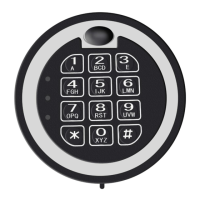

 To Next Page
 General