5
10
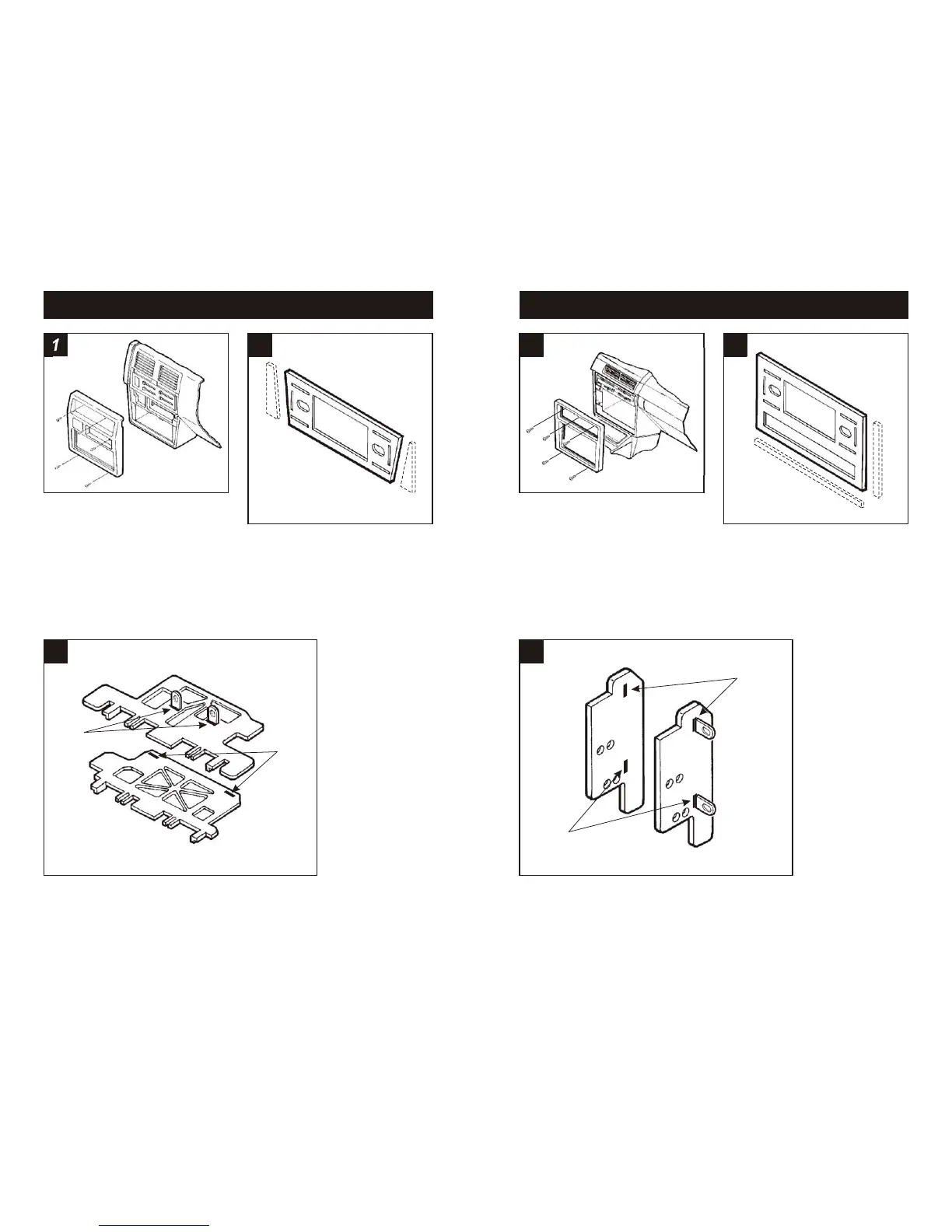
Using the scored lines as a guide, cut and
remove the dashed portions of Faceplate
#2.
Disconnect the negative battery terminal to
prevent an accidental short circuit. Remove
the ashtray and (1) screw exposed in the
top-right corner. Remove (2) Phillips screws
above the climate controls. Remove (2)
Phillips screws from the bottom of the dash
trim bezel. Unsnap the bezel and
disconnect the cigarette lighter wiring.
Remove (4) screws securing the factory
head unit and disconnect the wiring.
1
NISSAN Hardbody Pickup / Pathfinder 1986 1/2-93
2
3
Slide Mounting Tabs #8 into slots "E" on Brackets #13 and #14.
The Mounting Tabs, Brackets and Bracket slots can be identified
by the stamped letter on each component. Skip to the Installation
Instructions for ALL VEHICLES on Page #14.
"E"
"E"
3
Disconnect the negative battery terminal to
prevent an accidental short circuit. Remove
(3) screws above the climate controls.
Remove (2) screws from the bottom edge of
the dash trim bezel. Unclip the bezel and
remove. Remove (4) screws securing the
factory head unit and disconnect the wiring.
1
NISSAN Pulsar 1987-90
2
Slide Mounting Tabs #8 into slots "A" on Bracket Set #9. The
Mounting Tabs, Brackets and Bracket slots can be identified by the
stamped letter on each component. Skip to the Installation
Instructions for ALL VEHICLES on Page #14.
"A"
"A"
Using the scored lines as a guide, cut and
remove the dashed portions of Faceplate
#1.



 To Next Page