6
Kit Assembly 99-7612
ISO DIN head unit provision with pocket
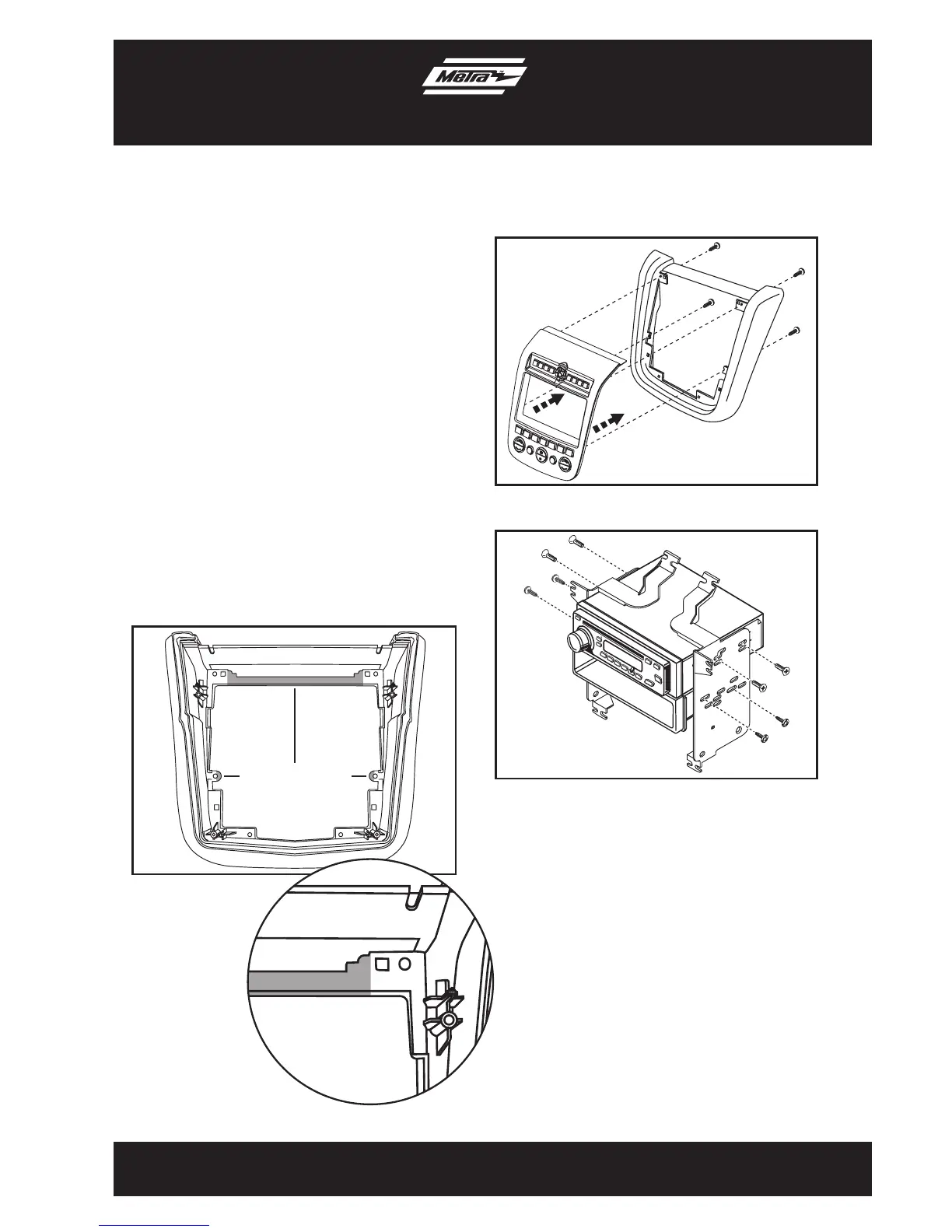
(Figure B)
(Figure C)
1. Trim the shaded areas from the factory
radio trim panel. (Figure A) Do not cut
the locator and screw hole off as they
will be necessary to mount the 99-7612
radio housing. (See detail)
2. Attach the 99-7612 Radio Housing to
the Radio Trim Panel using (4) supplied
3/8” Phillips screws. (Figure B)
3. Mount the Radio Housing Brackets to
the head unit with the screws supplied
with the unit. (Figure C)
4. Mount the pocket to the radio/bracket
assembly using (4) supplied 3/8”
Phillips screws. (Figure C)
(Figure A)
Trim shaded areas
Detail


 To Next Page