The World’s best kits.
®
MetraOnline.com © COPYRIGHT 2019 METRA ELECTRONICS CORPORATION REV. 8/14/19 INST99-8249
INSTALLATION INSTRUCTIONS
99-8249
Attention! Let the vehicle sit with the key
out of the ignition for a few minutes before
removing the factory radio. When testing the
aftermarket equipment, ensure that all factory
equipment is connected before cycling the
key to ignition.
KIT FEATURES
• ISO DIN radio provision with pocket
• ISO DDIN radio provision
• Built and painted in multiple colors to match the factory
color and appearance
KIT COMPONENTS
• A) Radio housing trim panel • B) Radio brackets • C) Pocket • D) Phillips screws (8)
TOOLS REQUIRED
• Panel removal tool • Phillips screwdriver
• 10mm socket wrench
TABLE OF CONTENTS
Dash Disassembly ...............................................2-3
Kit Preparation .......................................................4
Kit Assembly
–ISO DIN radio provision with pocket ..................5
–ISO DDIN radio provision .....................................6
WIRING & ANTENNA CONNECTIONS
(sold separately)
Wiring Harness: 70-1761 • TYTO-02 (amplified models)
Antenna Adapter: 40-LX11
Steering Wheel Control Interface: ASWC-1
A B C D
Toyota Camry 2015-2017

 Need help?
 General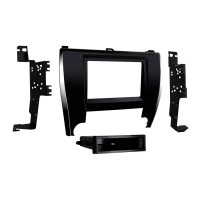

 To Next Page