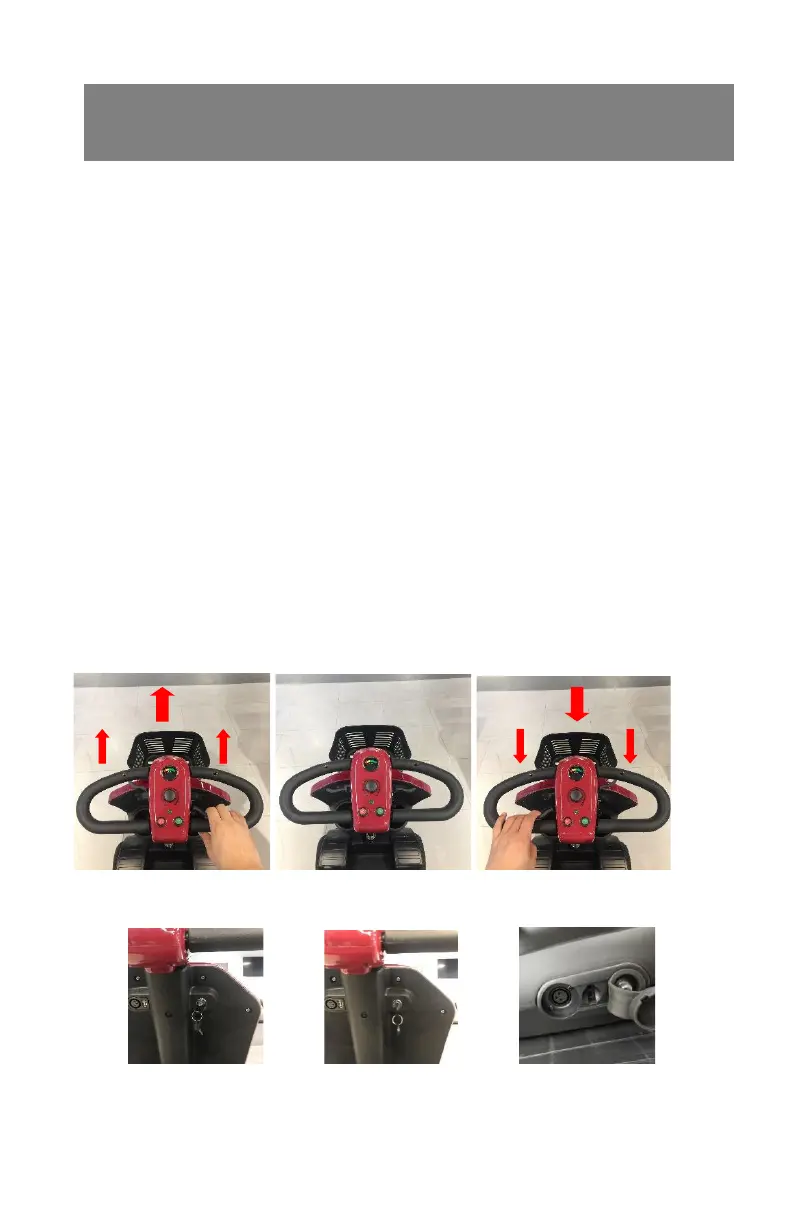
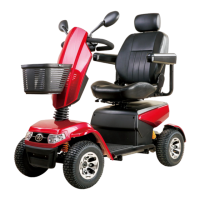
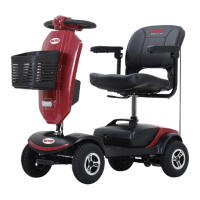
Throttle Lever
The throttle lever offers finger-tip control of your scooter.
It controls the speed as well as forward and reverse motion. To move the
scooter in a FORWARD motion PULL the lever with the RIGHT HAND or
PUSH the lever with the LEFT THUMB (Photo 7.1 ,Photo 7.2).
To move the scooter in a REVERSE motion PULL the lever with the LEFT
HAND or PUSH the lever with the RIGHT THUMB. The lever will return by
itself when released and the scooter will slow to a stop (Photo 7.1 ,Photo
7.2).
The more you move the lever, the more your speed increases up to its
preset maximum. It is possible to operate your scooter using one side of the
throttle lever. To do this you must PUSH and PULL on the chosen side of
the throttle lever.
Horn Button
Pressing the horn button operates an audible warning sound. Use this
function to warn pedestrians of your presence when necessary
P7.1 P7.2
Key Switch
P7.4 P7.5 P7.6
The key switch switches the scooter ON and OFF.
Please note that the key cannot be removed when it is in the ON position


 To Next Page