5
4.3 Reading a Compact Disk on your LE PLAYER
®
3+
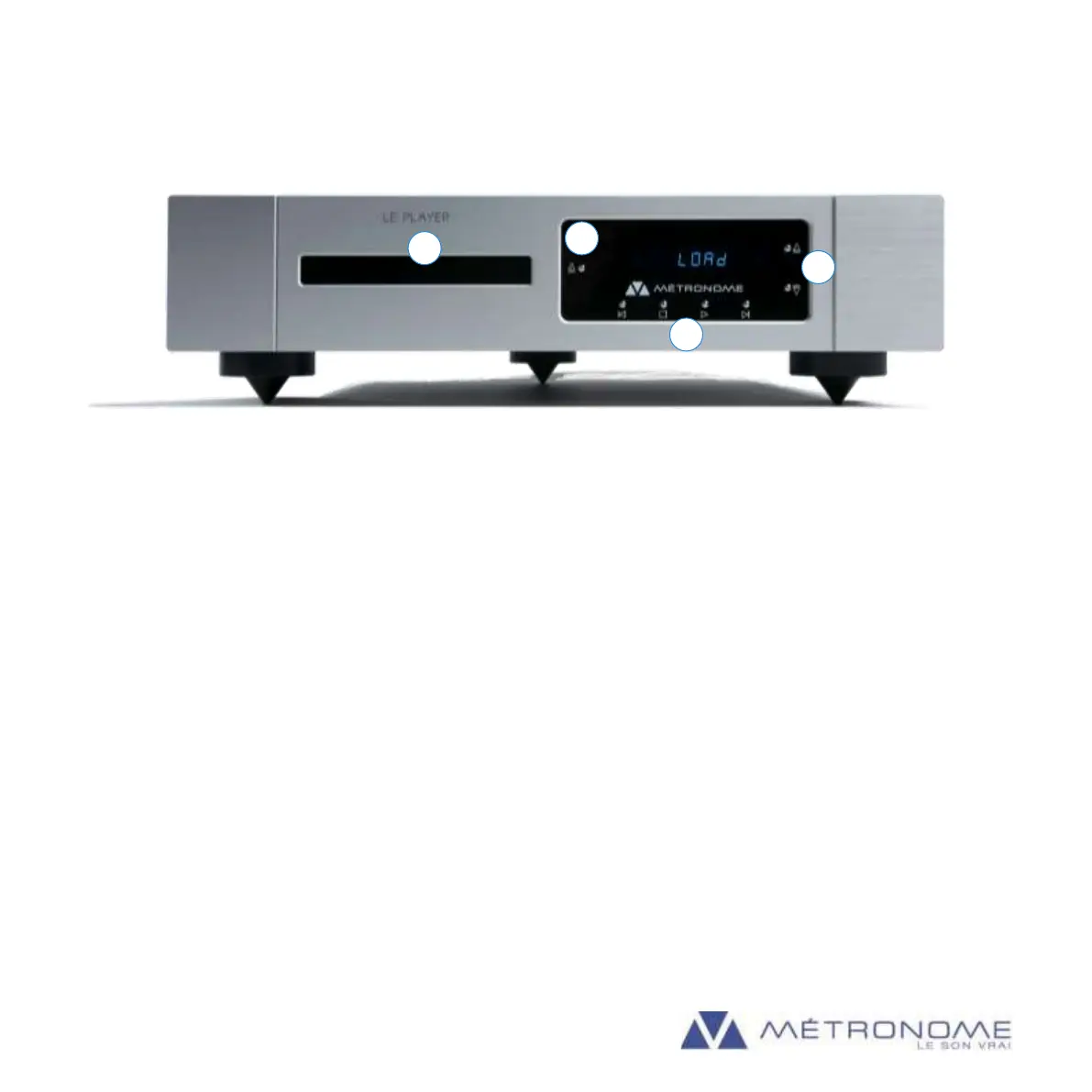
Let’s have a look at the front of the device :
A : Front Drawer B : Open/Close the Drawer
C : Functions buttons D : Input selection (USB - S/P DIF - CD)
How to play a CD :
Press on [B] to open the front drawer and put a CD on top of the drawer. Press again on [B] to close the drawer.
The CD initialization begins, it may take a few seconds to be completed, depending the number of tracks.
Once the display shows the disc information (total time, number of tracks), press on play [] to start on the front
board or on the remote control (see Chapter 6).
4.4 Using LE PLAYER
®
3+ as a D/A Converter
LE PLAYER
®
3+ has a high-resolution asynchronous USB input allowing to read digital files up to 32 bits / 384 kHz
and DSD files up to DSD 512 (DSD x8 = 22.5 MHz). The USB input accepts all formats, unlike the standard digital
S/PDIF input, which only accepts files up to 24 bits / 192 kHz.
Many transports and media players can be used to play music on Le Player 3+. Most of them have been tested,
including JRiver and Audirvana+, but Métronome Technologie cannot guarantee a complete functionality on all
the media players existing on the market.


 To Next Page