All-Engineering BV
https://metrumacoustics.com
info@metrumacoustics.com
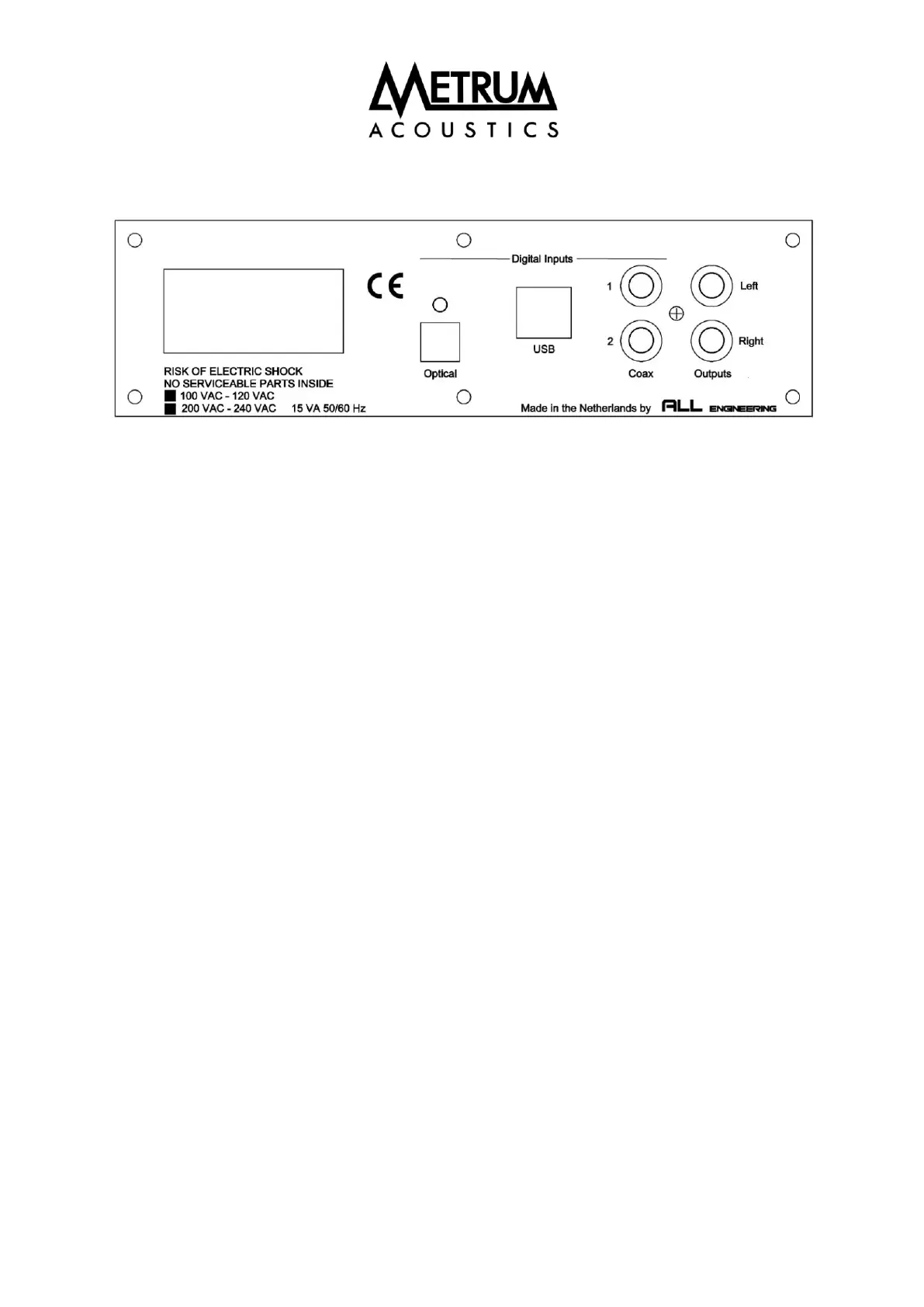
Inputs & Connections
• Cautionary note: Please connect your interconnects first before connecting the mains
power cable.
• Optical input: Use an optical Toslink cable to use the optical input. The optical input can be
used for sampling rates up to 96 kHz.
• Coaxial inputs: A 75 Ohm coaxial cable should be used to connect the DAC to other digital
equipment. To avoid ground loops both inputs have a galvanic isolation. The coaxial input
can handle a maximum sample rate of 192 kHz.
• USB input: Use an USB cable to connect the DAC to your computer. Only when using a
Windows operating system, you should install special drivers. In case of Linux or MAC no
additional drivers are required. The USB input can handle sampling rates up to 384 kHz.
• RCA outputs: Standard interlinks can be used to connect the DAC to your amplifier. The
"AMETHYST" is designed conform the "Red book standard", the maximum output will be 2
Volts RMS or 5.7 Volts peak to peak. Your (pre)amplifier should handle this output level. The
outputs are switched off in case a headphone is connected at the front panel.


 To Next Page