REMOTE CONTROL
Note:
1). The picture is only for reference.
2). The image, buttons and functions of remote control may vary depending on the region or model.
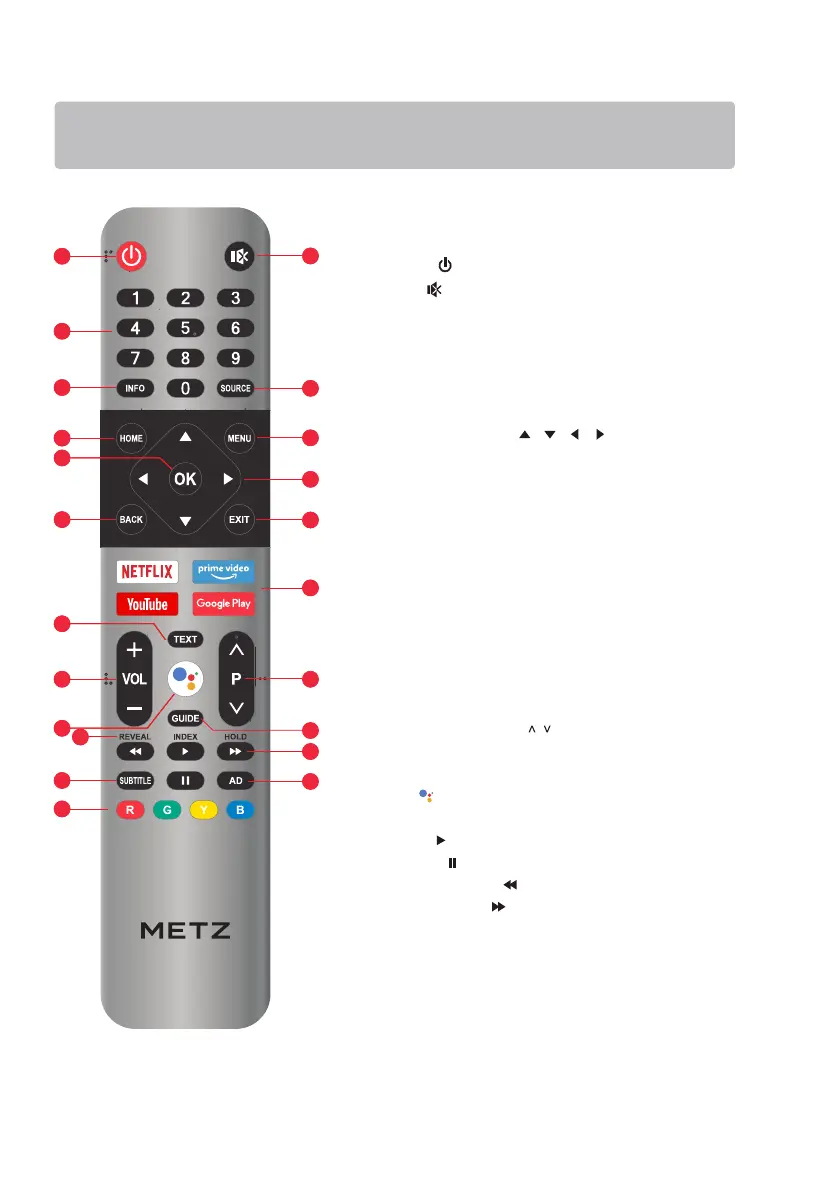
1. POWER ( ): Turn the TV on or to standby mode.
3. Number buttons (0~9):
Select the channel directly, or input a number.
2. MUTE ( ): Mute or restore the TV sound.
4. SOURCE: Select the input source.
5. INFO: Access the INFO interface.
6. MENU: Access the menu of quick settings.
11. BACK: Return to upper-level content, or exit the
current screen.
9. OK: Confirm, enter or execute the selected item,
or show the list of Quick Button.
8. Navigation Buttons ( / / / )
Navigate the menu to select the content you need.
10. EXIT: Exit the current operation.
15. Volume Up/Down (VOL +/-): Adjust the sound volume.
14. Program Up/Down (P
/ ): Switch channels.
7. HOME: Access the home page.
18. *** USB Play Control Buttons***
• Fast Backward ( ): Fast backward the playback.
• Fast Forward ( ): Fast forward the playback.
• Pause ( ): Pause the playback.
• Play ( ): Start the playback.
19. SUBTITLE: Turn on or turn off the subtitle menu.
21. Color Buttons (R/G/Y/B):
Execute the prompt function in specific mode.
20. AD: Turn on or turn off the function of audio description.
12. Application Buttons: Access specific applications
directly.
13. ***Teletext Buttons***
• TEXT: Access or exit the teletext menu.
• INDEX: Display index page.
• REVEAL: Display or hide the concealed information.
• HOLD: Hold the teletext page on screen without
updates or changes.
16. GUIDE: Access the EPG interface in DTV mode.
17. MIC ( ): Start using the near field voice function.
1
3
4
5
6
11
10
8
14
15
13
17
19
13
21
7
9
12
1
22
3
4
5
6
11
10
8
14
15
13
17
19
13
21
7
9
12
16
18
20
16
18
20


 To Next Page