INSTALLATION AND INSTRUCTIONAL MANUAL
xxxxx-xxx-xx month/day/year
PV SERIES
The wireless controller is a compact unit with two parts. One part is the Base Unit (Receiver) and the
other part is the Transmitter (Hand Held Controller). The Transmitter is used to send a corresponding
signal to the Base Unit to act as a remote switching device.
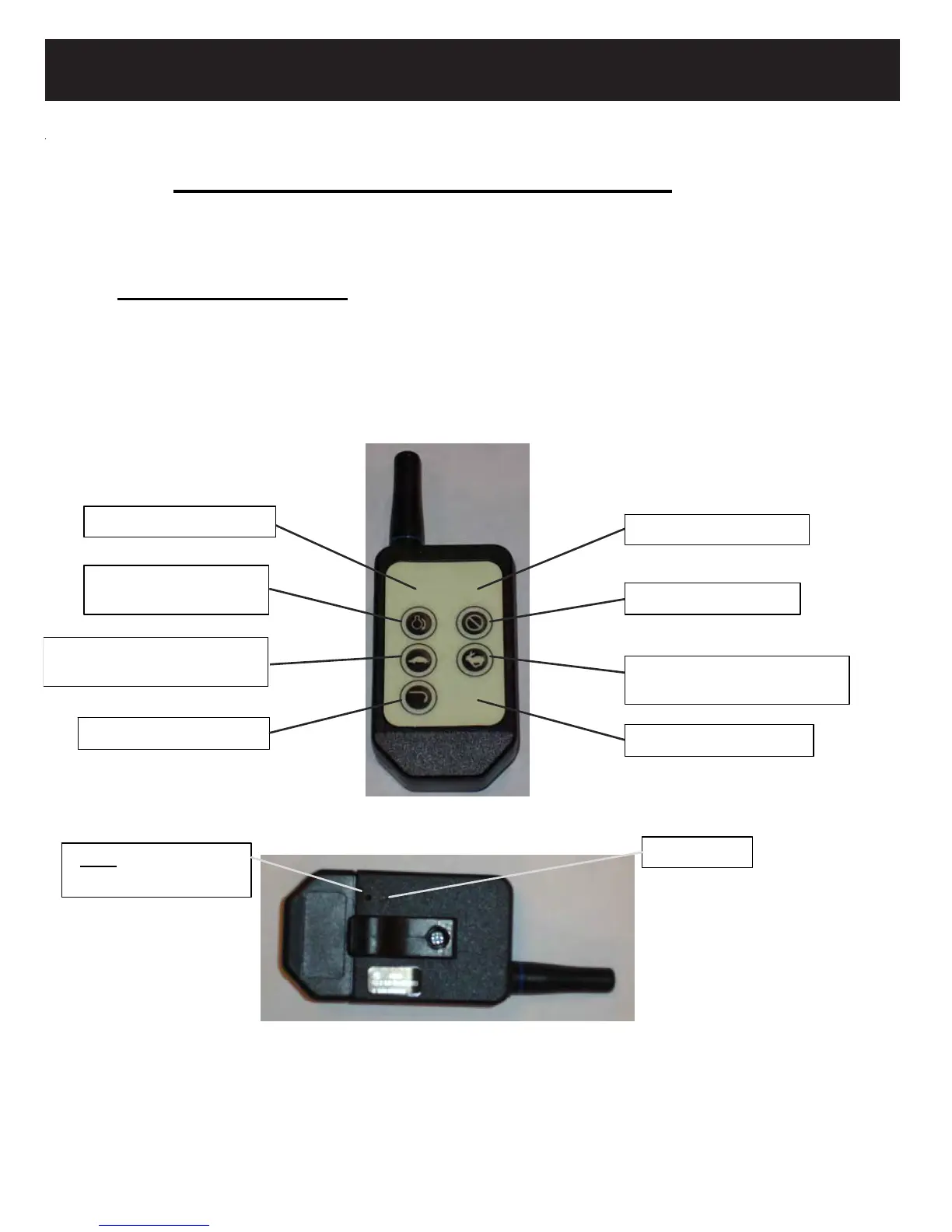
@ 418MHz) interface between the Transmitter and Base Unit. See Figures 1 & 2 for Transmitter button
When programming is completed, only (5) buttons are functional (Buttons #1, #3, #4, #5, & #6) (see Fig.
1).
Fig. 1: Transmitter Front Button Assignments
Fig. 2: Transmitter Back Button Assignments
utton #1 (clutch on/off)
Button #3 (Throttle decrease)
Button #4 (Throttle increase)
& “Hold to Choke
Button #6 (engine off)
Button
5 (engine start)
ADD” Button
depress with paperclip
“blue” LED
Button #7 (open button)
Button #8 (open button)
Button #2 (open button)
For use with Gas Engine packages
Meyer Products Standard
The Meyer Wireless Controller comes factory programmed. That means matching the Base Unit to
the Transmitter has been done by
Meyer Products. This gives a matched (1 of 16 million combinations
assignments. On the 8 button
Meyer Products Transmitter, all (8) buttons are used when programming.


 To Next Page