EasyManua.ls Logo

MFJ Enterprises MFJ-4230MVP - User Manual

MFJ Enterprises MFJ-4230MVP
4 pages
Print Icon
To Next Page IconTo Next Page
Loading...
MFJ-4230MVP
30 Amp Switching Power Supply
User Manual
Electrical specifications
Model MFJ-4230MVP
Input Voltage
100~120V AC Fixed
( or 200~240V AC fixed)
Input Frequency 47Hz ~ 63Hz
Polarity Grounded Negative
Output Voltage DC 4V~16V Adjustable
Continuous (13.8V) 25A
Surge(13,8V) 30A
Ripple & Noise <100mV
Efficiency 75%
Dimension(L*W*H mm) 154 x127x63 (6”x5”x2.5”)
Net Weight 1.35 kg (3.4 lB)
Note: Specifications may change without prior notice
User information
The MFJ-4230MVP power supplie enable you to run almost any electronic
product.
Check the mains supply voltage
Before you plug in and turn on the power supply for the first time,
please check the mains supply voltage.
The voltage rating of the power supply is printed on a label on the
cover of the unit. Verify that it corresponds with your local mains
supply voltage (that is factory fixed at 110VAC ).
Turning the power supply on
Turn the power supply on by pressing the power switch to the ’ON’
Position.
Turning the power supply off
Before you turn the power supply off, turn the radio off as
described in the user documentation for the radio.
Turn the power supply off by pressing the power switch to the
’OFF’ Position
Cooling
The MFJ-4230MVP power supply is cooled by convection and
forced air cooling (that is, normal airflow around the power supply
in combination with a temperature controlled fan to improve
cooling at higher levels of use). The fan is always activated and
the speed is controlled by a sensor. When the temperature rises,
the fan speed increases.
Question and Answer IconNeed help?

Do you have a question about the MFJ Enterprises MFJ-4230MVP and is the answer not in the manual?

Summary

Electrical Specifications

User Information

Check the mains supply voltage

Verify the power supply's voltage rating matches your local mains supply before initial use.

Turning the power supply on

Instructions on how to power on the MFJ-4230MVP power supply using the power switch.

Turning the power supply off

Procedure for safely powering off the unit, recommending turning off connected radio first.

Cooling

Details the convection and forced air cooling system, including temperature-controlled fan operation.

Installation and Panel Description

Installation Steps

Provides a numbered list of steps for installing and connecting the power supply.

Front Panel Layout

Identifies and describes the controls and indicators on the front panel of the unit.

Rear Panel Layout

Identifies and describes the connectors and switches located on the rear panel.

Important Safety Information

Safe Operation Warnings

Covers warnings related to moisture, cleaning, and ventilation to prevent hazards.

Electrical Connections Safety

Emphasizes proper grounding and cord safety for preventing electrical shock and fire.

Servicing and High Voltage Warnings

Highlights that servicing should be done by qualified technicians due to high voltage risks.

Installation Precautions

Advises placing the unit in a ventilated, cool area and installing it indoors only.

12 Month Limited Warranty

Warranty Terms and Conditions

Outlines the conditions for warranty claims, including proof of purchase and service procedures.

Warranty Exclusions and Limitations

Details what the warranty does not cover, such as consequential damages or non-MFJ products.

Service and Contact Information

Provides instructions for in-warranty and out-of-warranty service, including contact details.

Overview

The MFJ-4230MVP is a 30 Amp Switching Power Supply designed to power a wide range of electronic products. It offers a combination of robust performance, adjustable output, and essential safety features, making it suitable for various applications, particularly in amateur radio and electronics.

Function Description

The primary function of the MFJ-4230MVP is to convert AC mains voltage into a stable DC voltage suitable for powering electronic devices. It is a switching power supply, which means it uses high-frequency switching technology to achieve efficient power conversion and a compact design. The output voltage is adjustable, allowing users to tailor the power supply to the specific requirements of their equipment. It provides both continuous and surge current capabilities, ensuring stable operation even under varying load conditions.

Important Technical Specifications

Electrical Specifications:

  • Input Voltage: The power supply is available in two factory-fixed input voltage configurations: 100-120V AC or 200-240V AC. Users must verify that the unit's voltage rating matches their local mains supply voltage before operation.
  • Input Frequency: It operates within an input frequency range of 47Hz to 63Hz.
  • Polarity Grounded: Negative.
  • Output Voltage: The DC output voltage is adjustable from 4V to 16V.
  • Continuous Current (at 13.8V): 25A.
  • Surge Current (at 13.8V): 30A.
  • Ripple & Noise: Less than 100mV, indicating a clean and stable DC output.
  • Efficiency: 75%, reflecting good power conversion efficiency.

Physical Specifications:

  • Dimensions (LWH): 154 x 127 x 63 mm (approximately 6" x 5" x 2.5"). This compact size makes it suitable for desktop use or integration into various setups.
  • Net Weight: 1.35 kg (approximately 3.4 lbs), making it relatively lightweight and portable.

Output Connections: The power supply offers multiple output options for versatility:

  • DC Output 1 (Front Panel): Binding posts, with RED for Positive and Black for Negative.
  • DC Output 2 (Rear Panel): Anderson Power Pole connectors, with RED for Positive and Black for Negative.

Usage Features

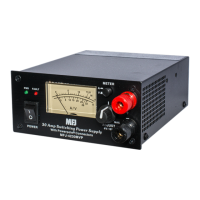
Front Panel Controls and Indicators:

  • Power Indicator: Illuminates when the unit is powered on.
  • Warning Indicator: Provides visual alerts for potential issues.
  • AC Power Switch: Toggles the main power to the unit.
  • V/A Indicate Meter: A combined meter displaying both voltage and amperage.
  • V/A Meter Knob: Likely used to select between voltage and amperage display or adjust meter sensitivity.
  • DC Voltage Adjust: A knob for fine-tuning the output DC voltage between 4V and 16V.

Rear Panel Controls and Connections:

  • 115/230V AC Switch: This switch is crucial for selecting the appropriate AC input voltage if the unit supports dual voltage operation (though the specifications mention factory-fixed voltage, this switch might be present for specific models or regional variations).
  • AC Input Socket: For connecting the mains power cable.

Operational Procedures:

  • Checking Mains Supply Voltage: Before initial use, users must verify that the voltage rating on the unit's label matches their local mains supply.
  • Connecting Power Cables: The positive (red) wire of the power cable should be connected to the positive terminal, and the negative (black) wire to the negative terminal on the back of the power supply. The power cable is then plugged into the power socket of the device to be powered.
  • Turning On/Off: The power supply is turned on by pressing the power switch to the 'ON' position. Before turning off the power supply, it is recommended to turn off the connected radio or electronic device first.

Cooling System: The MFJ-4230MVP employs a dual cooling mechanism:

  • Convection Cooling: Normal airflow around the unit helps dissipate heat.
  • Forced Air Cooling: A temperature-controlled fan is always activated. Its speed increases as the internal temperature rises, providing additional cooling during higher levels of use. This intelligent cooling system helps maintain optimal operating temperatures and prolong the lifespan of the power supply.

Maintenance Features

Safety Information and Warnings: The manual emphasizes several critical safety warnings to ensure safe operation and prevent damage or injury:

  • Moisture: Do not expose the appliance to water or moisture.
  • Cleaning: Always unplug the power supply from the mains outlet before cleaning.
  • Ventilation: Ensure the power supply is placed in an area with free airflow. Do not block ventilation openings to prevent overheating.
  • Electrical Connections: The power supply must be properly connected and grounded using the provided AC power cable, adhering to local codes. Damaged power cords must be replaced with the same type.
  • Servicing: Servicing should only be performed by a qualified service technician to avoid electric shock or fire.
  • High Voltage Levels: Users are warned that some internal components operate at potentially lethal voltage levels.
  • Installation: The power supply is designed for indoor use only and should not be operated outdoors or in wet environments. It should be placed in a well-ventilated and cool area.

Warranty Information: The MFJ-4230MVP comes with a 12-month limited warranty from MFJ Enterprises, Inc., covering defects in material and workmanship. Key aspects of the warranty include:

  • Proof of Purchase: A dated proof-of-purchase is required for warranty claims.
  • Repair/Replacement: MFJ will repair or replace defective products at their option, provided the product is returned postage prepaid with a fee for postage and handling.
  • Replacement Parts: Replacement parts are available free of charge upon request, also requiring proof of purchase and a fee for postage and handling.
  • Technical Consultation: Technical support is available via phone for owners attempting to repair units.
  • Exclusions: The warranty does not apply to kits or products manufactured by other entities. Wired and tested PC board products are covered only if returned as a standalone board.
  • Out-of-Warranty Service: MFJ offers out-of-warranty repair services, with units shipped COD for repair charges and shipping fees.
  • Design Changes: MFJ reserves the right to make design improvements without obligation to update previously manufactured products.
  • Shipping for Service: All products requiring service (in-warranty or out-of-warranty) must be sent to MFJ Enterprises, Inc. at their specified address, accompanied by a detailed problem description and proof-of-purchase.

This comprehensive description highlights the MFJ-4230MVP's capabilities, operational guidelines, and essential safety and maintenance considerations, providing a thorough understanding of the device.

MFJ Enterprises MFJ-4230MVP Specifications

General IconGeneral
BrandMFJ Enterprises
ModelMFJ-4230MVP
CategoryPower Supply
LanguageEnglish

Related product manuals