________________________________________________________________
MFJ-204B Antenna Bridge Instruction and Technical Manual
- 5 -
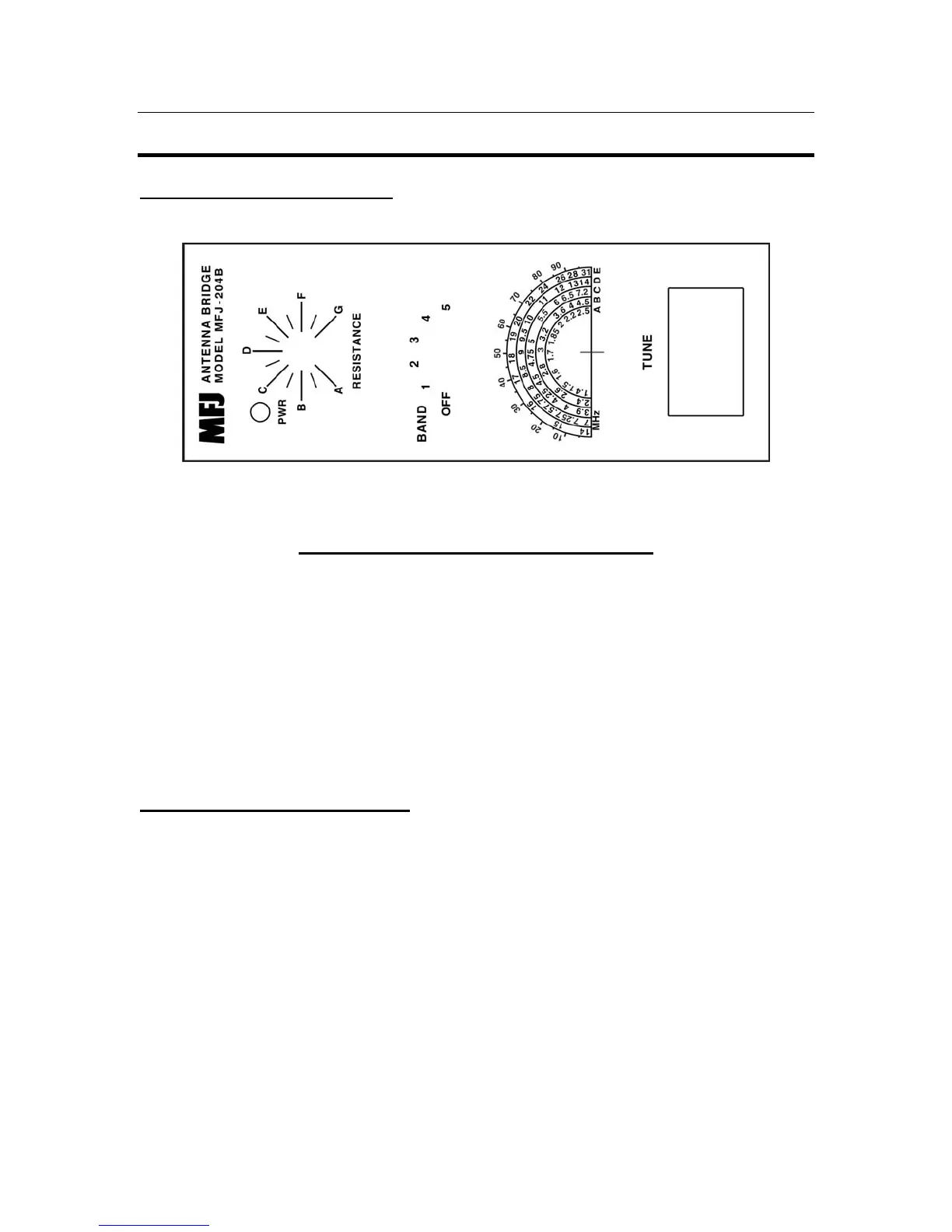
SYSTEM CONTROLS AND INDICATORS
Front Panel Jacks and Controls
1 2 3 4 5
FIGURE 1: Front Panel Jacks and Controls
1. Power On LED: Instantly know if the MFJ-204B is on or off with this bright LED.
2. Resistance Scale: This is where you read the resistance of your antenna using the
calibration chart for your unit.
3. Band Select Switch: This 6 position switch turn the power on and selects any one of
five over lapping bands.
4. Tune Control: This variable capacitor instantly sweeps across the desired band to
find that SWR fast and easy.
5. Null Meter: Instantly determine the null point of the RF Bridge.
Frequency Coverage of the Bands
NOTE: The frequency coverage may vary slightly from this chart and the label on the
cover of the unit and is for reference only. A frequency counter can be connected to the
Freq. Out connector shown in Figure 2 to get a more accurate reading of the frequency.
As an alternative to a frequency counter you can Zero Beat the output with an HF
receiver. See Appendix A.
BAND A: 1.40 - 2.50 Mhz
BAND B: 2.40 - 4.50 Mhz
BAND C: 3.90 - 7.20 Mhz
BAND D: 7.00 - 14.00 Mhz
BAND E: 14.00 - 31.00 Mhz


 To Next Page