

EasyManua.ls Logo

MG Mini lite - User Manual

MG Mini lite
8 pages
Print Icon
To Next Page IconTo Next Page
Loading...
Portable protection everywhere you go
Powered by 4G LTE
Question and Answer IconNeed help?

Do you have a question about the MG Mini lite and is the answer not in the manual?

Summary

Meet Your Device

Device Components Overview

Identifies key physical parts of the device including buttons, lights, speaker, microphone, and charging pins.

Indicator Light Behavior

Red Battery Light

Explains the behavior of the red light during charging and low battery states.

Blue Call Light

Details the solid and flashing patterns of the blue light during calls and charging.

Charging Your Device

Charging Procedure

Step-by-step instructions for plugging in the cradle and placing the device for charging.

Device Operation and Care

Making a Help Call

Instructions on how to press and hold the help button to initiate a call.

Cleaning the Device

Guidance on weekly cleaning using a soft cloth to ensure proper charging contacts.

Important Information

Coverage Requirements

Highlights the need for adequate cellular coverage for proper device functionality.

Water Resistance

Specifies the device is IP67 water-resistant, not submersible, and should be towel-dried.

Pacemaker Precautions

Advises individuals with pacemakers to consult physicians regarding device interactions.

Customer Service and Support

Contact Information

Provides phone number, operating hours, and website for customer support.

Summary

Meet Your Device

Device Components Overview

Identifies key physical parts of the device including buttons, lights, speaker, microphone, and charging pins.

Indicator Light Behavior

Red Battery Light

Explains the behavior of the red light during charging and low battery states.

Blue Call Light

Details the solid and flashing patterns of the blue light during calls and charging.

Charging Your Device

Charging Procedure

Step-by-step instructions for plugging in the cradle and placing the device for charging.

Device Operation and Care

Making a Help Call

Instructions on how to press and hold the help button to initiate a call.

Cleaning the Device

Guidance on weekly cleaning using a soft cloth to ensure proper charging contacts.

Important Information

Coverage Requirements

Highlights the need for adequate cellular coverage for proper device functionality.

Water Resistance

Specifies the device is IP67 water-resistant, not submersible, and should be towel-dried.

Pacemaker Precautions

Advises individuals with pacemakers to consult physicians regarding device interactions.

Customer Service and Support

Contact Information

Provides phone number, operating hours, and website for customer support.

Overview

The MGMini Lite is a portable personal safety device offering protection powered by 4G LTE. This device is designed for individuals who need a reliable way to call for help in emergencies, with features that make it easy to use and maintain.

Device Components:

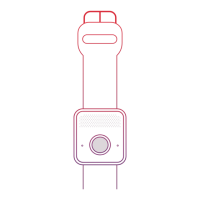
The MGMini Lite features several key components for its operation:

  • Help button (1): This is the primary button for initiating calls for help. It is located on the front of the device.
  • Blue call light / red battery light (2): This light, located around the help button, indicates the device's status, including call activity and battery level.
  • Speaker (3): Positioned on the top of the device, the speaker allows for two-way communication during calls.
  • Microphone (4): Located on the front, near the help button, the microphone captures the user's voice during calls.
  • Charging pins (5): These gold pins are located on the back of the device and connect to the charging cradle.

Light Indicators:

Red battery light around help button:

  • Charging: While the device is charging, the red battery light will flash every 5 seconds until the device is fully charged.
  • Fully charged: Once fully charged, the red battery light will remain solid.
  • Low battery: If the battery is low and the device is off the charging cradle, the red battery light will slowly flash.

Blue call light around help button:

  • Emergency call: During an emergency call, the blue light will be solid.
  • Charging: The blue light will also flash every 5 seconds while the device is charging.
  • Support needed: If the blue light flashes every 1 second, or if it double flashes, users should contact Customer Care for support.

Charging the Device:

It is crucial to charge the MGMini Lite before its first use to ensure proper functionality. The device should be charged daily. Typical charge time is 2-3 hours, though battery life may vary based on location and activity.

Charging process:

  1. Plug the charging cradle into an electrical outlet. A red light on the cradle will turn on, indicating it's ready.
  2. Locate the gold charging pins on the back of the device. Align these pins with the gold pins on the charging cradle.
  3. Place the device onto the cradle. Wait for an audible "Charging" message to confirm that the device is correctly placed and charging.

Important charging note: Ensure the electric outlet used for charging is in a convenient location for access and is not controlled by a light switch. This helps ensure consistent charging without interruption.

How to Call for Help or Test Your Device:

  1. Initiate call: Press and hold the help button for 3 seconds. Continue holding until the blue light around the help button appears, then release the button.
  2. Confirmation: You will hear a voice prompt, followed by tones or ringing, indicating the call is being placed.
  3. Monitoring Center: The Monitoring Center will answer the call. Clearly state whether you need help or are simply testing the device.

Connectivity issues: If the device does not connect properly, contact Customer Care immediately for assistance.

Cleaning Your Device:

Regular cleaning is recommended to ensure proper charging and device longevity.

  • Weekly cleaning: Clean your device weekly.
  • Method: Use a soft cloth, such as an eyeglass cleaning cloth, to gently rub the gold contacts on both the device and the charging cradle. This helps remove dirt, oil, and debris that can interfere with charging.
  • Stubborn debris: For more stubborn debris, you can spray household cleaner onto the cleaning cloth. Do not spray cleaner directly onto the device or cradle.

Important Information:

Coverage:

The MGMini Lite requires adequate cellular coverage to function correctly. It is essential to test the device in your area to confirm it works. If you experience any coverage issues, contact Customer Care immediately for support.

Charging:

To ensure continuous protection, wear your MGMini Lite at all times and charge it daily.

Water-resistant:

The device is IP67 water-resistant, meaning it can withstand immersion in water up to 1 meter for up to 30 minutes. However, it should not be submerged for extended periods. After exposure to water, the device should be towel-dried.

Pacemakers:

Individuals with pacemakers should exercise caution. It is recommended to consult their physicians and review relevant materials regarding interactions between cell phones and pacemakers. Users should follow the same precautions recommended for cell phones when using this device.

Customer Service:

For questions or additional assistance, customers can:
  • Scan the provided QR Code with their phone camera.
  • Visit medicalguardian.com/support/.
  • Contact the Customer Care team at 1 (800) 313-1191.
    • Operating hours: Monday-Friday, 9 AM-8 PM EST, and Saturday, 9 AM-5 PM EST.

MG Mini lite Specifications

General IconGeneral
BrandMG
ModelMini lite
CategoryWatch
LanguageEnglish