MGI Zip X3 User Manual 1312
6.0 Front Wheel
Unlocking & Locking the Front Wheel
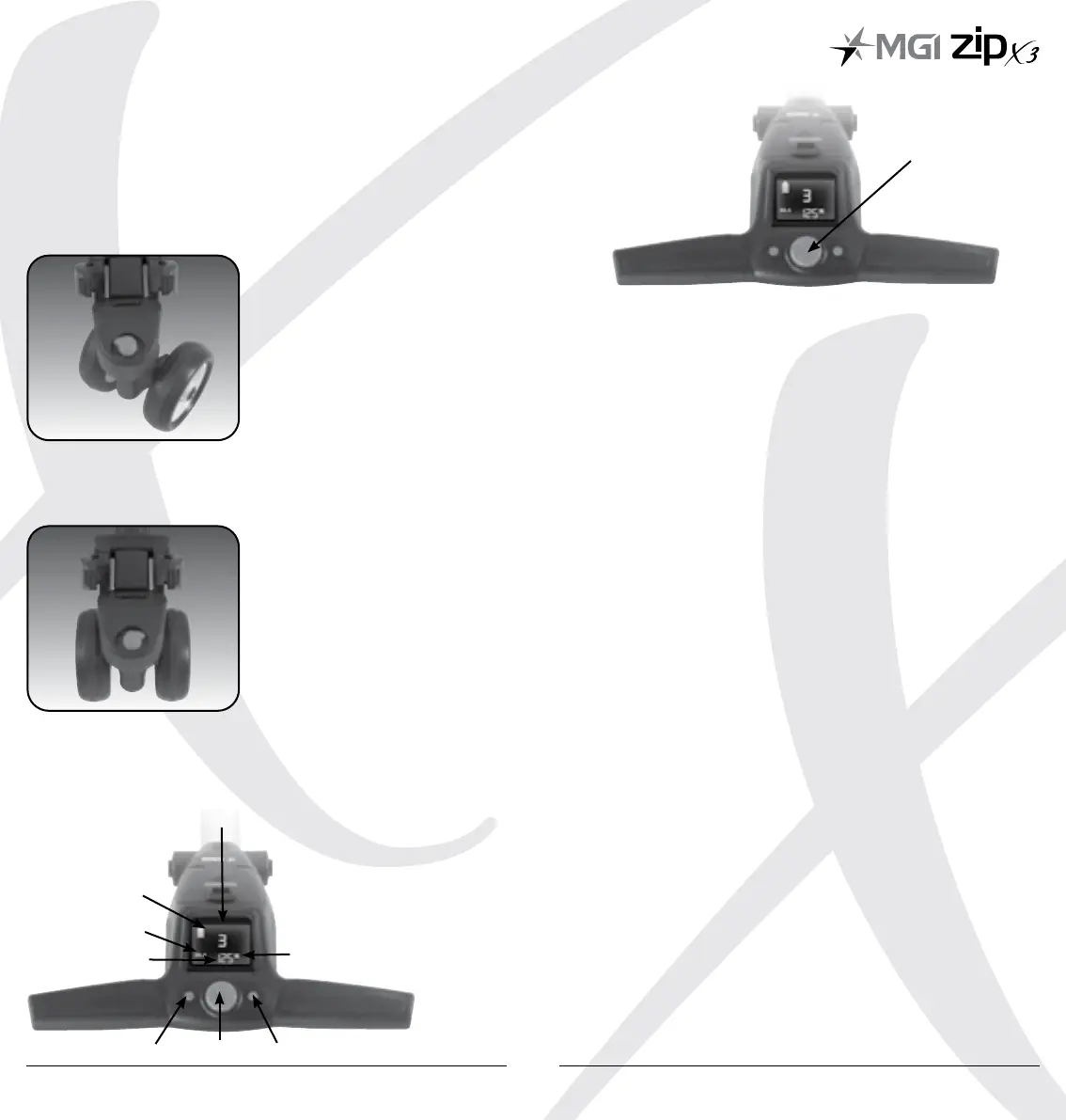
The front swivel wheel can be set in two positions.
1) Unlocked position to allow for 360˚ swivel for optimum turning
ability. Move the knob, on top of the front wheel assembly, to the
left hand side.
2) Locked position is best when using the Controlled Distance
function. Move the knob, on top of the front wheel assembly,
to the right hand side.
7.0 Operating the Digital Top Box
7.1 Top Box Display
7.2 Start / Stop the Zip X3
Zip X3 Speed Control
Please note the following points regarding the Zip X3 Speed
Control.
1. To select the desired speed, rotate the speed control button.
Turning the speed control button clockwise will increase the
speed, whilst anti-clockwise will decrease speed.
2. The speed setting chosen is displayed in the centre of the
coloured screen.
Please note you will feel notches as you rotate the speed control. The notches do not
indicate a change in speed. The speed will only increase or decrease as the number
changes in the display.
3. To start the Zip X3 at this desired speed, tap the top
of the speed control button.
4. Another tap will stop the Zip X3.
5. The desired speed can be altered up or down while
the Zip X3 is moving.
7.3 Turn the Zip X3 Off
Zip X3 Battery
Please note the following points regarding the Zip X3 Battery.
Connecting the Battery onto the Zip X3
1 Position the battery on the Zip X3 and push the battery
down to secure it. Push the battery handle down to connect
the battery to the Zip X3.
2. To turn the Zip X3 Top Box Display off:
Hold down the Start/Stop Speed Control Button and Left
Hand Distance Mode Button for four seconds and the display
will turn off thereby disabling the Top Box.
Please note that the battery will still be connected to the Zip X3 and will continue
to drain whilst connected.
3. Please note that the Zip X3 display will also turn off if the
Speed Control is not operated for 30 minutes.
Once again, please note that the battery will still be connected
to the Zip X3 and will continue to drain whilst connected.
4. To reactivate the Top Box Display, whilst the battery is
connected, hold down the Start/Stop Speed Control Button
and Left Hand Distance Mode Button for four seconds and
the display will turn on thereby enabling the Top Box.
Speed Control
1. Distance Mode Button
2. Unit Setting Button
3. ON / OFF Speed Control
Button
4. Speed Setting Indicator
5. Battery Level Indicator
6. Distance Mode
7. Distance
8. Unit Measurement
1. 3. 2.
8.
7.
6.
5.
4.


 To Next Page