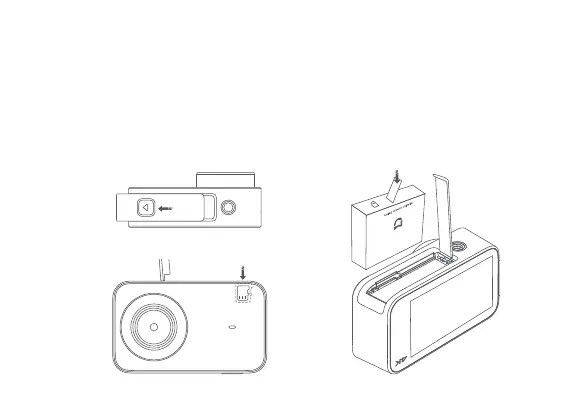
a. Remove the baery cover (as shown in the figure), align the baery pins with the direction
of the lens, and insert the baery. To remove the baery, gently pull the handle bar on the
baery.
b. Keep the label side of the MicroSD card towards the back of the camera body, and insert
the card into the card slot. To remove the MicroSD card, gently press the top edge of the
card to eject it from the slot.
3. Install and Disassemble
Do not damage the handle bar.
MicroSD Card
Press the baery cover lock buon and
push the baery cover outwards.


 To Next Page