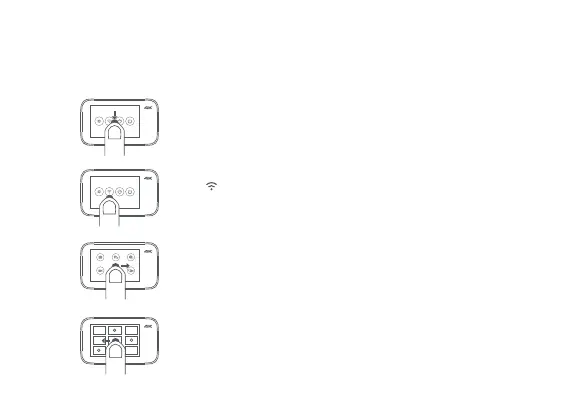
d. Operating screen
The preview page is displayed aer the camera is powered on (in screen lock mode, you
can double-tap the screen or press the function buon to wake up the camera).
Camera setup
On the preview page, slide down to enter setup page. Slide the
screen in the reverse direction or press the function buon to
return to the preview page.
Media library
On the preview page, slide leward to enter media library preview
page. Slide the screen in the reverse direction or press the function
buon to return to the preview page.
Note: A MicroSD card needs to be installed.
Mode selection
On the preview page, slide rightward to enter mode selection page.
Slide the screen in the reverse direction or press the function buon
to return to the preview page.
photo
Time Lapse
Burst Photos
延时摄像
Slow Motion
Video
Wi-Fi setup / Bluetooth device connection
Tap to enable or disable the Wi-Fi function.
Select the bluetooth device in the setup page, and connect according
to the prompt


 To Next Page