Need help?
Do you have a question about the Mi Note 10 and is the answer not in the manual?
Guidelines for safe disposal of the product according to WEEE regulations to protect the environment and human health.
Cautions regarding battery risks, laser classification, hearing protection, and operating temperature.
Essential safety guidelines for device usage, including accessory compatibility and battery handling.
Specific precautions for using the phone in hazardous environments, hospitals, and during thunderstorms.
Statement on software updates and potential risks associated with unauthorized modifications or update methods.
Details on EU directives, RED conformity, and the declaration of compliance for the device.
Information regarding Specific Absorption Rate (SAR) limits and compliance for the device.
General legal notes regarding device operation and regulatory compliance.
Notes on FCC compliance modifications and accessing the electronic certification label on the device.
Disclaimers regarding user guide accuracy and details about the device manufacturer and model.
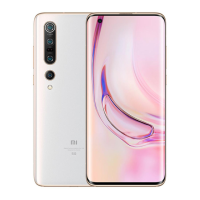
This document serves as the User Guide for the Mi Note 10, a mobile device designed for a wide range of functionalities and user-friendly interactions. The guide provides essential information for operating, maintaining, and understanding the safety aspects of the device.
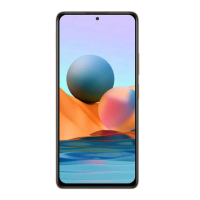
The Mi Note 10 is a smartphone featuring a sleek design with a display that shows the time and date, as indicated by "02 48" and "SAT. 16 AUG." on the screen illustration. On the right side of the device, there are physical buttons for volume control and power. At the bottom, a USB Type-C Port is provided for charging and data transfer.
The Mi Note 10 operates on MIUI, a customized Android-based operating system developed by Xiaomi. MIUI is designed to offer frequent updates and user-friendly features, drawing on suggestions from a large global user base. This ensures a continually evolving and optimized user experience.
The device supports dual nano-SIM cards, allowing users to manage two different mobile network connections simultaneously. This dual SIM capability is flexible, enabling either card to be set as the primary one, depending on the user's preference or network requirements. The device also supports Dual 4G SIM functionality, though its availability may vary by telecom operator and region. VoLTE (Voice over LTE) is supported, enhancing call quality and network performance, subject to regional telecom operator support. The system is designed to receive automatic updates to ensure optimal network performance and to keep the device's software current.
Connectivity features include Bluetooth and Wi-Fi, facilitating wireless communication with other devices and access to internet networks. The device also incorporates NFC (Near Field Communication) for short-range wireless interactions, such as mobile payments or quick data sharing.
To begin using the Mi Note 10, users are instructed to long-press the power button to turn on the device. Once powered on, the device will guide the user through on-screen instructions for initial configuration. This setup process is designed to be intuitive, allowing users to personalize their device settings from the outset.
The physical volume buttons allow for easy adjustment of audio levels, while the power button serves multiple functions, including turning the device on/off and potentially locking/unlocking the screen. The USB Type-C port provides a versatile connection point for charging the device and transferring data to and from other compatible devices.
The dual SIM functionality offers convenience for users who need to separate personal and work contacts, travel frequently, or take advantage of different network plans. The ability to set either SIM as primary provides flexibility in managing calls, messages, and data usage.
Proper maintenance of the Mi Note 10 involves adhering to several guidelines to ensure its longevity and safe operation. The device is designed to operate within a specific temperature range of 0°C to 40°C. Using the device outside this range may cause damage.
For charging, it is crucial to use only the included or authorized cable and power adapter. Using unauthorized accessories can lead to risks such as fire, electric shock, or damage to the device and adapter. Once charging is complete, the adapter should be disconnected from both the device and the power outlet, and the device should not be charged for more than 12 hours.
The device's battery is built-in, and users are advised not to attempt to replace it themselves to avoid damage. Any battery replacement or repair should be performed by an authorized repair center. The battery must be recycled or disposed of separately from household waste, following local regulations, as mishandling can cause fire or explosion. Users are cautioned against disassembling, hitting, crushing, or burning the battery. If the battery appears deformed or damaged, its use should be immediately discontinued. Short-circuiting the battery or placing it in a high-temperature environment should also be avoided to prevent overheating, burns, or other injuries.
Software updates are an important aspect of device maintenance. Users are encouraged to update the phone's operating system using the built-in software update feature or by visiting authorized service outlets. Updating software through unauthorized means may lead to device damage, data loss, security issues, or other risks.
The device should be kept dry, and users should avoid attempting to repair it themselves. If any part of the device malfunctions, contacting Mi customer support or bringing it to an authorized repair center is recommended. When connecting other devices, users should follow their respective instruction manuals and avoid connecting incompatible devices to the Mi Note 10. For AC/DC adapters, it is important that the socket-outlet is installed near the equipment and is easily accessible.
Environmental responsibility is also emphasized, with instructions for the safe disposal of the product. The WEEE (Waste Electrical and Electronic Equipment) marking indicates that the product should not be discarded with household waste in the EU. Instead, it should be recycled responsibly through return and collection systems or by contacting the retailer where it was purchased, to prevent harm to the environment and promote sustainable reuse of materials.
Safety precautions extend to various usage scenarios. Users must observe all applicable laws and rules restricting mobile phone use in specific situations and environments, such as petrol stations, explosive atmospheres, hospitals, and aircraft. Maintaining a minimum distance from medical devices like pacemakers and avoiding use near hearing aids or cochlear implants is advised to prevent interference. When driving, users should comply with traffic laws, and during thunderstorms, outdoor use should be avoided to prevent lightning strikes. The device should not be used to make calls while charging, nor in high-humidity environments like bathrooms, to prevent electric shock, injury, fire, and charger damage.
The Mi Note 10 is designed with Corning® Gorilla® Glass 5, providing enhanced durability for the display. This feature contributes to the device's overall robustness and resistance to everyday wear and tear.
 General
| Display | 6.47 inches, AMOLED, 1080 x 2340 pixels |
|---|---|
| Processor | Qualcomm Snapdragon 730G |
| RAM | 6 GB |
| Storage | 128 GB |
| Rear Camera | 108 MP (wide) + 12 MP (telephoto) + 5 MP (telephoto) + 20 MP (ultrawide) + 2 MP (macro) |
| Front Camera | 32 MP |
| Battery | 5260 mAh |
| Operating System | Android 9.0 (Pie), upgradable to Android 11, MIUI 12.5 |
| Weight | 208 g (7.34 oz) |
| Dimensions | 157.8 x 74.2 x 9.7 mm (6.21 x 2.92 x 0.38 in) |
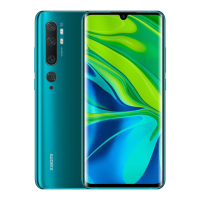
| Colors | Aurora Green, Glacier White, Midnight Black |

 To Next Page