Chapter 1 Introduction
Hardware Overview
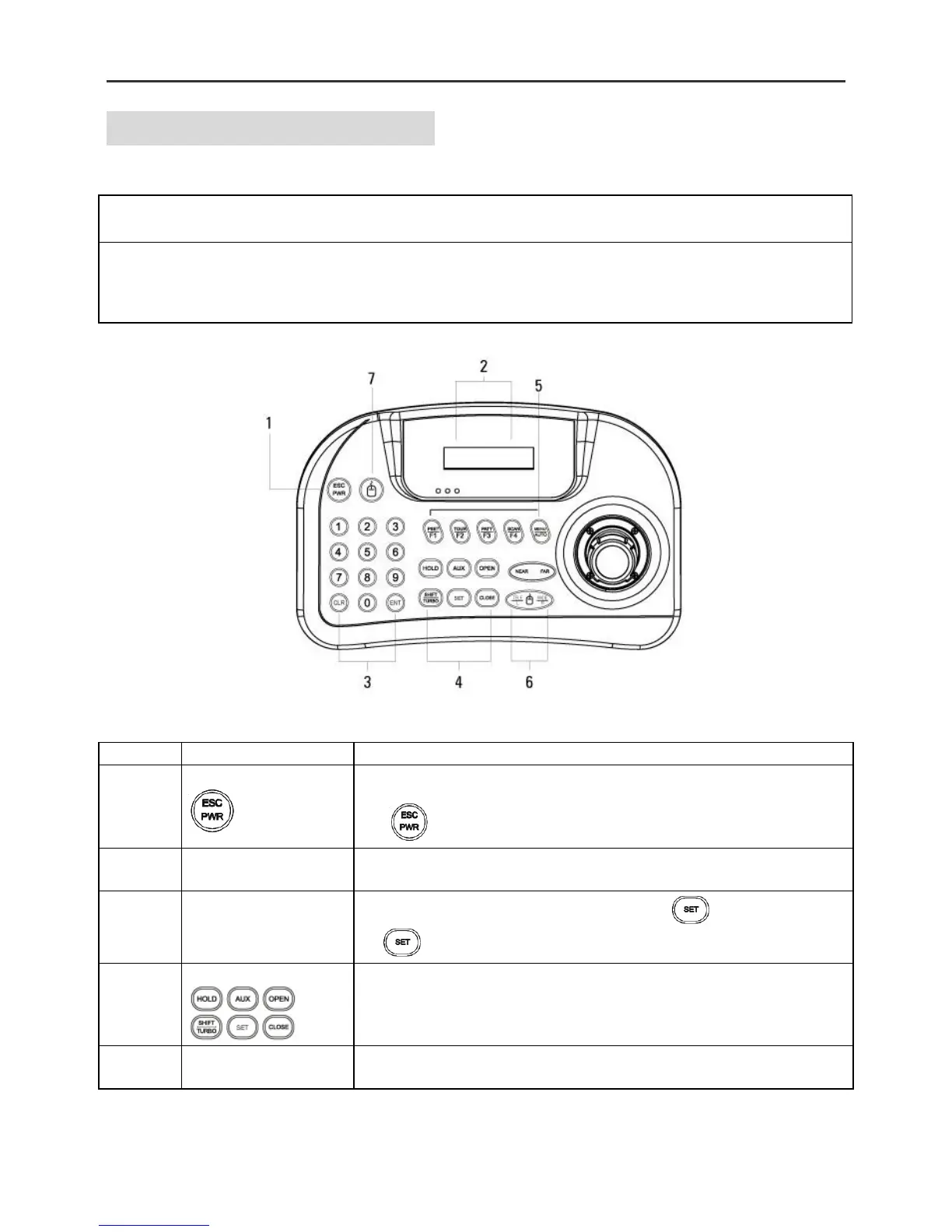
This remote keyboard contains easy to use control keys on the front and
simple input and output connectors on the back.
Control Buttons &
connection
This unit provides the primary operator interface. Most operations are one
or tow button presses. The following Table contains a description for each
buttons on the keyboard and ort of cable connection. Use Figure 1 and
Figure 2 as a reference
Pressing the ESC/POWER button enters the power on/off or escape key.
Right description led on(red). Pressing it again exits the Power off. (Push
the button 2-3 seconds) and then Power off)
LCD Display
16 x 2 Graphic display
Display Camera ID, Protocol, function status, general status, etc
Camera ID setting value change, PTZ setup (1+ ) , Main Setup
(2+ )
Hold : System locking (Unlocking : Input the password 4 digit ****)
SHIFT/TURBO : SHIFT – Key for special function (Customize)/ TURBO-
High Speed



 To Next Page