LINKGATE EncRadio SF & DecRadio SF
User Manual
Doc: ENC_SF_R_200_000
Version: 2.0
Page 9 of 12
8. Changing Linkgate EncRadio SF
settings
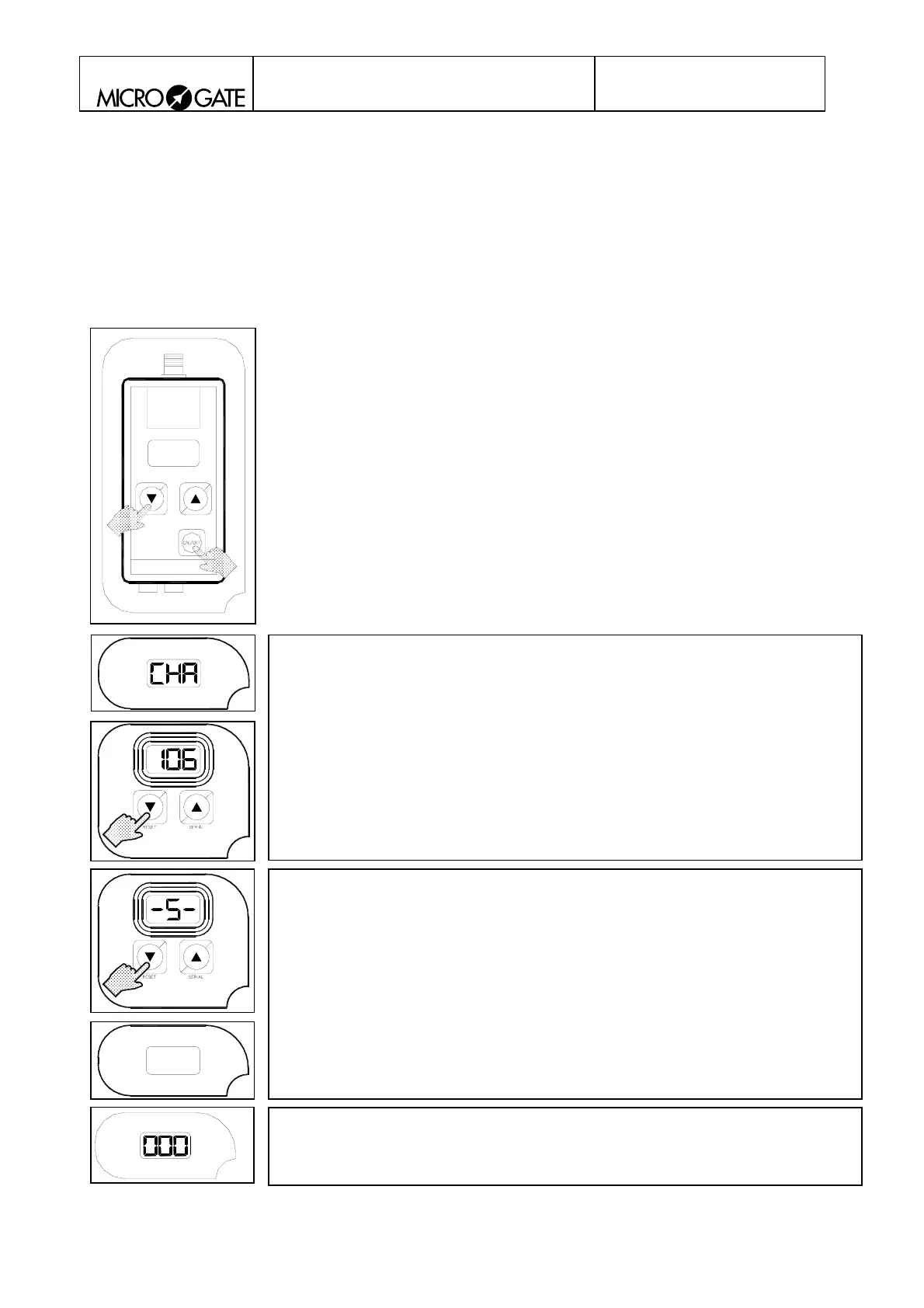
Changes in settings can be made by keeping an arrow key pressed down while switching on the
device with the ON/OFF key.
2
3
5
4
1
Changing transmission channel:
The user can change the transmission channel with the two arrow keys
when the current setting is displayed (blinking).
The possible settings are:
< 000 > - < 127 > = From channel 0 to channel 127
The system passes automatically to the next setting after 4 seconds o
inactivity.
Changing data transmission redundancy:
The user can change data transmission redundancy with the two arrow
keys when the current setting is displayed (blinking).
The possible settings are:
< -L- > = Long transmission of about 4 seconds
< -S- > = Short transmission of about 0.6 seconds
The system passes automatically to the next setting after 4 seconds o
inactivity.
Long < BEEP >
Bib number 0 is displayed
Settings modification is terminated and the system is ready for use.
6


 To Next Page