EasyManua.ls Logo

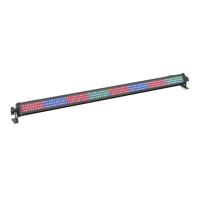
Microh LEDBAR RGB - User Manual

Microh LEDBAR RGB
2 pages
Print Icon
To Next Page IconTo Next Page
Loading...
LEDBAR
Operating Manual
Thank you for purchasing the LEDBAR RGB colour mixing LED Par. This unit has great output and has been
designed for use in Nights Clubs, Stage Lighting and Up Lighting and much more. This unit is controlled via
DMX 512 allowing the user to control it with other existing DMX lights.
Connection
This unit is connected using standard XLR 3 pin cable. To connect the signal cable(XLR), plug one side into
“ IN” socket in the back of light and other side into “ OUT” signal connector in the DMX512 board, (signal input:
1=>Ground, 2=>data-, 3=>data+ ). Power supply for this unit is 120V – 220V switch able. This unit requires
50W (.42amp) power which allows the user to connect up to 30 units on one 15amp circuit.
Function
This unit has several operation modes, Stand Alone, Master Slave and DMX.
Stand Alone Mode: 7 colour change/7 colour strobe/7 colour Automatic changing /7 colour automatic fade in
and fade out / sound colour changing.
Master Slave Mode – All units will perform the same function. One unit is set as the master and others are
set as the slave and will perform all the functions of the master unit giving the units a pre programmed look.
The units must be connected to each other via XLR cables.
DMX 512 Mode: In this mode each unit will be set to a DMX value and controlled by using a DMX controller.
Note
This unit has been designed for Indoor use. Operating temperature: -20—45, humidity0%-90
Function
Stand AloneDip switch as below means “on” status。◎ means “OFF”status
function
1 2 3 4 5 6 7 8 9 10
1 red
2 green
3 blue
Question and Answer IconNeed help?

Do you have a question about the Microh LEDBAR RGB and is the answer not in the manual?

Summary

LEDBAR Connection Guide

Connection Setup

Details on connecting the LEDBAR using XLR 3 pin cable and power requirements.

LEDBAR Operational Modes

Stand Alone Mode

Describes 7 colour change, strobe, automatic fade, and sound-activated modes.

Master Slave Mode

Explains how units sync functions, with one master and multiple slaves via XLR.

DMX 512 Mode

Details controlling units with a DMX controller by setting individual DMX values.

Dip Switch Configuration

Stand Alone Dip Switch Settings

Configuration for Stand Alone mode using dip switches for various functions and speeds.

Master;Slave Dip Switch Settings

Instructions for setting up Master and Slave units using specific dip switch combinations.

DMX 512 Dip Switch Settings

Guide to configuring DMX 512 mode by setting dip switches for address selection.

DMX Channel Assignment and Specifications

DMX Channel Functions

Details on DMX channel functions for dimmer, strobe, color effects, and chase sequences.

Technical Specifications

Provides key technical details including power, LED count, size, and weight.

Microh LEDBAR RGB Specifications

General IconGeneral
TypeLED Bar
ColorRGB
VoltageAC 100-240V
Frequency50/60Hz
LED TypeSMD 5050
Operating ModesDMX, Auto, Sound Active, Master/Slave
IP RatingIP20
ControlSound Active

Related product manuals