5
5. DMX-512 CONTROL CONNECTIONS
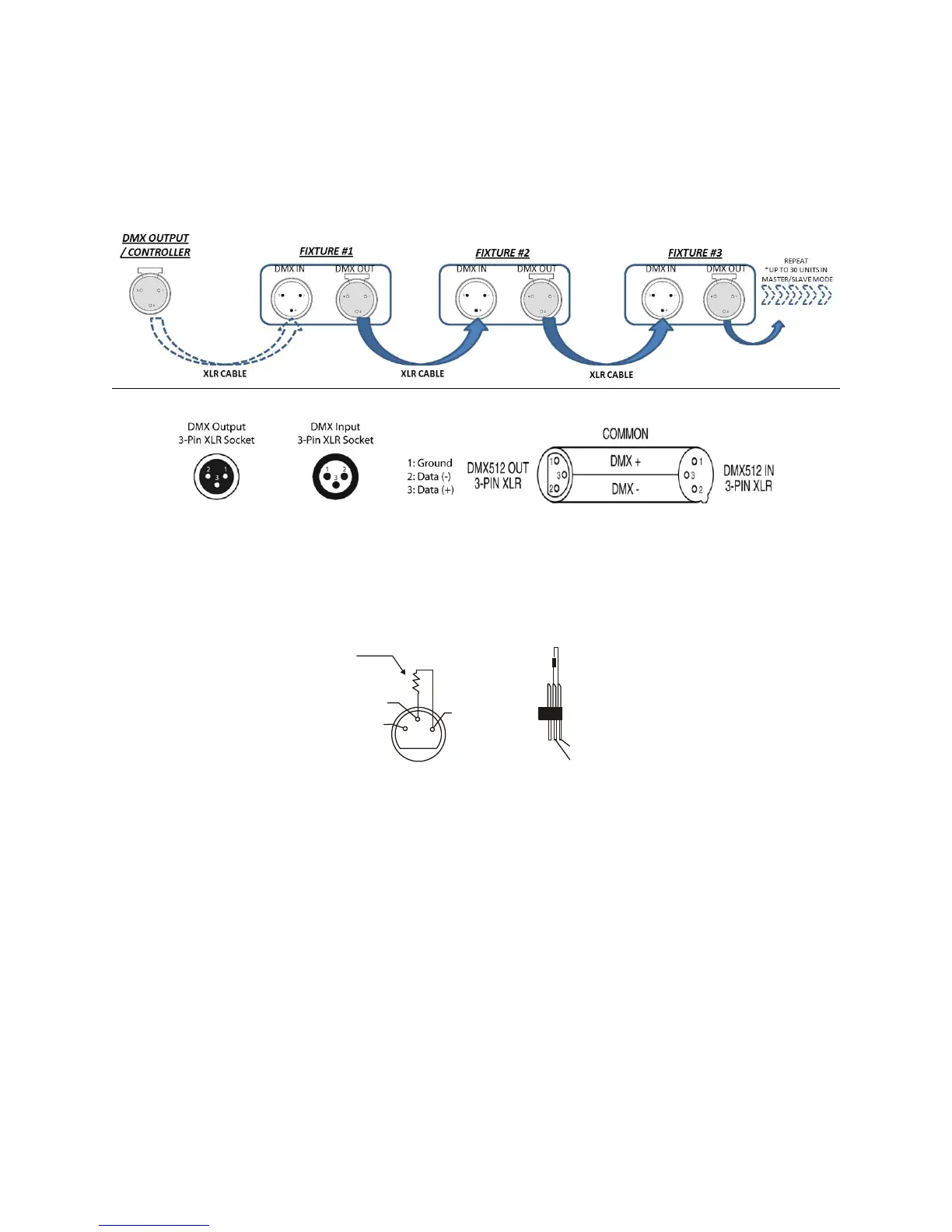
This fixture complies with international USITT DMX standards and can be used with either a 3 pin or 5 pin DMX connector. Plug in
the provided 3 pin XLR cable to the female 3-pin XLR output of your controller and the other side to the male 3-pin XLR input of the
LEDPRO64RGBW. To connect the units to DMX, you must daisy chain the fixtures together as referred in the diagram below.
Always end your DMX-512 connection with a DMX terminator.
For installations where the DMX cable has to run a long distance, or is in an electrically noisy environment, it is recommended to
use a DMX terminator. This helps in preventing corruption of the digital control signal by electrical noise. The DMX terminator is
simply an XLR plug with a 120 Ω resistor connected between pins 2 and 3,which is then plugged into the output XLR socket of the
last fixture in the chain. Please see illustrations below.
1
2
3
PIN 3
PIN 2
120


 To Next Page