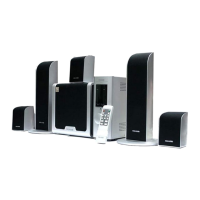
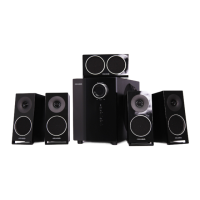
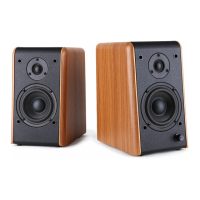
This document describes the FC361 Multimedia Speaker System, a high-fidelity audio solution designed by Microlab Technology Company Ltd. The system is engineered to deliver a rich and detailed sound experience, drawing on European musical culture and advanced acoustic design principles.
Function Description
The FC361 system features an external power amplifier, a subwoofer, and two satellite speakers. The amplifier serves as the central control unit for the audio system, providing various adjustments for sound output.
Front View of the Amplifier:
- POWER INDICATOR: This light illuminates when the system is powered on, indicating its operational status.
- BASS CONTROL: This knob allows users to adjust the bass level. Turning it anti-clockwise reduces the bass, while turning it clockwise increases it, enabling users to customize the low-frequency response to their preference.
- TREBLE CONTROL: Similar to the bass control, this knob adjusts the treble level. Anti-clockwise rotation decreases treble, and clockwise rotation increases it, allowing for fine-tuning of the high-frequency sound.
- VOLUME CONTROL: This is the main volume adjustment for the entire speaker system. Users can turn it anti-clockwise to decrease the volume and clockwise to increase it, setting the overall sound level to their desired intensity.
- PHONE JACK: A 3.5mm stereo jack is provided for connecting headphones. When headphones are plugged in, the sound output from the speakers is typically muted, and audio is routed exclusively to the headphones.
- POWER: This key acts as the main power switch for the system. Pressing it down switches the system ON, and pressing it up places the system OFF.
Back View of the Amplifier:
- INPUT 1: This is a stereo signal input jack, typically a 3.5mm stereo jack, used for connecting audio sources like sound cards, CD players, or MP3 players.
- INPUT 2: These are 2.1 channel (2 RCA) audio input jacks, designed for connecting audio sources with RCA outputs, such as VCDs or DVDs. The "L" and "R" jacks correspond to the left and right audio channels.
- AUDIO OUTPUT: These are 2.1 channel (3 RCA) audio output jacks. These jacks are used to connect the amplifier to the subwoofer and satellite speakers. The subwoofer connects to the S.W. jack, and the satellite speakers connect to the L & R audio output jacks.
- POWER CORD: This is the connection point for the main power supply.
- FUSE: A fuse is incorporated into the power input to protect the system from electrical overloads.
Usage Features
The FC361 system is designed for ease of use and high-fidelity sound reproduction.
Key Technologies and Design Principles:
- V12 Technology: The system incorporates V12 fine cone 2.5" full-range speaker units, designed by renowned Danish speaker designer Peter Larsen. These units are engineered to provide an excellent flat frequency response, setting an industrial standard for audio clarity.
- 2.1+1 System: Microlab's external power amplifier Hi-Fi 2.1 system separates the amplifier from the speaker units. This design aims to eliminate audio distortion caused by vibration, overheating, and electromagnetic interference, thereby enhancing sound quality.
- 5.25" Subwoofer: The subwoofer features a 5.25" unit with a dual Sr Magnet system. This design utilizes a costly low-Q value, long-stroke program, which contributes to quick and high-resolution low-frequency sound.
- Full Frequency Reproduction: The V12 fine cone 2.5" full-range speakers are capable of providing an ideal sound effect, creating a true 3D sound field and reproducing rich levels and details across the entire frequency spectrum.
- X-Bass Technology: Microlab's robust bass replay technology is based on a specific woofer unit design and the geometric structure of the subwoofer cabinet. This technology, informed by psychological theory, aims to reproduce an extraordinarily high-quality low-frequency response.
- Design for Music: The system's ultimate goal is to inherit and carry forward the European musical culture style. All design elements are music-oriented and sourced from music and art, allowing users to enjoy a refined musical taste.
System Connection and Setup:
- Satellite Speaker Connection: Connect the cables of the satellite speakers to the L & R audio output jacks on the back of the amplifier. Position the left channel satellite speaker on the left and the right satellite on the right for optimal stereo imaging.
- Subwoofer Connection: Connect the cable of the woofer speaker to the S.W. audio output jack on the back of the amplifier.
- Audio Source Connection (RCA): For sources like VCDs or DVDs, use an audio cable with double RCA ends. Connect one end to the output jacks of the VCD/DVD and the other end to the "L" & "R" of Input 2 on the amplifier.
- Audio Source Connection (3.5mm Stereo): For sources like sound cards, CDs, or MP3 players, use an audio cable with double 3.5mm stereo plugs. Connect one end to the audio output jacks on the sound card/CD/MP3 player and the other end to the Input 1 jacks on the amplifier.
- Power Connection: After ensuring all cables are correctly connected, plug the power cord into a suitable AC outlet. The design of the plug and outlet may vary by country.
- Headphone Usage: When headphones are connected to the PHONE JACK, the sound will be routed exclusively to the headphones.
Maintenance Features
Proper maintenance ensures the longevity and optimal performance of the FC361 system.
Safety Instructions:
- General Safety: Do not dismantle the apparatus or expose it to rain or moisture to reduce the risk of electric shock. Refer all servicing to qualified personnel.
- Read and Retain Instructions: Always read and keep the safety and operating instructions for future reference. Adhere to all warnings on the appliance and in the instructions.
- Power Source: Operate the product only from the type of power source indicated by the marking near the power cord entry. Consult a dealer or power company if unsure about your home's power supply.
- Grounding/Polarization: Ensure the plug is fully inserted into the wall outlet or extension cord receptacle to prevent blade or pin exposure. If the plug is polarized (one blade wider than the other), do not defeat this safety feature.
- Power Cord Protection: Route power-supply cords to prevent them from being walked on or pinched, paying attention to plugs, convenience receptacles, and the point where they exit the appliance.
- Overloading: Avoid overloading wall outlets, extension cords, or integral convenience receptacles, as this can lead to fire or electric shock.
- Ventilation: Place the product in a position and location that allows for proper ventilation to prevent overheating.
- Heat Sources: Keep the product away from heat sources such as radiators, heat registers, stoves, amplifiers, or any naked flame sources like lighted candles.
- Water and Moisture: Do not expose the product to rain, dripping, splashing, or excessive moisture. Avoid using it near water sources like bathtubs, sinks, or swimming pools.
- Object and Liquid Entry: Never push objects into product openings, as they may cause fire or electric shock. Do not spill any liquid on the product or place liquid-containing objects on top of it.
- Cleaning: Unplug the product from the wall outlet before cleaning. Use a dry cloth to dust the subwoofer cabinet. If using an aerosol cleaning spray, spray it onto the cloth first, not directly onto the cabinet. Avoid disturbing the drive units.
- Attachments and Accessories: Use only attachments and accessories recommended by the manufacturer to avoid hazards. If placing the product on a cart, stand, tripod, bracket, or table, ensure it is stable and follow the manufacturer's instructions for mounting.
- Moving the Appliance: Move the product and cart combination with care to prevent overturning due to quick stops, excessive force, or uneven surfaces.
- Non-use Periods: Unplug the power cord from the outlet during lightning storms or when the apparatus is left unused for a long period.
- Servicing: Do not attempt to service the product yourself. Refer all servicing to qualified service personnel.
- Replacement Parts: When replacement parts are required, ensure the service technician uses parts specified by the manufacturer or parts with the same characteristics as the original part.
- Mains Fuses: Use only fuses of the correct type and rating for continued protection against fire hazard.
- Volume Control: Avoid turning up the volume excessively when listening to low-level inputs or no audio signals, as this can damage the speaker when a peak level section is suddenly played.
- Power Disconnection: The only way to completely disconnect the product from the power supply is by removing the power cord from the wall outlet or the product. Ensure the wall outlet or power cord entry remains freely accessible at all times.
- Environmental Temperature: The highest environmental temperature suitable for this product is 40°C.
Troubleshooting Guide:
- Power LED won't light up: Check if the system is powered on and if the power plug is well connected.
- No Sound: Verify if the audio source is working, if the audio and speaker cables are well connected, and if the volume is at the right level.
- One or more satellite no sound: Check if the satellite cable is well connected.
- No Bass: Check if the Bass Volume is at the right level.
- Sound is distorted: Check if the volume is at a lower level.
- If problems persist, contact the distributor or seek professional service.

 Need help?
 General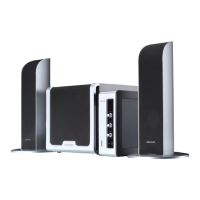

 To Next Page