Operation:
1. Turn on the AC power source and the speaker power from the rear panel power switch.
2. Activate the media player playback.
3. Adjust the volume on the media player, and speaker master volume to your preferred listening
level.
FrequentlyAskedQuestions (FAQ)
FrequentlyAsked Questions Answers
Check the media source own volume level, adjust to
about mid volume range and listen.
Adjust speaker’s own volume level to mid range and
listen
Check if the audio source is properly connected or
media player’s playback has started
Ensure volume is correctly set
Correct digital music format is used, e.g., Mp3
What are the products
supported?
Where to place this speaker
If the problem still exists, please contact the distributor or ask for professional service
Check if the volume is at lower level and the Mp3
format is recorded at above 196 bitrate
Ensure playback track is of proper and higher bit rate,
too much compression will increase noise level
Static sound heard
Low volume output
No Sound
Sound is distorted
It is magnetically shielded so can be placed
near LCD TV Monitor without any distortion
Any playback devices such as PC, Media
Players with 3.5mm stereo plug.
Operation
EN
5
EN
6
Technical Information
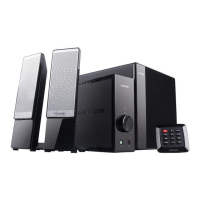
AMPLIFIER
Speakers
Interfaces
Total Power: 40 Watt RMS
Power distribution: 10 Watt x 2 + 20 Watt
Harmonic distortion: < 0.3 % 1 W 1 kHz
Frequency response: 30 Hz - 20 kHz
Signal/Noise ratio: > 75 dB
Separation: > 45 dB
Tweeter driver type: 2.5" x 2
Tweeter rated power: 10 Watt 6 ohm
Bass driver type: 5"
Bass rated power: 30 Watt 8 ohm
Output: 2RCA
Input: 3.5mm stereo jack
© 2011 Microlab Electronics Co., Ltd All rights reserved.
- The end -
Intentionally left blank
80-M300(11)-97-0001-01 2011-10-10


 To Previous Page