EasyManua.ls Logo

Micronta 22-025 - Page 3

Default Icon
8 pages
Print Icon
To Next Page IconTo Next Page
To Previous Page IconTo Previous Page
Loading...
This
Checker
can
also
be
used
for
selecting
transistors
with
the
same
characteristics
by
reading
settings
of
the
BASE
CURRENT
CONTROL
and
comparing
them.
With
two
transistors
of
the
same
type,
the
one
having
the
higher
BASE
CURRENT
CON-
TROL
reading
has
the
higher
gain.
Also
the
brightness
of
LED
Indicator
shows
the
magnitude
of
the
output
signal,
and
can
be
adjusted
with
the
BASE
CURRENT
CONTROL
knob.
You
can
also
check
transistors
with
little
collector
current
by
connecting
an
AC
Voltmeter
or
Oscilloscope
to
the
OUTPUT
Terminals.
The
OUTPUT
Terminals
can
be
used
for
the
following
purposes:
1.
As
output
terminals
for
amplified
signals.
2.
For
graphic
representation
of
waveforms
(when
connected
to
an
Oscilloscope).
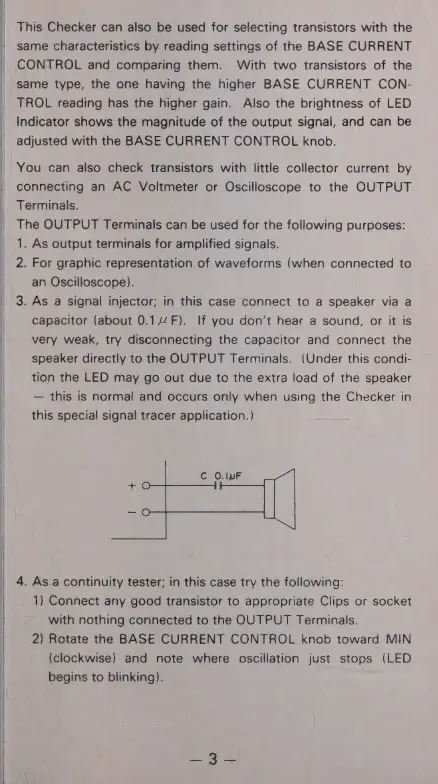
3.
As
a
signal
injector;
in
this
case
connect
to
a
speaker
via
a
capacitor
(about
0.14
F).
If
you
don’t
hear
a
sound,
or
it
is
very
weak,
try
disconnecting
the
capacitor
and
connect
the
speaker
directly
to
the
OUTPUT
Terminals.
(Under
this
condi-
tion
the
LED
may
go
out
due
to
the
extra
load
of
the
speaker
this
is
normal
and
occurs
only
when
using
the
Checker
in
this
special
signal
tracer
application.)
С
O.luF
4.
As
a
continuity
tester;
in
this
case
try
the
following:
1)
Connect
any
good
transistor
to
appropriate
Clips
or
socket
with
nothing
connected
to
the
OUTPUT
Terminals.
2)
Rotate
the
BASE
CURRENT
CONTROL
knob
toward
MIN
(clockwise)
and
note
where
oscillation
just
stops
(LED
begins
to
blinking).