EasyManua.ls Logo

Micronta 22-185A - Check Before Operation

Default Icon
44 pages
Print Icon
To Next Page IconTo Next Page
To Previous Page IconTo Previous Page
Loading...
CHECK
BEFORE
OPERATION
1
OFF
ON
CONTINUITY.
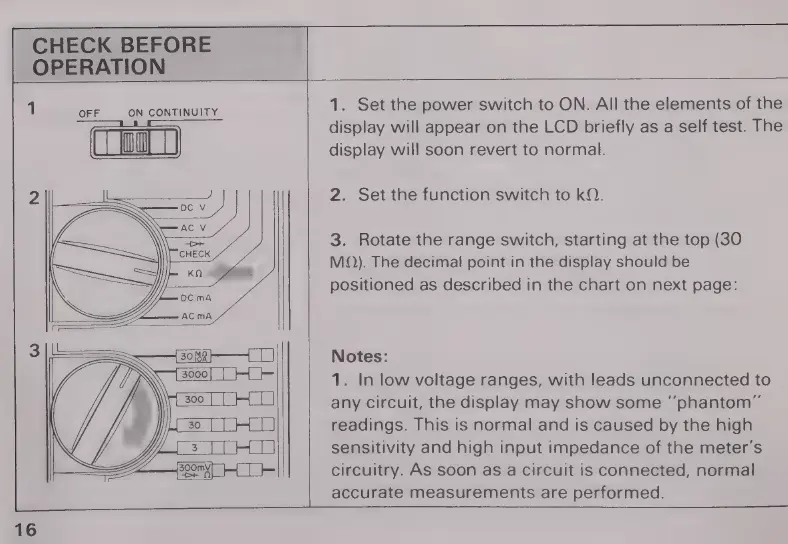
1.
Set
the
power
switch
to
ON.
All
the
elements
of
the
display
will
appear
on the
LCD
briefly
as
a
self
test.
The
||
[0]
|
display
will
soon
revert
to
normal.
|
2.
Set
the
function
switch
to
kQ.
3.
Rotate
the
range
switch,
starting
at
the
top
(30
MQ).
The
decimal
point
in
the
display
should
be
positioned
as
described
in
the
chart
on
next
page:
Notes:
1.
In
low
voltage
ranges,
with
leads
unconnected
to
any
circuit,
the
display
may
show
some
“phantom”
readings.
This
is
normal
and
is
caused
by
the
high
sensitivity
and
high
input
impedance
of
the
meter's
circuitry.
As
soon
as
a
circuit
is
connected,
normal
accurate
measurements
are
performed.
16

Related product manuals