The “original” DC-3 is fitted with
basic navigation equipment in the
shape of the Radio suite which pro-
vides Nav1 and Nav2 frequencies, a
Comms Radio with Com1 and Com2
and an ADF. These when coupled to the
RMI (VOR) and GSI (glideslope indica-
tor) gauges on the main panel, provide
for basic IFR navigation. The RADIO
COMPASS is your ADF indicator.
However, if you are more com-
fortable with modern avionics when
flying in the simulator, there is an
option to use the GNS530 and 430
suite, together with a modern
Autopilot. A knob at the base of the
main instrument panel, immediately
below the Manifold Pressure Gauge,
toggles between the Sperry Gyro-Pilot
and the GNS Suite.
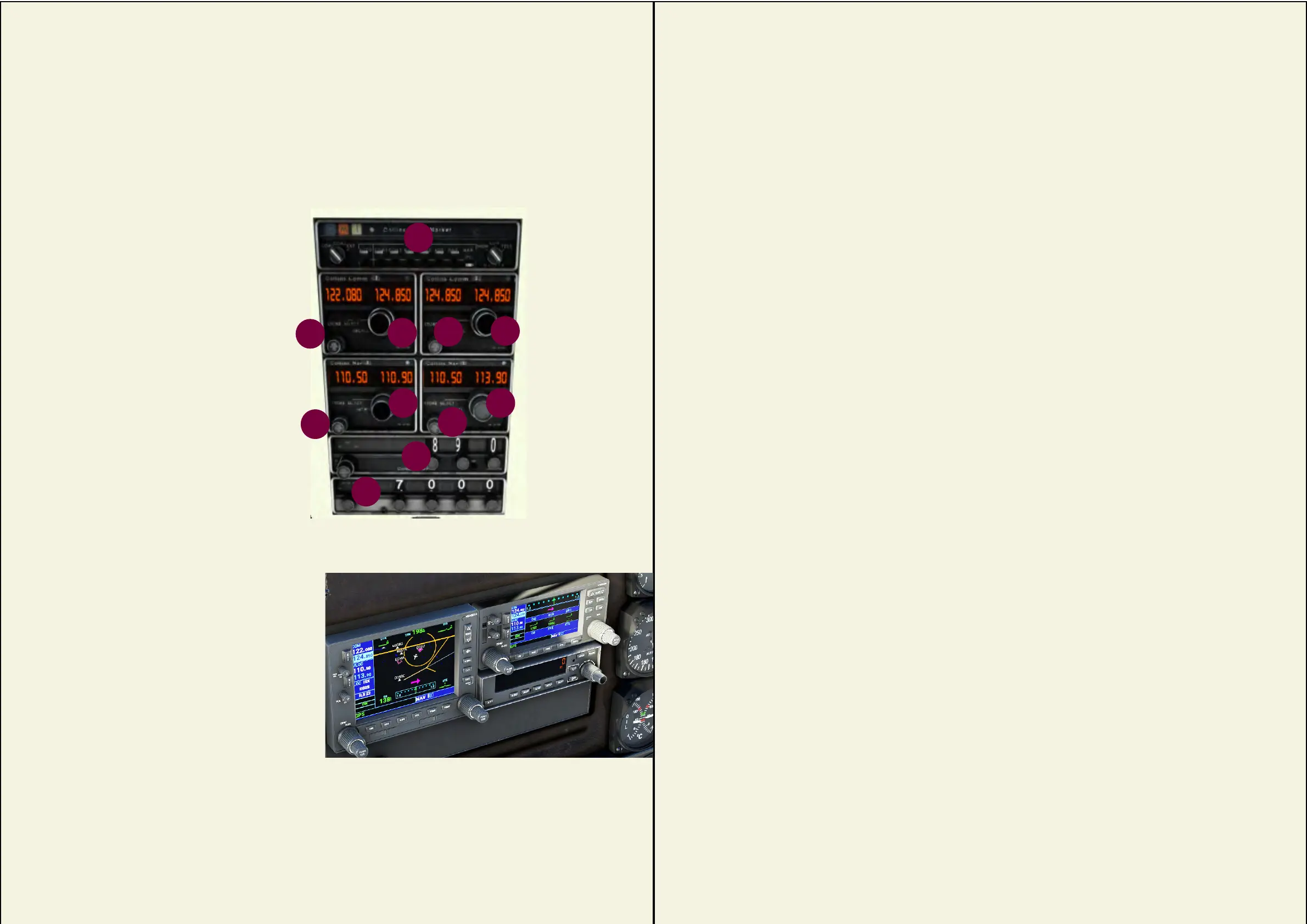
YourDC-3isttedwithradiosetsfor
communications with the ground and for
navigationwhenusedinconjunctionwiththe
navigation instruments.
There are two Comms radios (Com1 &
Com2), two Nav radios (Nav1 & Nav2) an ADF
receiverandnally,aTransponder.
Immediately above the radio suite is an
AUDIO unit for audio signal and marker signal-
control.
The suite is mounted centrally, in the roof panel.
1. Comms1 ON/OFF and
Standby-Active switch
2. Comms1 Standby
Frequency (broad and fine)
3. Comms2 ON/OFF and
Standby-Active switch
4. Comms2 Standby
Frequency (coarse and fine)
5. Nav1 ON/OFF and
Standby-Active switch
6. Nav1 Standby
Frequency (broad and fine)
7. Nav2 ON/OFF and
Standby-Active switch
8. Nav2 Standby
Frequency (coarse and fine)
9. ADF
10. TRANSPONDER
11. AUDIO UNIT
1
2
3
5
6 8
9
4
7
RADIO SUITES
17
10
11
For the
modern pilot...
18
This page intentionally left blank.



 To Next Page